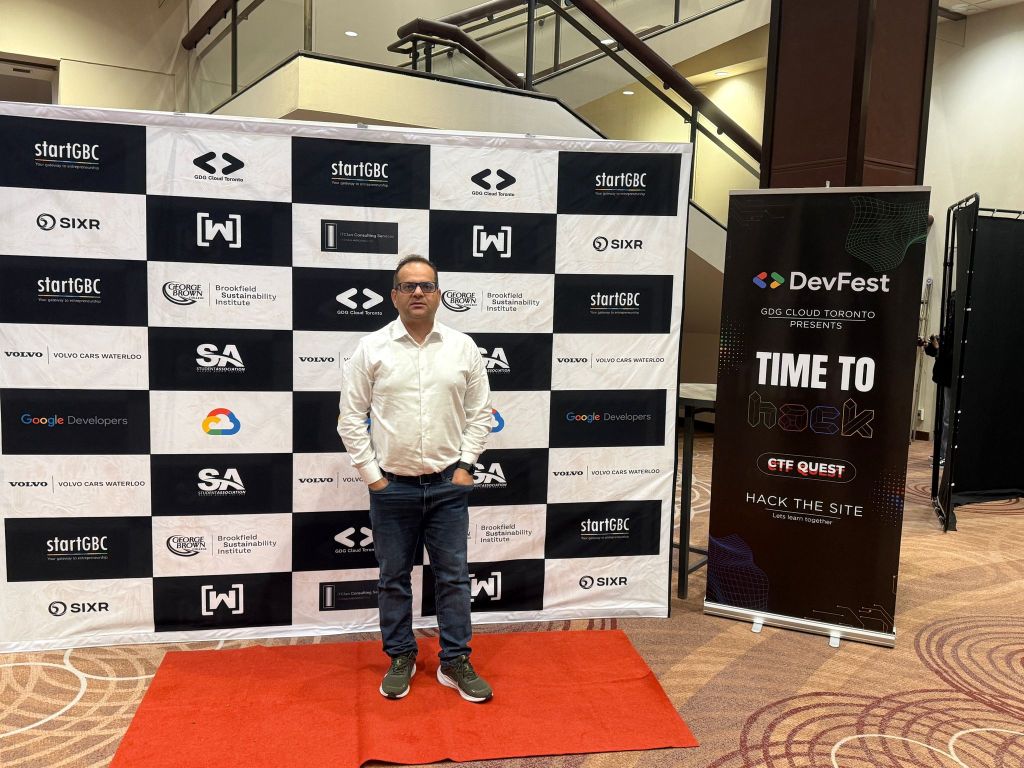
Volunteering at Google DevFest Toronto 2025 – Challenges to Creativity

Google DevFest Toronto 2025 was an action-packed day filled with inspiration, community, and cutting-edge technology. Held on November 15 at the Sheraton Centre Toronto Hotel, this was my first-ever Google Developers Group DevFest, and it truly lived up to the hype.

From the moment I arrived, the energy was palpable. The schedule was packed with sessions from top Google and industry speakers, hands-on workshops, and numerous opportunities to connect with Toronto’s most passionate developers and tech professionals. One of my favorite parts was diving into the Capture the Flag challenge. Tackling cryptic puzzles alongside fellow problem-solvers pushed me beyond what I thought possible. Crossing the finish line earned me some great swag, including a GDG backpack and NFC keys that I’ll proudly use.

A standout workshop was “Apps Script: Vibe-code a Gmail add-on with Gemini CLI & MCP servers.” In this session, I built a Gmail add-on that uses Vertex AI’s image model to generate unique cat images on demand inside Gmail. Working hands-on with Gemini CLI, MCP servers, gcloud, and Apps Script gave me a practical look at the future of AI-driven cloud apps. I highly recommend this lab to anyone looking to blend code, cloud services, and creativity.

The event perfectly balanced learning, networking, and fun, demonstrating the power of the local developer community and the exciting innovations coming from Google Cloud and AI. For anyone interested in the future of tech, Google DevFest Toronto is a must-attend event to supercharge your skills and connect with like-minded professionals. I’m already looking forward to next year’s experience!

Event details: November 15, 2025, Sheraton Centre Toronto Hotel, 123 Queen Street West, Toronto, ON #GDGToronto #DevFest2025

Fabric IQ + Foundry IQ: Building the Unified Intelligence Layer for Agentic Apps

Fabric IQ and Foundry IQ create a shared intelligence layer that connects data, analytics, and AI agents across your enterprise, turning raw information into contextual understanding for smarter decisions.​

This unified approach eliminates silos by providing semantic consistency—agents now grasp business concepts like “Q3 sales performance” across Fabric’s OneLake and Foundry’s knowledge bases, reducing errors and speeding workflows.​

Core Components of the IQ Layer

Fabric IQ adds business logic to OneLake data with Maps, Graphs, and Digital Twins, enabling spatial and relational analysis. Foundry IQ powers agentic retrieval via Azure AI Search, automating RAG pipelines for multimodal data while enforcing Purview governance.​

Work IQ integrates Microsoft 365 signals like Teams conversations, creating a “one brain” for agents that blends quantitative Fabric data with qualitative context—no more hallucinations from poor grounding.​

Real-World Manufacturing Example

A manufacturer models factory disruptions in Fabric IQ Graphs. Foundry IQ agents prompt: “Analyze Line 3 downtime ripple effects on orders.” The system queries live streams, predicts delays, and auto-alerts via Teams, cutting response times 70%.​​

Retail Digital Twin in Action

Retailers use Fabric IQ Digital Twins for store IoT data. Foundry agents optimize: “Adjust shelf stock by foot traffic and sales.” Results include visuals, forecasts, and auto-reorders, lifting margins 15% with zero custom code.​

Getting Started Roadmap

Enable in F64+ capacities, link via Data Agents, pilot sales/ops queries. Track insight velocity to justify scale-up.​

#MicrosoftFabric #AzureAIFoundry #FabricIQ #AgenticAI


5 Practical Use Cases: Fabric Data Agents Powering Foundry HR and Sales Copilots

Fabric Data Agents bridge natural language to enterprise data, fueling Foundry copilots for HR and sales teams with secure, real-time insights.​

These agents auto-generate SQL, KQL, or DAX over OneLake, letting non-technical users query without IT—perfect for high-velocity business decisions.​

HR Copilot: Staffing Insights

HR prompts Foundry: “Show staffing gaps by role and region.” Data Agent scans Fabric warehouses, returns trends with turnover risks, embedded in Teams for instant action—slashing recruitment delays 40%.​

Sales Performance Copilot

Sales managers ask: “Top lost deal reasons with revenue impact.” Agent pulls Fabric lakehouse transactions, generates infographics, and suggests upsell targets—boosting close rates 25%.​​

Productivity Analytics

“Analyze team output vs. benchmarks.” Combines Fabric metrics with 365 signals via Foundry IQ, spotting burnout patterns for proactive interventions.​

Compliance Queries

“Flag policy violations in Q4 hires.” Grounds responses in Purview-governed data for audit-ready reports.​

Deployment Tips

Publish agents from lakehouses/warehouses, connect in Foundry projects. Start with 5-10 queries, measure time savings.​

#MicrosoftFabric #DataAgents #Copilots #HRTech

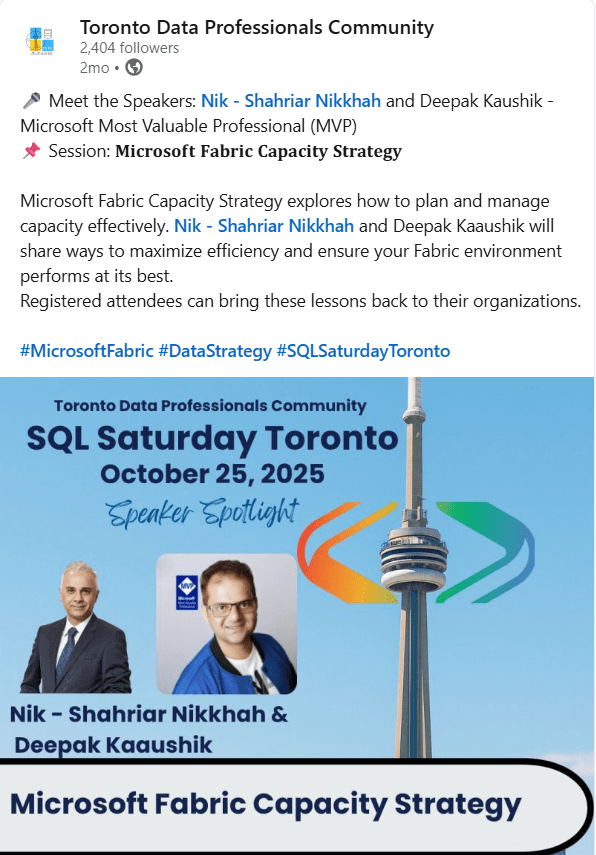
 SQL Saturday Toronto Session: 𝐌𝐢𝐜𝐫𝐨𝐬𝐨𝐟𝐭 𝐅𝐚𝐛𝐫𝐢𝐜 𝐂𝐚𝐩𝐚𝐜𝐢𝐭𝐲 𝐒𝐭𝐫𝐚𝐭𝐞𝐠𝐲

Thrilled to be speaking at SQL Saturday Toronto alongside Nik on a topic that’s top of mind for many data leaders — Microsoft Fabric Capacity Strategy.

In this session, we’ll dive into how to plan, allocate, and manage capacity effectively within Microsoft Fabric to maximize performance and ROI. Whether you’re just starting to adopt Fabric or optimizing an enterprise-scale environment, we’ll explore practical strategies to help you make the most of your investment — from workload governance to monitoring and scaling best practices.

Registered attendees will walk away with actionable insights they can immediately bring back to their organizations to drive greater efficiency and impact.

Looking forward to connecting with the community and sharing experiences around Microsoft Fabric in real-world data environments.

hashtag#MicrosoftFabric hashtag#DataStrategy hashtag#SQLSaturdayToronto

Unify and activate your data for AI innovation


Unifying and activating your data has become the secret sauce for businesses aiming to unlock the full potential of AI. Many organizations rush to adopt new AI models, but without a strong, unified data foundation, these initiatives often stall or fail to deliver meaningful impact.

Most business leaders agree AI will be a key driver of revenue growth in the coming years. In fact, nearly nine out of ten believe AI is critical to staying competitive, and almost all who invest in AI see positive returns. But there’s a catch—over 80% say their organizations could accelerate AI adoption if their data infrastructure were stronger. Simply put, AI’s power is only as good as the quality and accessibility of your data.

Many enterprises still operate on data estates that have organically evolved over decades. These data landscapes are typically fragmented, with data scattered across multiple clouds, on-prem systems, and countless applications. This creates inefficiencies such as duplicate data copies, interoperability challenges, exposure risks, and vendor complexity.

To accelerate AI innovation, the first step is unification. Bringing all your data sources under a single, unified data lake with standardized governance creates a foundation for agility and trusted insights. Microsoft’s ecosystem supports this vision through OneLake, Azure Data Lake Storage, and unified access to operational databases like Azure SQL, Cosmos DB, and PostgreSQL, along with cloud stores like Amazon S3.

But unifying your data is just the starting point. The real magic happens when you transform this wealth of raw data into powerful, AI-ready assets. This means building pipelines that can clean, enrich, and model data so AI applications—from business intelligence to intelligent agents—can use them efficiently. Microsoft Fabric, Azure Databricks, and Azure AI Foundry are tightly integrated to support everything from data engineering and warehousing to AI model development and deployment.

Empowering your teams with easy access to insights is equally crucial for driving adoption. Self-service analytics tools and natural language-powered experiences like Power BI with Copilot help democratize data exploration. When users can ask questions in everyday language and get reliable answers, data literacy spreads quickly, accelerating decision-making.

Governance and security have to scale alongside innovation. With data flowing across clouds and services, maintaining compliance and reducing risk is non-negotiable. Microsoft Purview and Defender provide comprehensive governance layers, while Azure Databricks Unity Catalog and Fabric’s security controls ensure consistent policies, auditing, and access management across data and AI workloads.

Approaching data modernization with a focus on one impactful use case helps make the journey manageable and tangible. For example, a customer service scenario can unify interaction data, surface trends in Power BI, and leverage AI agents to improve real-time support—all while establishing a pattern applicable across finance, operations, and sales.

If your data landscape feels chaotic, you’re not alone. The key is to act deliberately by defining a clear data strategy, modernizing platforms, and starting with targeted AI-driven projects. Microsoft’s Intelligent Data Platform offers a unified, scalable foundation to help you unify, activate, and govern your data estate—setting your business up for AI success today and tomorrow.

Azure AI Foundry and Microsoft Fabric: Driving Data Unification and the Agentic World

Azure AI Foundry and Microsoft Fabric together create the backbone for unified data estates that power intelligent agents, turning fragmented silos into a single source of truth for AI-driven decisions across enterprises.​

This stack unifies multi-modal data in Fabric’s OneLake while Foundry agents query it securely, enabling the agentic world where AI handles complex reasoning over real enterprise data without custom integration.​

The Power of Data Unification

Fabric consolidates lakehouses, warehouses, pipelines, and real-time streams into OneLake, eliminating data movement and enabling governance at scale with Purview lineage.​

Foundry builds on this by connecting agents to Fabric Data Agents—endpoints that translate natural language to SQL, KQL, or Spark code—grounding responses in governed datasets for hallucination-free insights.​

Developers get SDKs, notebooks, and MLOps for full lifecycles, while business users prompt agents in Teams or apps for instant analytics, accelerating from PoC to production.​

Case Study 1: Gay Lea Foods Accelerates Reporting with Fabric

Canadian dairy co-op Gay Lea Foods struggled with slow, manual reporting across supply chain data. They unified 100TB of operational data in Fabric lakehouses and warehouses, cutting report generation from days to minutes.​

Real-Time Intelligence processes live inventory streams; Power BI visuals embed in Teams for plant managers. Adding Foundry agents, ops teams now ask “Predict milk production shortfalls by farm,” blending Fabric queries with predictive reasoning for 30% faster decisions.​​

Results: Reporting time slashed 80%, supply chain efficiency up 25%, with full audit trails for compliance—all on F64 capacity with auto-scaling.​

Case Study 2: Global Retailer Masters Demand Forecasting

A major retailer faced siloed POS, e-commerce, and supplier data, leading to stockouts during peaks. Fabric pipelines ingest petabyte-scale streams into OneLake, with Spark jobs running ML baselines on lakehouses.​

Foundry agents link via Data Agents: “Forecast holiday demand by SKU, factoring weather and promotions.” Agents orchestrate KQL on eventhouses, SQL on warehouses, and return visuals with confidence scores embedded in Dynamics 365.​​

Impact: Forecast accuracy improved 35%, inventory costs down 22%, and non-technical buyers access insights via chat—scaling to 500 stores without added headcount.​

Key Capabilities Fueling the Agentic Shift

OneLake acts as the semantic layer, with shortcuts to external sources like Snowflake or S3, feeding Foundry’s 1400+ connectors for hybrid data unification.​

Agentic workflows shine: Foundry IQ evaluates responses against Fabric ground truth; multi-agent systems divide tasks like “Query sales data, then optimize pricing via ML.” Copilot accelerates Fabric notebooks 50% for prep work.​

Gartner’s 2025 Leaders status confirms this—Microsoft tops vision/execution for AI apps and data integration, powering 28K Fabric customers with 60% YoY growth.​

Security layers include passthrough auth, RBAC, encryption at rest/transit, and Purview for lineage, making it enterprise-ready for regulated sectors.​

Why This Drives the Agentic World

Enterprises shift from dashboards to agents because unified data + orchestration = reliable AI at scale. Fabric handles volume/variety; Foundry adds reasoning/tools for outcomes like auto-remediation or cross-system actions.​​

Customers see 40-60% dev savings, 25%+ prediction gains, and seamless Teams/Power App embedding—unlocking ROI where legacy BI falls short.​

Roadmap and Strategic Advice

Microsoft roadmap deepens integration: Global fine-tuning in Foundry, adaptive Fabric capacities, and edge agents via Azure Arc for IIoT unification.​

Data leaders: Pilot Fabric on top workloads, expose Data Agents for 5-10 queries, then deploy Foundry pilots in sales/ops. Measure time-to-insight and scale via reservations.​

This duo doesn’t just unify data—it builds the agentic world where AI acts on your estate autonomously.

#MicrosoftFabric #AzureAIFoundry #DataUnification #AgenticAI #GartnerLeader

Microsoft Fabric and Azure AI Foundry: Leaders in Gartner’s 2025 Magic Quadrants Powering Enterprise AI

Microsoft earns top spots in Gartner’s 2025 Magic Quadrants for Data Science and Machine Learning Platforms, AI Application Development Platforms, and Data Integration Tools, spotlighting Fabric and Foundry as game-changers for unified data and intelligent apps.​

These recognitions validate how Fabric builds governed data foundations while Foundry orchestrates production AI agents, delivering real ROI across industries.​

Gartner Recognition Highlights Strategic Strength

Gartner positions Microsoft furthest for vision and execution in AI app development, crediting Foundry’s secure grounding to enterprise data via over 1400 connectors.​

In Data Science and ML, Azure Machine Learning atop Foundry unifies Fabric, Purview, and agent services for full AI lifecycles from prototyping to scale.​

Fabric leads data integration with OneLake’s SaaS model, powering 28,000 customers and 60% YoY growth for real-time analytics and AI readiness.​

How Fabric and Foundry Work Together

Fabric centralizes lakehouses, warehouses, pipelines, and Power BI in OneLake for governed, multi-modal data. Foundry agents connect via Fabric Data Agents, querying SQL, KQL, or DAX securely with passthrough auth.​

This duo grounds AI in real data—agents forecast from streams, summarize warehouses, or visualize lakehouses without hallucinations or custom code.​​

Developers prototype locally with Semantic Kernel or AutoGen, then deploy to Foundry for orchestration, observability, and MLOps via Azure ML fine-tuning.​

Case Study: James Hall Boosts Profitability with Fabric

UK wholesaler James Hall mirrors half a billion rows across 50 tables in Fabric, serving 30+ reports to 400 users for sales, stock, and wastage insights.​

Fabric’s Real-Time Intelligence processes high-granularity streams instantly, driving efficiency and profitability through unified dashboards—no more silos.​

Adding Foundry, they could extend to agents asking “Predict stock shortages by store” via Data Agents, blending Fabric analytics with AI reasoning for proactive orders.​

Another Example: Retail Forecasting with Unified Intelligence

A global retailer ingests POS, inventory, and weather data into Fabric pipelines. Real-Time Intelligence detects demand spikes; lakehouses run Spark ML for baselines.​

Foundry agents query these via endpoints: “Forecast Black Friday sales by category, factoring promotions.” Multi-step orchestration pulls Fabric outputs, applies reasoning, and embeds results in Teams copilots.​​

This cuts forecasting time from days to minutes, with 25-40% accuracy gains over legacy tools, per similar deployments.​

Capabilities That Set Them Apart

Fabric’s SaaS spans ingestion to visualization on OneLake, with Copilot accelerating notebooks and pipelines 50% faster.​

Foundry adds agentic AI: Foundry IQ grounds responses in Fabric data; Tools handle docs, speech, and 365 integration; fine-tuning via RFT adapts models dynamically.​

Security shines—RBAC, audits, Purview lineage, and data residency ensure compliance for finance, healthcare, or regulated ops.​

Gartner notes this ecosystem’s interoperability with GitHub, VS Code, and Azure Arc for hybrid/edge, powering IIoT leaders too.​

Business Impact and ROI Metrics

Customers report 35-60% dev time savings, 25% better predictions, and seamless scaling from PoC to production.​

James Hall gained profitability insights across sites; insurers cut claims 25% via predictive agents.​

For data leaders, start with Fabric pilots on high-volume workloads, add Foundry Data Agents for top queries, then scale agents org-wide.​

Path Forward for Enterprises

Leverage these Leaders by auditing data estates against Gartner’s criteria—unify in Fabric, agent-ify in Foundry. Pilot with sales or ops use cases for quick wins.​

As Gartner evolves, Microsoft’s roadmap promises deeper agentic AI, global fine-tuning, and adaptive cloud integration.​

This stack turns data into decisions at enterprise scale—proven by analysts and adopters alike.

#MicrosoftFabric #AzureAIFoundry #GartnerMagicQuadrant #DataAI
Mentorship – Azure AI and Cloud Engineering by Microsoft MVP

In the ever-evolving landscape of technology, mentorship plays a pivotal role in shaping careers and fostering growth. Meet Deepak Kaushik, a distinguished Microsoft Azure MVP, whose passion for cloud engineering is matched only by his commitment to nurturing talent. Today, we delve into the inspiring journey of mentorship as Deepak guides Ansh Sharma, a driven individual from India, towards a promising career in Azure and cloud engineering.

Ansh Sharma’s journey began with a fervent desire to excel in the realm of cloud computing. Armed with ambition and a thirst for knowledge, Ansh crossed paths with Deepak Kaushik, a seasoned expert in the field. Recognizing Ansh’s potential, Deepak readily extended a guiding hand, initiating a mentorship that would prove transformative.

For Ansh, the mentorship with Deepak Kaushik has been nothing short of enlightening. From the intricacies of Azure architecture to mastering cloud deployment strategies, Deepak’s mentorship has provided Ansh with a comprehensive understanding of the domain. Through regular sessions, Deepak imparts not only technical expertise but also invaluable insights gained from years of industry experience.

Beyond technical skills, mentorship transcends into the realm of personal and professional development. Deepak’s mentorship has instilled in Ansh a sense of confidence and resilience, empowering him to tackle challenges head-on. Through constructive feedback and encouragement, Deepak has nurtured Ansh’s growth, fostering a mindset geared towards continuous learning and improvement.

The mentorship journey between Deepak and Ansh exemplifies the essence of knowledge sharing and community building within the tech industry. As Ansh navigates the intricacies of Azure and cloud engineering, he finds solace in knowing that he has a mentor who is not only invested in his success but also passionate about paying it forward.

In today’s fast-paced world, mentorship serves as a beacon of guidance amidst the sea of opportunities and challenges. Deepak Kaushik’s commitment to mentoring individuals like Ansh Sharma underscores the importance of fostering a culture of collaboration and support within the tech community. Through mentorship, barriers are broken, and dreams are realized, propelling individuals towards a future brimming with possibilities.

As Ansh Sharma continues to chart his course in Azure and cloud engineering, one thing remains certain – with Deepak Kaushik as his mentor, the sky is truly the limit.

In the grand tapestry of technology, mentorship threads together the past, present, and future, weaving a narrative of growth, empowerment, and endless possibilities.

Microsoft Fabric and Azure AI Foundry: The Ultimate Duo for Enterprise AI and Data

Microsoft Fabric handles your data foundation while Azure AI Foundry powers intelligent agents on top, creating a seamless flow from raw analytics to conversational AI that drives business decisions.​​

How They Complement Each Other

Fabric unifies lakehouses, warehouses, and real-time streams in OneLake for governed data access. Foundry connects via Fabric Data Agents (formerly AI Skills) to query that data securely, generating SQL, KQL, or DAX on the fly without custom code.​​

Agents in Foundry use your identity for passthrough auth, pulling only authorized insights from Fabric workloads. This grounds AI responses in real enterprise data, avoiding hallucinations while scaling across semantic models and event streams.​​

Real-World Integration Example

A retail team loads sales data into Fabric Lakehouse. They build a Data Agent over it, publish the endpoint, then link it to a Foundry Agent. Prompt: “Forecast Q4 revenue by region with stock risks.” Foundry agent calls the Data Agent, which runs KQL on Real-Time Intelligence and SQL on Warehouse, returning precise forecasts with visuals.​

Finance scenario: “Analyze cash flow anomalies from ledgers and predict shortfalls.” Fabric grounds the query in governed datasets; Foundry orchestrates multi-step reasoning with tools for accurate math on millions of rows.​​

Setup in Minutes

In Fabric, create a Data Agent from Lakehouse or Warehouse data, test queries, and publish. Switch to Foundry portal, add the Fabric connection via endpoint, attach to your agent, and deploy. Same-tenant setup ensures security with RBAC and audit logs.​​

Strategic Value for Leaders

This pairing turns Fabric into an AI-ready data layer and Foundry into a smart frontend, cutting dev time 40-60% on agentic apps. Start with high-value queries like sales forecasting or compliance checks, then expand to Teams bots or custom copilots.​​

#MicrosoftFabric #AzureAIFoundry #DataAI #AgenticAI

Azure Foundry Resources: What They Are and How to Create Them Step-by-Step

Microsoft Azure continues to simplify how developers and enterprises build AI-powered applications. One of the most important additions in this space is Azure AI Foundry (aligned with Azure AI Studio), which provides a unified way to build, manage, and deploy generative AI and machine learning solutions.

At the core of Azure AI Foundry are Foundry Resources.

In this blog post, we’ll cover:

  • What Azure Foundry Resources are
  • Why they matter
  • Key components
  • Step-by-step instructions to create an Azure Foundry Resource
  • Best practices and common scenarios

What Are Azure Foundry Resources?

Azure Foundry Resources are the foundational Azure resources used by Azure AI Foundry to manage AI workloads such as:

  • Large Language Models (LLMs)
  • Prompt engineering
  • Model deployment
  • Evaluation and monitoring
  • Secure integration with enterprise data

A Foundry Resource acts as a central AI workspace that connects models, compute, data, and security in one place.

Why Azure Foundry Resources Matter

Traditional AI development often involves stitching together multiple services manually. Azure Foundry Resources simplify this by offering:

  • Centralized AI project management
  • Built-in security and governance
  • Seamless integration with Azure OpenAI models
  • Enterprise-grade identity, networking, and compliance
  • Faster AI application lifecycle from build to deployment

This makes Foundry Resources ideal for enterprise AI, copilots, and generative AI applications.

Key Components of an Azure Foundry Resource

When you create a Foundry Resource, Azure integrates several services automatically:

  • Azure AI Services
  • Azure OpenAI (if enabled in your subscription)
  • Azure Machine Learning
  • Managed identity
  • Networking and access controls
  • Model catalog and deployments

All of these capabilities are accessible through Azure AI Foundry Studio.

Prerequisites

Before creating a Foundry Resource, make sure you have:

  • An active Azure subscription
  • Contributor or Owner access on the subscription or resource group
  • Access to Azure OpenAI (if you plan to use GPT models)
  • A supported Azure region such as East US, West Europe, or Sweden Central

Step-by-Step: How to Create an Azure Foundry Resource

Step 1: Sign in to Azure Portal

Navigate to the Azure Portal and sign in using your Azure credentials.

Step 2: Search for Azure AI Foundry

In the Azure Portal search bar, type Azure AI Foundry and select it from the results.

Step 3: Create a Foundry Resource

On the Azure AI Foundry page, click Create and select Foundry Resource.

Step 4: Configure Basic Details

Provide the following information:

  • Subscription: Select your Azure subscription
  • Resource Group: Create a new one or select an existing group
  • Resource Name: Example ai-foundry-prod-01
  • Region: Choose a region that supports Azure AI Foundry and Azure OpenAI

Click Next to continue.

Step 5: Configure Networking

You can choose between:

  • Public endpoint (default and easiest)
  • Private endpoint (recommended for enterprise and production workloads)

For production environments, enabling a private endpoint and restricting public access is a best practice.

Click Next.

Step 6: Identity and Security

  • Managed identity is enabled by default
  • Role assignments can be configured later using Azure RBAC

This identity enables secure access to Azure services such as Storage Accounts, Azure OpenAI, and Key Vault.

Click Next.

Step 7: Review and Create

Review all configuration details and click Create.
Deployment typically completes within a few minutes.

Access Azure AI Foundry Studio

After deployment:

  1. Open the newly created Foundry Resource
  2. Click Launch Azure AI Foundry Studio

From here, you can deploy models, design prompts, build copilots, evaluate outputs, and monitor usage.

Common Use Cases for Azure Foundry Resources

Azure Foundry Resources are commonly used for:

  • Enterprise copilots for HR, Finance, and IT
  • Document summarization and document intelligence
  • Knowledge-base chatbots using RAG patterns
  • AI-powered analytics assistants
  • Model experimentation, evaluation, and governance

Best Practices

  • Use separate Foundry Resources for development, testing, and production
  • Enable private networking for sensitive workloads
  • Store secrets in Azure Key Vault
  • Monitor usage and costs using Azure Monitor
  • Use Azure RBAC instead of shared access keys

Final Thoughts

Azure Foundry Resources provide a powerful, secure, and scalable foundation for building enterprise-grade AI solutions on Azure. By simplifying model management, security, and deployment, they allow teams to focus on delivering real business value with AI.

If you are building generative AI applications, copilots, or intelligent platforms, Azure AI Foundry should be one of your first stops.

Aligning Azure AI Foundry with Azure OpenAI and Microsoft Fabric

Why This Integration Matters

Generative AI is only as powerful as the data behind it. While Azure OpenAI provides industry-leading models, enterprises need:

  • Governed, trusted enterprise data
  • Real-time and batch analytics
  • Security, identity, and compliance
  • Scalable AI lifecycle management

Microsoft Fabric acts as the data foundation, Azure OpenAI delivers the intelligence, and Azure AI Foundry provides the AI application and orchestration layer.

High-Level Architecture Overview

The integrated architecture consists of three core layers:

Data Layer – Microsoft Fabric

Microsoft Fabric provides a unified analytics platform built on OneLake. It enables:

  • Data ingestion using Fabric Data Pipelines
  • Lakehouse architecture with Bronze, Silver, and Gold layers
  • Data transformation using Spark notebooks
  • Real-time analytics and semantic models

Fabric ensures AI models consume clean, governed, and up-to-date data.

Intelligence Layer – Azure OpenAI

Azure OpenAI delivers large language models such as:

  • GPT-4o / GPT-4.1
  • Embedding models for vector search
  • Fine-tuned and custom deployments

These models are used for:

  • Natural language understanding
  • Summarization and reasoning
  • Retrieval-Augmented Generation (RAG)

Application Layer – Azure AI Foundry

Azure AI Foundry acts as the control plane where you:

  • Connect to Azure OpenAI deployments
  • Build and test prompts
  • Configure RAG workflows
  • Evaluate and monitor model outputs
  • Secure and govern AI applications

This is where AI solutions move from experimentation to production.

End-to-End Data Flow

A typical flow looks like this:

  1. Data is ingested into Microsoft Fabric using pipelines
  2. Raw data lands in OneLake (Bronze layer)
  3. Data is transformed and enriched (Silver and Gold layers)
  4. Curated data is vectorized using embeddings
  5. Azure OpenAI generates embeddings and responses
  6. Azure AI Foundry orchestrates prompts, retrieval, and evaluations
  7. Applications consume responses through secure APIs

Step-by-Step: Setting Up Azure OpenAI + Fabric + AI Foundry

Step 1: Set Up Microsoft Fabric

  • Enable Microsoft Fabric in your tenant
  • Create a Fabric workspace
  • Create a Lakehouse backed by OneLake
  • Ingest data using Data Pipelines or notebooks

Organize data using the Medallion architecture for AI readiness.

Step 2: Prepare Data for AI Consumption

  • Clean and normalize data
  • Chunk large documents
  • Store metadata and identifiers
  • Create delta tables for curated datasets

High-quality data significantly improves LLM output quality.

Step 3: Create an Azure OpenAI Resource

  • Create an Azure OpenAI resource in a supported region
  • Deploy required models:
    • GPT models for generation
    • Embedding models for vector search

Capture endpoints and keys securely using Managed Identity and Key Vault.

Step 4: Create an Azure AI Foundry Resource

  • Create a new Azure AI Foundry resource
  • Enable managed identity
  • Configure networking (private endpoints recommended)
  • Connect Azure OpenAI deployments

This resource becomes your AI application workspace.

Step 5: Implement RAG with Fabric + Foundry

  • Generate embeddings from Fabric data
  • Store vectors in a supported vector store
  • Configure retrieval logic in Azure AI Foundry
  • Combine retrieved context with user prompts

This approach grounds AI responses in enterprise data.

Step 6: Secure and Govern the Solution

  • Use Azure Entra ID for authentication
  • Apply RBAC across Fabric, Foundry, and OpenAI
  • Monitor usage and cost using Azure Monitor
  • Log prompts and responses for auditing

Enterprise governance is critical for production AI workloads.

Common Enterprise Use Cases

This integrated stack enables:

  • AI copilots powered by enterprise data
  • Financial and operational reporting assistants
  • Knowledge discovery and document intelligence
  • Customer support and internal helpdesk bots
  • AI-driven analytics experiences

Best Practices

  • Keep Fabric as the single source of truth
  • Use private networking for all AI services
  • Separate dev, test, and prod environments
  • Continuously evaluate prompts and responses
  • Monitor token usage and latency

Final Thoughts

The combination of Microsoft Fabric, Azure OpenAI, and Azure AI Foundry represents Microsoft’s most complete AI platform to date. Fabric delivers trusted data, Azure OpenAI provides state-of-the-art models, and Azure AI Foundry brings everything together into a secure, enterprise-ready AI application layer.

If you’re building data-driven generative AI solutions on Azure, this integrated approach should be your reference architecture.