Optimizing SAP Migration to Azure for Maximum Efficiency and Reliability

As businesses evolve in the digital era, migrating critical SAP systems to Azure has become a strategic imperative. Microsoft’s refined capacity management processes on Azure minimize downtime, risks, and costs while enhancing employee efficiencies. This article delves into IoTCoast2Coast’s measured approach to migrating sensitive data and confidential workloads with SAP systems, leveraging Azure’s agility and scalability.

The Right Approach to SAP Migration

Migrating mission-critical SAP systems to Azure requires a strategic approach to ensure maximum cost savings, scalability, and agility without disrupting business operations. IoTCoast2Coast adopted a horizontal strategy, migrating low-risk environments like sandboxes first to gain Azure migration experience. This approach mitigates risks while building confidence in Azure’s capabilities.

Prerequisites for Azure AD Integration with SAP Cloud Platform

To configure Azure AD integration with SAP Cloud Platform, specific prerequisites are necessary, including Azure and SAP Cloud Platform subscriptions, basic Azure knowledge, and appropriate user permissions.

Creating an Optimal SAP Environment on Azure

Azure stands out as the preferred platform for SAP deployments due to its reliability, scalability, and compliance capabilities. Azure supports a wide range of SAP solutions, including SAP HANA and S/4 HANA, providing a robust foundation for enterprise-grade SAP environments.

Telemetry Solution for SAP on Azure

Managing telemetry and monitoring for SAP landscapes requires a comprehensive approach. Microsoft developed the Unified Telemetry Platform (UTP) on Azure, enabling service maturity, compliance, and holistic health monitoring for SAP and other business processes.

Implementing UTP in SAP on Azure

The implementation of UTP involves creating a reusable custom method and configuration table to drive consistent telemetry payloads. This method integrates seamlessly with SAP business process events, ensuring accurate telemetry data capture and analysis.

Azure Monitor for Enhanced Monitoring and Alerting

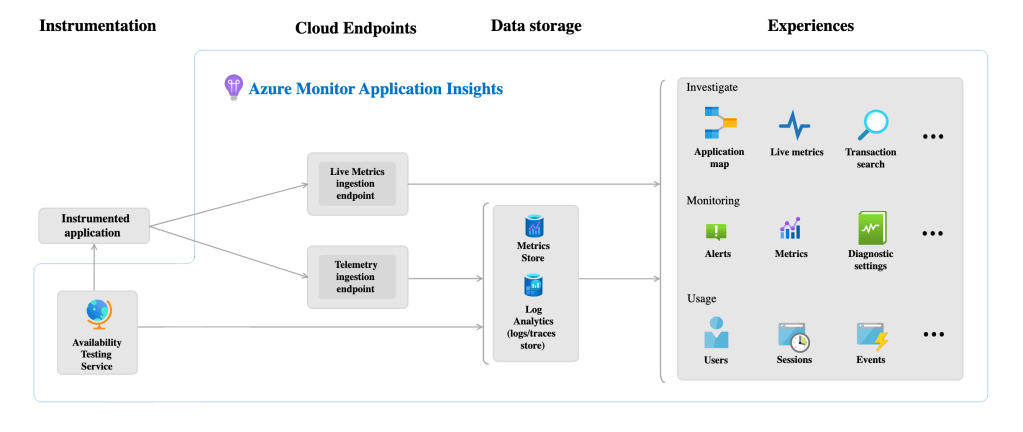
Azure Monitor plays a vital role in monitoring and alerting for SAP on Azure environments. It provides deep insights into application performance, infrastructure health, and end-to-end business processes. Leveraging tools like Azure Application Insights and Azure Log Analytics enables proactive monitoring and issue resolution.

Best Practices and Lessons Learned

Key best practices include performing a thorough inventory of internal processes, capturing true end-to-end telemetry, building for Azure-native SAP components, and standardizing data usage across the organization. These practices ensure accurate monitoring, reporting, and business intelligence insights.

Conclusion

Microsoft’s Azure platform, coupled with refined monitoring and telemetry solutions like UTP and Azure Monitor, empowers enterprises to optimize SAP migration, enhance business visibility, and drive operational excellence. By adopting best practices and leveraging Azure’s capabilities, organizations can unlock the full potential of SAP on Azure, paving the way for digital transformation and business success in the cloud era.

Databricks vs Microsoft Fabric: Choosing the Right Data Platform

*image sourced from Google

With the rise of big data, businesses need robust data platforms to support analytics and machine learning. Two leading options are Databricks and Microsoft’s new Fabric platform. This article compares the key features and use cases of Databricks vs Fabric to help you choose the right tool.

What is Databricks?

Databricks provides a unified analytics platform optimized for big data and AI. It runs on Apache Spark and is available on all major cloud providers including AWS, Azure, and Google Cloud.

Key capabilities include:

  • Optimized Apache Spark performance – Runs Spark workloads faster and more reliably than standalone deployments.
  • Unified analytics – Combining data engineering, data science, and business intelligence in one platform.
  • Interactive notebooks – Supports collaboration via notebooks in Python, R, Scala, and SQL.
  • Machine learning – Integrated platform for the machine learning lifecycle including experiment tracking, model management, and deployment.
  • Delta Lake – Provides performance boost and reliability for big data workloads. Brings ACID transactions to Apache Spark.

Overall, Databricks excels at large-scale data processing and machine learning applications leveraging Apache Spark.

Introducing Microsoft Fabric

Microsoft Fabric is a new integrated data platform launched in 2022. It unifies data services within Azure and aims to simplify analytics.

Key highlights of Fabric:

  • Unified environment – Combining data engineering, machine learning, and business intelligence tools in one platform.
  • Built on Azure – Leverages underlying Azure services like Synapse Analytics, Data Factory, and Power BI.
  • Lightweight notebooks – Supports collaborative notebooks for data exploration and visualization.
  • Power BI integration – Natively supports Power BI reports and dashboards.
  • Microservices architecture – Designed for modern containerized application development.

Fabric focuses on enabling easy collaboration for analytics and BI use cases within the Azure ecosystem.

Architecture Comparison

Under the hood, Databricks and Fabric both utilize Apache Spark for data processing workloads. However, their architecture and approach differ:

Databricks

  • Runs Spark workloads within the customer’s own cloud infrastructure.
  • Charges are based on usage metrics like DBUs and instance hours.
  • Cloud agnostic – available on AWS, Azure, and Google Cloud.
  • Specialized features for big data, streaming, and ML.

*image sourced from Microsoft

Microsoft Fabric

  • Tightly integrated into Azure services.
  • Capacity-based pricing model rather than usage-based.
  • Leverages Azure-native services like Synapse Analytics.
  • General purpose features with a focus on collaboration.

*image sourced from Microsoft

Databricks provides more flexibility for the production of big data workloads while Fabric simplifies analytics within Azure.

Key Differences

CategoryDatabricksMicrosoft Fabric
ApproachCloud agnosticAzure-centric
UsageBig data & MLCollaboration & BI
PricingConsumption-basedCapacity-based
FeaturesDelta Lake, MLflowPower BI integration

When to Choose Databricks

Databricks shines for large-scale data processing and machine learning applications. It’s a good choice when:

  • You need a cost-effective Apache Spark platform.
  • Your data pipeline requires handling streaming data at scale.
  • Your data science teams want an end-to-end ML platform.
  • You need reliability features like Delta Lake for your big data lake.
  • You require a cloud-agnostic platform available across AWS, Azure, and GCP.

When to Choose Microsoft Fabric

Fabric simplifies collaboration and BI-focused analytics within Azure. Consider it if:

  • You want easy access to Power BI and Azure Synapse capabilities.
  • Your users will benefit from its collaborative notebooks.
  • Your analytics workloads are focused on business intelligence.
  • You want a unified data environment within the Azure ecosystem.
  • You need built-in support for microservices and containers.

Conclusion

Databricks outperforms for big data and machine learning use cases while Microsoft Fabric enables straightforward collaboration and BI within Azure. Evaluate their key features and your business needs to choose the right platform. Both options help simplify data analytics, but with different approaches.

Azure Cognitive Services Overview

*image sourced from Google

Azure offers a vast array of services tailored to meet the diverse needs of developers. In this article, we’ll explore some of the most popular and powerful services that can significantly enhance your development experience and application capabilities.

Azure App Service: A Fully Managed Platform for Web Applications and APIs

Azure App Service is a fully managed platform that allows you to quickly build, deploy, and scale web applications and APIs written in various languages, including .NET, Java, Node.js, Python, and more. App Service supports multiple deployment options, such as Git, Docker containers, and continuous deployment from Azure DevOps, providing flexibility and ease of use.

Azure Functions: Embrace Serverless Computing

Azure Functions enables you to run code without provisioning or managing servers. Functions are event-driven, scalable, and charged based on consumption, making them ideal for building microservices, data processing pipelines, and integrating with other Azure services. With Azure Functions, you can focus on writing code and let Azure handle the infrastructure.

Azure Cosmos DB: A Globally Distributed, Multi-Model Database Service

Azure Cosmos DB is a globally distributed, multi-model database service that supports various data models, including key-value, document, graph, and columnar. Cosmos DB offers features like multi-master replication, automatic indexing, and tunable consistency levels, ensuring high availability, scalability, and low latency for your applications.

Azure Kubernetes Service (AKS): Managed Kubernetes for Containerized Applications

Deploy and manage containerized applications at scale with AKS, a fully managed Kubernetes service. AKS simplifies the provisioning, scaling, and management of Kubernetes clusters, enabling rapid deployment and scaling of containerized workloads. With AKS, you can easily orchestrate your containerized applications, ensuring efficient resource utilization and high availability.

Azure Cognitive Services: Infuse Your Applications with Intelligent Capabilities

*image sourced from Google

Azure Cognitive Services offers pre-built AI models and APIs that enable you to infuse your applications with intelligent capabilities. Cognitive Services includes functionalities like computer vision, speech recognition, language understanding, and decision-making, empowering you to create intelligent and engaging user experiences.

Azure IoT Hub: Build and Manage Secure, Scalable IoT Solutions

*image sourced from Google

Azure IoT Hub enables you to connect, monitor, and manage billions of IoT devices with ease. Leverage cloud-to-device messaging, device twin management, and seamless integration with other Azure services for comprehensive IoT application development. With Azure IoT Hub, you can create secure, scalable, and reliable IoT solutions.

Azure DevOps: Streamline Your Development Lifecycle

*image sourced from Google

Azure DevOps is a suite of services for version control, agile planning, continuous integration and deployment, automated testing, and monitoring. DevOps enables collaborative development, automated release pipelines, and seamless integration with other Azure services, ensuring a smooth and efficient development lifecycle.

Azure Machine Learning: Build, Train, and Deploy Machine Learning Models at Scale

*image sourced from Google

Azure Machine Learning is a comprehensive service that supports the entire machine learning lifecycle, from data preparation and model training to deployment and management. With Azure Machine Learning, you can build, train, and deploy machine learning models at scale, infusing your applications with intelligent capabilities.

These are just a few examples of the powerful services Azure offers for developers. Throughout the remaining articles in this series, we’ll dive deeper into specific services, exploring their features, use cases, and best practices for leveraging them in your development projects. By familiarizing yourself with these services, you’ll be well-equipped to build, deploy, and manage modern, scalable, and secure applications on Azure.

Introduction to GenAI

Generative AI is a category of artificial intelligence technology that can produce various types of content, including text, imagery, audio, synthetic data and other media using generative models. These systems rely on machine learning algorithms and neural networks, particularly generative models, to create new content based on patterns they’ve learned from vast amounts of existing data.These models are capable of creating content that is not directly copied from existing data but is instead generated based on patterns and information they’ve learned during training.

Generative AI has uses across a wide range of industries, including art, writing, script writing, software development, product design, healthcare, finance, gaming, marketing, and fashion.

*images from google

ChatGPT, example of a text based GenAI chatbot

*images from google

DALL-E, example of a text to image GenAI model

Generative models, a key component of generative AI, are designed to learn the underlying statistical patterns and structures of the training data. By capturing these patterns, they can then generate new data that closely resembles the original dataset. There are several types of generative models, with the most well-known being Generative Adversarial Networks (GANs), Variational Autoencoders (VAEs), and Recurrent Neural Networks (RNNs).

How Does Generative AI Work?

Generative Adversarial Networks (GANs) are a well-known generative AI approach. A generator and a discriminator, two neural networks that cooperate in competition, make up a GAN.

The Generator neural network model’s objective is to produce artificial data that is similar to the real data. It creates content by converting random noise into more organized representations, like pictures. When it comes to text generation, it picks up the ability to put together cohesive sentences and paragraphs.

The Discriminator neural network model’s job is to assess the generated material and identify if it is authentic or fraudulent. It has seen a great deal of actual data and is able to differentiate it from fake data.

The generator aims to create data (e.g., images) that is similar to a given dataset, while the discriminator’s job is to distinguish between real data and data generated by the generator. The generator continually refines its approach to create content, trying to deceive the discriminator into accepting its creations as real. Meanwhile, the discriminator becomes increasingly skilled at telling real from fake. This dynamic creates a feedback loop that pushes both networks to improve their performance over time.

Transformers

The power of generative AI comes from the use of transformers. Transformers produced a 2018 revolution in natural language processing.

Transformers, introduced by Vaswani et al. in the paper “Attention Is All You Need” in 2017, are a type of neural network architecture designed to handle sequential data, making them especially well-suited for Natural Language Processing (NLP) tasks. 

Image Credit: Google Cloud Skill Boost

At a high level, a transformer model consists of an encoder and decoder.The encoder encodes the input sequence and passes it to the decoder, which learns how to decode the representation for a relevant task.

While transformers themselves are not inherently generative models, they provide a crucial foundation for generative AI. In generative AI applications, transformers can be used to generate content, such as text, images, or even code, by leveraging their ability to capture complex patterns and relationships within the data.

Applications

There are numerous uses for generative AI in a variety of sectors. Here are a few noteworthy instances:

Art & ingenuity: Generative AI is capable of producing unique works of poetry, music, and art that frequently test the bounds of human ingenuity. It has made it possible for musicians and artists to experiment with new mediums.

Content Generation: To save time and resources, content creators can utilize generative AI to automate the creation of articles, reports, or product descriptions.

Image and Video Generation: Lifelike images and videos can be produced using generative AI, which has uses in design, entertainment, and advertising.

Generative AI in healthcare: It can help create artificial medical images to help diagnose illnesses or train medical personnel.

Natural language processing: This technology can be applied to the creation of chatbots, conversational agents, and even language translation.

Anomaly Detection: In cybersecurity, generative AI can help detect anomalies in network traffic or identify fraudulent activities.

Code generation: Generative AI can assist developers by real-time code auto-completion and suggestions. Help you debug your lines of source code, explain your code to you line by line, translate code from one language to another, generate documentation and tutorials for source code and much more.

Conclusion

Rapid advancement has allowed generative AI to become a game-changing technology that has the power to completely disrupt several sectors. Its capacity to produce content that is nearly identical to that of human labor creates new avenues for automation and creativity. But it also brings up significant moral and societal issues, like worries about deepfakes and improper use of this technology.

It is critical that developers, researchers, and society as large handle these issues in a responsible and moral manner as generative AI advances. Generative AI has the potential to unleash hitherto unimaginable levels of creativity and invention given the correct methodology.

Empowering Disaster Recovery for SAP HANA Systems on Microsoft Azure

In the ever-evolving landscape of enterprise technology, the seamless operation of mission-critical applications such as SAP is paramount. Microsoft Azure stands out as a trusted path to enterprise-ready innovation, offering a robust platform for running SAP solutions in the cloud with unparalleled reliability and scalability.

System Reliability and Disaster Recovery

When it comes to mission-critical SAP applications, system availability and disaster recovery are non-negotiable. Organizations rely on key metrics such as Recovery Point Objective (RPO) and Recovery Time Objective (RTO) to design effective disaster recovery plans that ensure business continuity in the face of unexpected events.

  • RPO measures the amount of data at risk in terms of time.
  • RTO defines the maximum tolerable downtime for systems after a disaster.

Design Principles for Disaster Recovery Systems

Creating a robust disaster recovery system for SAP HANA on Azure involves several key considerations:

  1. DR Region Selection: Choose a DR region with available SAP Certified VMs for SAP HANA to ensure compatibility and performance.
  2. Clear RPO and RTO Values: Define clear expectations for RPO and RTO values, aligning them with business requirements and architectural needs.
  3. Cost Management: Balance the cost of implementing disaster recovery with the criticality of systems, opting for scalable solutions and on-demand resizing of DR instances.
  4. Non-disruptive DR Tests: Invest in non-disruptive DR tests to validate system readiness without impacting production environments, albeit with additional infrastructure costs.

Disaster Recovery Architecture on Azure

Azure offers Azure Site Recovery (ASR) for faster VM replication across regions, complemented by SAP HANA System Replication (HSR) for database consistency. The architecture ensures continuity and resilience in the face of local or regional failures, as depicted in the detailed diagrams.

Steps for Invoking DR or a DR Drill

The process involves DNS changes, VM recovery, database restoration, application layer provisioning, and validation steps, ensuring a smooth transition during a disaster or drill scenario.

Resiliency and Reliability

Azure’s built-in backup and disaster recovery solutions, coupled with resilient architecture principles, ensure that applications remain available and data is protected. Resiliency and reliability are foundational to maintaining business continuity and mitigating the impact of unforeseen disruptions.

In conclusion, Microsoft Azure provides a comprehensive framework for implementing robust disaster recovery strategies for SAP HANA systems, empowering enterprises to navigate challenges with confidence and resilience in the cloud era.

Azure Dev Series: Embracing the Cloud Computing Revolution with Azure

*image sourced from Google

In today’s fast-paced digital landscape, cloud computing has emerged as a transformative force, revolutionizing the way organizations develop, deploy, and manage applications.

The cloud computing paradigm offers unparalleled scalability, cost-efficiency, and agility, enabling businesses to stay competitive and innovative. Microsoft Azure, one of the leading cloud platforms, provides a comprehensive ecosystem of services and tools that empower developers to harness the full potential of cloud computing.

The Essence of Cloud Computing: Cloud computing is a model that enables on-demand access to a shared pool of configurable computing resources, such as servers, storage, networks, applications, and services, over the internet. Instead of investing in costly on-premises infrastructure, organizations can rent these resources from cloud providers, paying only for what they consume.
This pay-as-you-go model offers several key advantages:

  1. Scalability: Cloud resources can be easily scaled up or down to match fluctuating demand, ensuring optimal performance and resource utilization without the need for costly overprovisioning.
  2. Cost Efficiency: By avoiding upfront capital expenditures and paying only for the resources consumed, organizations can significantly reduce IT costs and achieve a lower total cost of ownership (TCO).
  3. Agility and Time-to-Market: Cloud services can be provisioned quickly, enabling organizations to rapidly adapt to changing business needs, accelerate innovation, and bring new products and services to market faster.
  4. Global Reach: Cloud providers operate globally distributed data centers, enabling organizations to deliver low-latency experiences to users worldwide and expand their reach into new markets.
  5. Resilience and Disaster Recovery: Cloud providers offer robust disaster recovery and business continuity solutions, ensuring data protection and application availability in the event of outages or disasters.

Why Choose Azure?

Microsoft Azure is a leading cloud computing platform that offers a comprehensive set of services and tools designed to meet the diverse needs of developers and organizations.

*image sourced from Google

Here are some key reasons why Azure is an attractive choice:

  1. Comprehensive Services: Azure provides a vast array of services, including compute, storage, networking, databases, analytics, machine learning, artificial intelligence, Internet of Things (IoT), and more, enabling developers to build and deploy virtually any application or workload.
  2. Integration with Microsoft Technologies: Azure seamlessly integrates with other Microsoft products and technologies, making it a natural fit for developers already familiar with the Microsoft ecosystem, such as .NET, Visual Studio, and SQL Server.
  3. Hybrid Capabilities: Azure supports hybrid scenarios, allowing organizations to extend their on-premises infrastructure to the cloud, enabling seamless integration and workload portability across on-premises, cloud, and edge environments.
  4. Robust Security and Compliance: Azure offers robust security features, including advanced threat protection, encryption, and identity and access management, helping organizations safeguard their applications and data. It also provides compliance certifications for various industry standards and regulations.
  5. Global Footprint and Availability: Azure has a massive global footprint, with data centers in over 60 regions worldwide, enabling organizations to deliver low-latency experiences to users globally and meet data residency requirements.
  6. Open Source Support: Azure embraces open-source technologies, providing support for various open-source languages, frameworks, and tools, enabling developers to leverage their existing skills and toolsets.
  7. DevOps and Automation: Azure seamlessly integrates with popular DevOps tools and practices, enabling continuous integration, deployment, and automated delivery pipelines, accelerating software delivery and improving collaboration.

Throughout this series, we’ll dive deeper into the various Azure services and explore how developers can leverage them to build, deploy, and manage modern, scalable, and secure applications. Whether you’re a seasoned developer or just starting your cloud journey, this series will equip you with the knowledge and skills necessary to navigate the Azure ecosystem and unlock its full potential, empowering you to drive innovation and business growth in the cloud computing era.

An Overview of Microsoft Fabric

Microsoft Fabric is Microsoft’s unified data analytics platform, bringing together many of the company’s data tools and services in a single integrated environment. Fabric’s mission is to simplify how businesses deal with data by offering all of the capabilities required to acquire, process, analyze, and get insights from data via a single set of tools and user experiences.

Fabric, Power BI, Power Platform, Data Platform: What Is Microsoft Fabric  and Why Should I Care?

*images are from google

In this article, we will look at Microsoft Fabric’s core components, how it intends to solve the complexity of existing analytics systems, and the numerous capabilities it gives to various data roles. By the conclusion, you should have a firm grasp on what Fabric is and how it can help your company.

Existing Analytics Solutions’ Complexity

Prior to Fabric, managing analytics initiatives frequently included interfacing with a plethora of different solutions from various vendors There were well over 30 separate products in Microsoft’s portfolio encompassing data integration, storage, engineering, warehousing, science, and business intelligence.

*images are from google

Furthermore, each product had its own license, administration, and user experience. This added significant complexity to enterprises in terms of cost, resources required to maintain the many systems, and assuring correct tool integration.

It also meant that data teams spent too much time learning about different technologies rather than focusing on the analytics task itself. This overall climate makes developing and scaling analytics programs difficult.

Introducing Fabric

Microsoft Fabric aims to address this complexity through a single unified platform that combines critical analytics capabilities into a common set of services and user experiences. At a high level, Fabric is like an “umbrella” that brings structure and simplicity to what was a fractured landscape of individual tools.

Some key goals of Fabric include:

  • Providing a complete analytics platform with everything needed for end-to-end projects
  • Centralizing around a shared data lake (OneLake) to eliminate data movement/silos
  • Empowering all users from data scientists to business analysts
  • Reducing costs through a unified licensing and resource mode

The core components that make up Fabric include tools for data integration, engineering, warehousing, science, real-time analytics and business intelligence. All are integrated and share a common set of services like governance, security and OneLake storage.

*images are from google

Microsoft Fabric Components

The main capabilities provided by Fabric include:

Data Integration 

Azure Data Factory and Data Flow allow organizations to ingest data from various sources into Fabric. Data Factory provides an intuitive UI for defining/executing data pipelines and movement. Data Flow enables powerful ETL capabilities through a code-based workflow designer.

Data Engineering

Synapse provides the ability to build data infrastructure using Lakehouse technology. Lakehouse combines a data lake and warehouse to enable analytical workloads directly on raw/semi-processed data. Engineers can define schemas, metadata and ingest data pipelines to transform and prepare data for analytics.

Data Warehousing  

Synapse delivers a fully managed and elastic cloud data warehouse service for analytics at scale using SQL. It unifies SQL and Spark processing for queries against both structured and semi-structured data stored in the data lake. Customers pay only for the resources used.

Data Science

Synapse facilitates the end-to-end machine learning lifecycle, from data prep/modeling to model training/deployment. It allows data scientists to leverage various AI services for tasks like feature engineering, model training etc. Models can also be deployed and served through web services.

Real-time Analytics

Synapse real-time analytics processes streaming data as it arrives from various sources using the Kusto query language. This enables low-latency analytics of IoT, sensor or other continuously generated data to detect patterns, anomalies or drive real-time actions.

Business Intelligence

With deep integration into Fabric, Power BI delivers self-service analytics and visual data exploration. Users can access and report against the single authoritative data source in OneLake without data movement or preparing additional data models.

*images are from google

Each workload is accessible through a common user environment and stores/accesses data in OneLake, eliminating data silos and movement. Additional services like Data Activator enable automating actions from insights.

Conclusion

In today’s data-driven world, organizations must simplify how they work with analytics. Microsoft Fabric offers a uniform platform for doing so. Fabric reduces the complexity caused by conventional tool sprawl by merging important capabilities into a coherent collection of services. Whether you are an individual data specialist or the leader of an enterprise-wide analytics program, Fabric might help you achieve your objectives faster by providing a standard set of strong yet accessible tools.

How to integrate ChatGPT, a large language model, with Azure

In this article, we will be discussing how to integrate ChatGPT, a large language model, with Azure.

Azure is a cloud-based platform that provides a wide range of services for building, deploying, and managing applications and services. With Azure, you can easily integrate ChatGPT into your applications and services.

Here’s how you can integrate ChatGPT with Azure:

Step 1: Create an Azure Cognitive Services account

The first step is to create an Azure Cognitive Services account. Azure Cognitive Services provides a set of APIs and services that enable you to add intelligent features to your applications. To create an Azure Cognitive Services account, go to the Azure portal and follow the steps to create a new Cognitive Services resource.

Step 2: Create a resource group

Once you have created a Cognitive Services account, the next step is to create a resource group. A resource group is a logical container for your Azure resources. To create a resource group, go to the Azure portal and follow the steps to create a new resource group.

Step 3: Create a ChatGPT instance

The next step is to create a ChatGPT instance. ChatGPT is a large language model that can be used to generate human-like text. To create a ChatGPT instance, go to the Azure portal and follow the steps to create a new ChatGPT resource.

Step 4: Configure the ChatGPT instance

Once you have created a ChatGPT instance, you need to configure it. To configure the ChatGPT instance, you need to specify the language and the model size. You can also configure other settings such as the temperature and the number of responses to generate.

Step 5: Integrate ChatGPT into your application

The final step is to integrate ChatGPT into your application. To do this, you can use the Azure Cognitive Services API to send a text string to the ChatGPT instance and receive the generated text response. You can integrate ChatGPT into your application using one of the following methods:

  • REST API: You can use the Azure Cognitive Services REST API to send a text string to the ChatGPT instance and receive the generated text response.
  • SDK: You can use the Azure Cognitive Services SDK to integrate ChatGPT into your application. The SDK provides a set of client libraries for different programming languages such as Python, .NET, and Java.

Here’s an example of how to use the Azure Cognitive Services API to integrate ChatGPT into your application:

kotlinCopy codeimport requests

endpoint = 'https://<your_chatgpt_instance>.cognitiveservices.azure.com/text/analytics/v3.0/predict'

headers = {
    'Ocp-Apim-Subscription-Key': '<your_subscription_key>',
    'Content-Type': 'application/json'
}

data = {
    'documents': [
        {
            'id': '1',
            'text': 'Hello, ChatGPT!'
        }
    ],
    'model-version': 'latest',
    'language': 'en',
    'settings': {
        'temperature': 0.5,
        'max-length': 50,
        'top-p': 0.9
    }
}

response = requests.post(endpoint, json=data, headers=headers)

print(response.json())

Conclusion

In this article, we discussed how to integrate ChatGPT with Azure. We covered the steps to create an Azure Cognitive Services account, create a resource group, create a ChatGPT instance, configure the ChatGPT instance, and integrate ChatGPT into your application using the Azure Cognitive Services API. By following these steps, you can easily add ChatGPT to your applications and services on the Azure platform.

Azure architect series | EP 02 | Azure Data Lakehouse Architecture

Welcome to the second episode of our Azure Data Architecture series! In this episode, our guest speaker Deepak Kaushik, a Microsoft Valuable Professional, will be sharing his extensive knowledge and expertise on Azure Data Lakehouse Architecture. If you’re looking to harness the full potential of your data with Azure, then this episode is a must-watch. Deepak will take you on a deep dive into the Azure Data Lakehouse Architecture, discussing its benefits, use cases, and implementation strategies. Whether you’re a data engineer, data scientist, or data analyst, you’ll gain invaluable insights into how you can leverage this architecture to drive business outcomes and gain a competitive edge. So sit back, relax, and join us for an engaging and informative discussion on Azure Data Lakehouse Architecture with Deepak Kaushik. Don’t forget to like and subscribe to our channel to stay up-to-date on the latest trends and best practices in the world of Azure data architecture. Connect with the speaker here: LinkedIn: https://www.linkedin.com/in/davekaushik/ Blog: https://www.c-sharpcorner.com/members… Website: https://deepak-kaushik.com/ Twitter : https://twitter.com/ThinkForDeepak

Azure Architecture Series | EP 01 | Unwinding Microsoft Azure Well-Architected Framework

The Microsoft Azure Architecture Series is a comprehensive video series that provides a deep dive into the architecture and design of Azure solutions. Whether you’re new to Azure or an experienced architect, this series offers practical guidance and real-world scenarios to help you build scalable, secure, and highly available cloud solutions. Whether you’re interested in building cloud solutions for your organization or enhancing your cloud skills, the Microsoft Azure Architecture Series is an invaluable resource for anyone looking to maximize their use of Azure. Subscribe to the channel to get the latest updates and be sure to leave your comments and feedback to help shape future episodes. Connect with the speaker here: LinkedIn: https://www.linkedin.com/in/davekaushik/ Blog: https://www.c-sharpcorner.com/members… Website: https://deepak-kaushik.com/ Twitter : https://twitter.com/ThinkForDeepak