Aligning Azure AI Foundry with Azure OpenAI and Microsoft Fabric

Why This Integration Matters

Generative AI is only as powerful as the data behind it. While Azure OpenAI provides industry-leading models, enterprises need:

  • Governed, trusted enterprise data
  • Real-time and batch analytics
  • Security, identity, and compliance
  • Scalable AI lifecycle management

Microsoft Fabric acts as the data foundation, Azure OpenAI delivers the intelligence, and Azure AI Foundry provides the AI application and orchestration layer.

High-Level Architecture Overview

The integrated architecture consists of three core layers:

Data Layer – Microsoft Fabric

Microsoft Fabric provides a unified analytics platform built on OneLake. It enables:

  • Data ingestion using Fabric Data Pipelines
  • Lakehouse architecture with Bronze, Silver, and Gold layers
  • Data transformation using Spark notebooks
  • Real-time analytics and semantic models

Fabric ensures AI models consume clean, governed, and up-to-date data.

Intelligence Layer – Azure OpenAI

Azure OpenAI delivers large language models such as:

  • GPT-4o / GPT-4.1
  • Embedding models for vector search
  • Fine-tuned and custom deployments

These models are used for:

  • Natural language understanding
  • Summarization and reasoning
  • Retrieval-Augmented Generation (RAG)

Application Layer – Azure AI Foundry

Azure AI Foundry acts as the control plane where you:

  • Connect to Azure OpenAI deployments
  • Build and test prompts
  • Configure RAG workflows
  • Evaluate and monitor model outputs
  • Secure and govern AI applications

This is where AI solutions move from experimentation to production.

End-to-End Data Flow

A typical flow looks like this:

  1. Data is ingested into Microsoft Fabric using pipelines
  2. Raw data lands in OneLake (Bronze layer)
  3. Data is transformed and enriched (Silver and Gold layers)
  4. Curated data is vectorized using embeddings
  5. Azure OpenAI generates embeddings and responses
  6. Azure AI Foundry orchestrates prompts, retrieval, and evaluations
  7. Applications consume responses through secure APIs

Step-by-Step: Setting Up Azure OpenAI + Fabric + AI Foundry

Step 1: Set Up Microsoft Fabric

  • Enable Microsoft Fabric in your tenant
  • Create a Fabric workspace
  • Create a Lakehouse backed by OneLake
  • Ingest data using Data Pipelines or notebooks

Organize data using the Medallion architecture for AI readiness.

Step 2: Prepare Data for AI Consumption

  • Clean and normalize data
  • Chunk large documents
  • Store metadata and identifiers
  • Create delta tables for curated datasets

High-quality data significantly improves LLM output quality.

Step 3: Create an Azure OpenAI Resource

  • Create an Azure OpenAI resource in a supported region
  • Deploy required models:
    • GPT models for generation
    • Embedding models for vector search

Capture endpoints and keys securely using Managed Identity and Key Vault.

Step 4: Create an Azure AI Foundry Resource

  • Create a new Azure AI Foundry resource
  • Enable managed identity
  • Configure networking (private endpoints recommended)
  • Connect Azure OpenAI deployments

This resource becomes your AI application workspace.

Step 5: Implement RAG with Fabric + Foundry

  • Generate embeddings from Fabric data
  • Store vectors in a supported vector store
  • Configure retrieval logic in Azure AI Foundry
  • Combine retrieved context with user prompts

This approach grounds AI responses in enterprise data.

Step 6: Secure and Govern the Solution

  • Use Azure Entra ID for authentication
  • Apply RBAC across Fabric, Foundry, and OpenAI
  • Monitor usage and cost using Azure Monitor
  • Log prompts and responses for auditing

Enterprise governance is critical for production AI workloads.

Common Enterprise Use Cases

This integrated stack enables:

  • AI copilots powered by enterprise data
  • Financial and operational reporting assistants
  • Knowledge discovery and document intelligence
  • Customer support and internal helpdesk bots
  • AI-driven analytics experiences

Best Practices

  • Keep Fabric as the single source of truth
  • Use private networking for all AI services
  • Separate dev, test, and prod environments
  • Continuously evaluate prompts and responses
  • Monitor token usage and latency

Final Thoughts

The combination of Microsoft Fabric, Azure OpenAI, and Azure AI Foundry represents Microsoft’s most complete AI platform to date. Fabric delivers trusted data, Azure OpenAI provides state-of-the-art models, and Azure AI Foundry brings everything together into a secure, enterprise-ready AI application layer.

If you’re building data-driven generative AI solutions on Azure, this integrated approach should be your reference architecture.
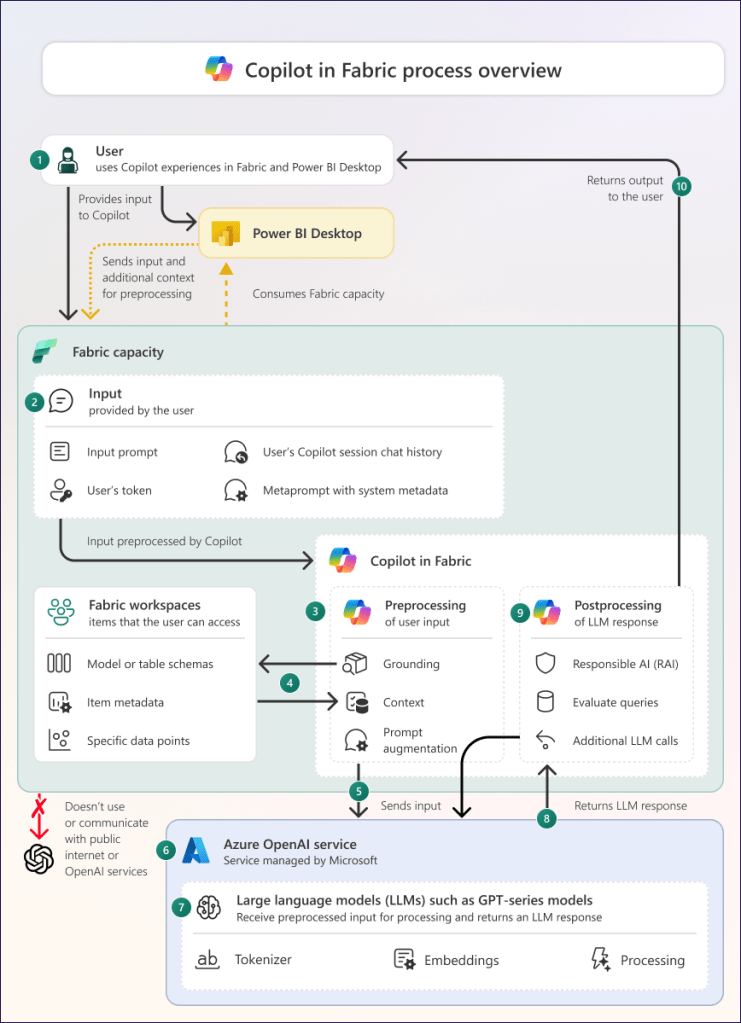
Microsoft Fabric Meets Copilot: AI That Supercharges Your Data Workflows

Microsoft Fabric with Copilot turns complex data tasks into simple conversations, letting teams build, analyze, and act faster across lakehouses, pipelines, and reports. This combo unifies your data estate while AI handles the heavy lifting for insights and automation.

Copilot Across Fabric Workloads

Copilot works seamlessly in notebooks, Data Factory, Power BI, and Real-Time Intelligence. In notebooks, it generates Python or Spark code from natural language like “Add revenue columns and plot trends.” Data Factory users prompt “Build a pipeline to clean sales data and join with inventory,” and Copilot creates the steps with error fixes.

Power BI Copilot drafts reports: “Summarize churn by region with visuals,” pulling from OneLake for instant dashboards. Real-Time Intelligence converts prompts to KQL queries for live streams, like spotting shipment delays.​​

Real-World Samples in Action

Sales teams ask: “Show customer churn trends by region.” Copilot queries Fabric warehouses, generates a map and KPIs, ready for Dynamics 365 embedding.

Finance prompt: “Highlight monthly cash flow anomalies.” It scans unified ledgers, flags outliers, and suggests forecasts via Power BI visuals.

Manufacturing: “Flag machines with downtime risks.” Copilot builds real-time dashboards from IoT streams, alerting on patterns with auto-generated alerts.

Quick Setup and Best Practices

Enable Copilot in the Fabric admin portal for F64+ capacities—it’s on by default for paid SKUs. Start with security groups for pilot users, then train on prompts like “Explain this dataset” or “Optimize this query.”

Pro tip: Load data as dataframes for best results; Copilot understands schema and suggests transformations. Track ROI by time saved on ETL and analysis.

Why It Changes Everything for Data Leaders

Fabric + Copilot cuts dev time 50% while scaling enterprise analytics. Integrate with Purview for governance, then deploy agents for ongoing insights—your path to AI-driven decisions without the hassle.

#MicrosoftFabric #Copilot #DataAI

Azure AI Foundry: Your Enterprise AI Control Plane for Production Scale

Azure AI Foundry transforms AI from scattered experiments into secure, scalable business reality. Teams build agents and apps with top models like GPT and Claude, all under one roof with governance and MLOps baked in.

What Sets It Apart

This platform unifies development through SDKs, CLI, portals, and notebooks for end-to-end workflows. Projects bundle data, prompts, tools, and deployments with versioning to speed collaboration and cut complexity.

Real Power in Action

Agent services orchestrate multi-agent systems that connect to Microsoft 365, CRM, and operations data for smart copilots. Native pipelines handle training, testing, deployment, and monitoring with GitHub CI/CD integration.

Security That Enterprises Demand

Role-based access, audit trails, and data residency keep things compliant. Bring your own storage and encryption while built-in filters manage risks across models and outputs.

Proven Examples Driving Impact

Insurance firms like those in claims processing use Foundry to slash review times from days to hours by automating intake with secure RAG over enterprise docs.

Retail giants such as ASOS built AI stylists that blend NLP and vision to deliver personalized product picks from millions of items, boosting engagement fast.​​

Manufacturers deploy edge agents for predictive maintenance, ingesting sensor data to forecast failures and cut downtime with real-time alerts.

Strategic Moves for Leaders

Position Foundry as your AI gateway, integrating with Fabric lakehouses to avoid silos. Kick off with knowledge agents or dev tools, then scale to cross-domain workflows for maximum ROI.

Azure AI Foundry: The Enterprise AI Control Plane You’ve Been Waiting For

What Azure AI Foundry Is

Azure AI Foundry (now branded simply as Microsoft Foundry) is a unified environment to design, build, evaluate, and operate AI applications and agents at scale. It brings together model catalog, orchestration, security, governance, and MLOps in a single, enterprise-ready experience.

  • It provides access to a broad catalog of foundation models, including OpenAI GPT, Anthropic Claude, and other third-party or open-source models under one roof.
  • Teams can collaborate in projects that bundle datasets, prompts, tools, agents, and deployment assets with built-in lifecycle management.

Key Capabilities That Matter

Under the hood, Azure AI Foundry is much more than a model playground; it is an opinionated platform for building production workloads.

  • Unified development experience: SDKs, CLI, and a portal provide consistent workflows with versioning, reusable components, and integrated notebooks for end-to-end AI development.
  • Agentic experiences: Foundry Agent Service enables multi-agent orchestration, tool usage via Model Context Protocol, and deep integration into Microsoft 365 and business systems.
  • Native MLOps: Built-in pipelines support training, evaluation, deployment, and monitoring of models with CI/CD via GitHub and Azure DevOps.

Governance, Security, and Responsible AI

For enterprises, AI is only real when it is secure, governed, and compliant. Azure AI Foundry leans heavily into these requirements.

  • Enterprise governance: Role-based access control, audit trails, and project-level isolation help segment workloads and protect sensitive assets.
  • Data control: Organizations can bring their own storage and Key Vault, ensuring data residency, encryption, and retention align with internal policies.
  • Risk and safety tooling: Content filtering, policy configurations, and evaluation workflows support responsible AI practices across models and scenarios.

Architecting Real-World Use Cases

The real power of Foundry shows up when it is applied to concrete business problems.

  • RAG and knowledge agents: Foundry makes it straightforward to build Retrieval-Augmented Generation experiences over secured enterprise data, reducing the need for heavy fine-tuning.
  • Line-of-business copilots: With connectors into Microsoft 365, Dynamics, and hundreds of SaaS systems, you can design agents that work across email, documents, CRM, and operations data.
  • Edge and hybrid scenarios: Support for cloud, on-premises, and edge deployment enables predictive maintenance, IoT analytics, and offline/low-connectivity use cases.

Strategic Guidance for Data & AI Leaders

For architects and data leaders, Azure AI Foundry is not just another service; it is a strategic control plane for enterprise AI.

  • Treat Foundry as the standard entry point for generative AI, with central governance over models, prompts, tools, and data connections.
  • Align AI projects with existing data platforms (Fabric, Synapse, lakehouses) and security baselines, so Foundry becomes an extension of your broader data and cloud strategy—not a silo.
  • Start with high-impact, low-friction scenarios—knowledge copilots, developer productivity, and customer service—and then scale into multi-agent, cross-domain workflows as maturity increases.

Microsoft MVP PGI Invitation – Interaction and Feedback on AI Platform Deep Dive on Private Chatbots, Assistants and Agents

Over the past years, I had the incredible opportunity to attend several Microsoft Product Group Interactions (PGIs)—exclusive sessions where Microsoft MVPs engage directly with the product teams shaping the future of the Microsoft cloud ecosystem.

These PGIs focused on some of the most exciting innovations in the Azure AI space, including:

Azure Patterns & Practices for Private Chatbots and Assistants
Azure AI Agents & Tooling Frameworks
Secure, Enterprise-Grade Architectures for Private LLMs

As a Microsoft MVP in Azure & AI, it’s always energizing to engage directly with the engineering teams and share insights from real-world scenarios.

As someone who works closely with customers designing AI and data solutions, I was glad to provide feedback on:

  • 🗣️ Community Feedback
    Throughout the PGIs, MVPs had the opportunity to provide valuable feedback. I contributed thoughts around:
    Making solutions more accessible and intuitive for developers and architects
    Ensuring seamless integration across Azure services
    Enhancing user experience and governance tooling
    Continuing to focus on enterprise readiness and customization flexibility
    These insights help shape product roadmaps and ensure the technology aligns with real-world needs and challenges.

    🙌 Looking Ahead
    A big thank you to the Azure AI and Patterns & Practices teams for their openness, innovation, and collaboration. The depth of these sessions reflects Microsoft’s strong commitment to empowering the MVP community and evolving Azure AI responsibly and effectively.
    Stay tuned as I continue to share learnings, hands-on demos, and architectural best practices on my blog and YouTube channel!
    #AzureAI #MicrosoftMVP #PrivateAI #PowerPlatform #Copilot #AIAgents #MicrosoftFabric #AzureOpenAI #SemanticKernel #PowerBI #MVPBuzz

Embracing Responsible AI Practices for Traditional and Generative AI

Introduction: Artificial Intelligence (AI) is reshaping industries and enhancing human capabilities. From traditional AI models like recommendation systems to the transformative potential of generative AI, the need for responsible AI practices has never been more critical. As we navigate these advancements, it becomes imperative to ensure that AI operates ethically, transparently, and inclusively.

1. Ideation and Exploration: The journey begins with identifying the business use case. Developers explore Azure AI’s model catalog, which includes foundation models from providers like OpenAI and Hugging Face. Using a subset of data, they prototype and evaluate models to validate business hypotheses. For example, in customer support, developers test sample queries to ensure the model generates helpful responses.

2. Experimentation and Refinement: Once a model is selected, the focus shifts to customization. Techniques like Retrieval Augmented Generation (RAG) allow enterprises to integrate local or real-time data into prompts. Developers iterate on prompts, chunking methods, and indexing to enhance model performance. Azure AI’s tools enable bulk testing and automated metrics for efficient refinement.

3. Deployment and Monitoring: Deploying LLMs at scale requires careful planning. Azure AI supports seamless integration with enterprise systems, ensuring models are optimized for real-world applications. Continuous monitoring helps identify bottlenecks and areas for improvement. Azure AI’s Responsible AI Framework ensures ethical and accountable deployment.

4. Scaling and Optimization: As enterprises expand their use of LLMs, scalability becomes crucial. Azure AI offers solutions for managing large-scale deployments, including fine-tuning and real-time data integration. By leveraging Azure AI’s capabilities, businesses can achieve consistent performance across diverse scenarios.

Conclusion: The enterprise LLM life cycle is an iterative process that demands collaboration, innovation, and diligence. Azure AI empowers organizations to navigate this journey with confidence, unlocking the full potential of LLMs while adhering to ethical standards. Whether you’re just starting or scaling up, Azure AI is your partner in building the future of enterprise AI.

What do you think? Would you like me to refine or expand on any section?

Please write impressive blogpost for Responsible AI Practices for Traditional & Generative AI

Title: Embracing Responsible AI Practices for Traditional and Generative AI

Introduction: Artificial Intelligence (AI) is reshaping industries and enhancing human capabilities. From traditional AI models like recommendation systems to the transformative potential of generative AI, the need for responsible AI practices has never been more critical. As we navigate these advancements, it becomes imperative to ensure that AI operates ethically, transparently, and inclusively.

1. Understanding Responsibility in Traditional and Generative AI: Traditional AI, which powers applications like fraud detection and predictive analytics, focuses on processing structured data to provide specific outputs. Generative AI, on the other hand, uses advanced models like GPT to create new content, whether it’s text, images, or music. Despite their differences, both require responsible practices to prevent unintended consequences. Responsible AI involves fairness, accountability, and respect for user privacy.

2. Building Ethical AI Systems: For traditional AI, ethics often revolve around eliminating biases in data and ensuring models do not disproportionately harm certain groups. Practices like diverse data sourcing, periodic audits, and transparent algorithms play a critical role. Generative AI, due to its broader creative capabilities, has unique challenges, such as avoiding the generation of harmful or misleading content. Guidelines to include:

  • Training models with diverse and high-quality datasets.
  • Filtering outputs to prevent harmful language or misinformation.
  • Clearly disclosing AI-generated content to distinguish it from human-created work.

3. The Importance of Transparency: Transparency builds trust in both traditional and generative AI applications. Organizations should adopt practices like:

  • Documenting data sources, methodologies, and algorithms.
  • Communicating how AI decisions are made, whether it’s a product recommendation or a generated paragraph.
  • Introducing “explainability” features to demystify black-box algorithms, helping users understand why an AI reached a certain decision.

4. Ensuring Data Privacy and Security: Both traditional and generative AI rely on extensive data. Responsible AI practices prioritize:

  • Adhering to privacy regulations like GDPR or CCPA.
  • Implementing secure protocols to protect data from breaches.
  • Avoiding over-collection of personal data and ensuring users have control over how their data is used.

5. The Role of AI Governance: Strong governance frameworks are the cornerstone of responsible AI deployment. These include:

  • Establishing cross-functional AI ethics committees.
  • Conducting regular audits to identify ethical risks.
  • Embedding responsible AI principles into organizational policies and workflows.

6. The Future of Responsible AI: As AI evolves, so must the practices governing it. Collaboration between governments, tech companies, and academic institutions will be essential in setting global standards. Open-source initiatives and AI research organizations can drive accountability and innovation hand-in-hand.

Conclusion: Responsible AI is not just a regulatory necessity—it is a moral imperative. Traditional and generative AI hold the power to create significant societal impact, and organizations must harness this power thoughtfully. By embedding ethics, transparency, and governance into every stage of the AI lifecycle, we can ensure that AI contributes positively to humanity while mitigating risks.

Navigating the Enterprise LLM Life Cycle with Azure AI

Introduction: The rise of Large Language Models (LLMs) has revolutionized the way enterprises approach artificial intelligence. From customer support to content generation, LLMs are unlocking new possibilities. However, managing the life cycle of these models requires a strategic approach. Azure AI provides a robust framework for enterprises to operationalize, refine, and scale LLMs effectively.

1. Ideation and Exploration: The journey begins with identifying the business use case. Developers explore Azure AI’s model catalog, which includes foundation models from providers like OpenAI and Hugging Face. Using a subset of data, they prototype and evaluate models to validate business hypotheses. For example, in customer support, developers test sample queries to ensure the model generates helpful responses.

2. Experimentation and Refinement: Once a model is selected, the focus shifts to customization. Techniques like Retrieval Augmented Generation (RAG) allow enterprises to integrate local or real-time data into prompts. Developers iterate on prompts, chunking methods, and indexing to enhance model performance. Azure AI’s tools enable bulk testing and automated metrics for efficient refinement.

3. Deployment and Monitoring: Deploying LLMs at scale requires careful planning. Azure AI supports seamless integration with enterprise systems, ensuring models are optimized for real-world applications. Continuous monitoring helps identify bottlenecks and areas for improvement. Azure AI’s Responsible AI Framework ensures ethical and accountable deployment.

4. Scaling and Optimization: As enterprises expand their use of LLMs, scalability becomes crucial. Azure AI offers solutions for managing large-scale deployments, including fine-tuning and real-time data integration. By leveraging Azure AI’s capabilities, businesses can achieve consistent performance across diverse scenarios.

Conclusion: The enterprise LLM life cycle is an iterative process that demands collaboration, innovation, and diligence. Azure AI empowers organizations to navigate this journey with confidence, unlocking the full potential of LLMs while adhering to ethical standards. Whether you’re just starting or scaling up, Azure AI is your partner in building the future of enterprise AI.

🍁 A True Blessing: Hosting the Canadian MVP Show – Azure & AI World 🍁

There are moments in life where passion meets purpose — and for me, that journey has been nothing short of a blessing.

It’s with immense gratitude and excitement that I share this milestone:
I’ve been honored seven times as a Microsoft MVP, and today, I continue to proudly serve the global tech community as the host of the Canadian MVP Show – Azure & AI World. 🇨🇦🎙️


🌟 A Journey Fueled by Community

From the beginning, the goal was simple: share knowledge, empower others, and build a space where ideas around Azure, AI, and Microsoft technologies could thrive.

Thanks to your incredible support, our content — including blogs, tutorials, and videos — has now reached over 1.1 million views across platforms. 🙌 That number isn’t just a metric — it’s a reflection of a passionate, curious, and ever-growing tech community.


🎥 Our YouTube Channel: Voices That Matter

The Canadian MVP Show YouTube channel has become a home for insightful conversations and deep dives into the world of Azure and AI. We’ve been joined by fellow Microsoft MVPs and Microsoft Employees, all of whom generously share their experiences, best practices, and forward-thinking ideas.

Each episode is a celebration of collaboration and community-driven learning.


🙏 The Microsoft MVP Experience

Being part of the Microsoft MVP program has opened doors I could’ve only dreamed of — from speaking at international conferences, to connecting with Microsoft product teams, and most importantly, to giving back to the global tech community.

The MVP award is not just recognition; it’s a responsibility — to uplift others, to be a lifelong learner, and to serve as a bridge between innovation and impact.


💙 Why It Matters

Technology is moving fast — but community is what keeps us grounded.

To be able to:

  • Democratize AI knowledge
  • Break down the complexities of cloud
  • Empower the next generation of developers and architects

…through this platform has been one of the greatest honors of my career.


🙌 Thank You

To every viewer, guest, supporter, and community member — thank you. Your encouragement, feedback, and shared passion make this journey worthwhile.

We’re just getting started — and the future of Azure & AI is brighter than ever. 🚀

Let’s keep learning, growing, and building together.

🔔 Subscribe & join the movement: @DeepakKaaushik-MVP on YouTube

With gratitude,
Deepak Kaushik
Microsoft MVP (7x) | Community Speaker | Show Host
My MVP Profile

🔍 Exploring Azure AI Open Source Projects: Empowering Innovation at Scale

The fusion of Artificial Intelligence (AI) and open source has sparked a new era of innovation, enabling developers and organizations to build intelligent solutions that are transparent, scalable, and customizable. Microsoft Azure stands at the forefront of this revolution, contributing actively to the open-source ecosystem while integrating these projects seamlessly with Azure AI services.

In this blog post, we’ll dive into some of the most impactful Azure AI open-source projects, their capabilities, and how they can empower your next intelligent application.


🧠 1. ONNX Runtime

What it is: A cross-platform, high-performance scoring engine for Open Neural Network Exchange (ONNX) models.

Why it matters:

  • Optimized for both cloud and edge scenarios.
  • Supports models trained in PyTorch, TensorFlow, and more.
  • Integrates directly with Azure Machine Learning, IoT Edge, and even browser-based apps.

Use Case: Deploy a computer vision model trained in PyTorch and serve it using ONNX Runtime on Azure Kubernetes Service (AKS) with GPU acceleration.


🤖 2. Responsible AI Toolbox

What it is: A suite of tools to support Responsible AI practices—fairness, interpretability, error analysis, and data exploration.

Key Components:

  • Fairlearn for bias detection and mitigation.
  • InterpretML for model transparency.
  • Error Analysis and Data Explorer for identifying model blind spots.

Why use it: Build ethical and compliant AI solutions that are transparent and inclusive—especially important for regulated industries.

Azure Integration: Works natively with Azure Machine Learning, offering UI and SDK-based experiences.


🛠️ 3. DeepSpeed

What it is: A deep learning optimization library that enables training of massive transformer models at scale.

Why it’s cool:

  • Efficient memory and compute usage.
  • Powers models with billions of parameters (like ChatGPT-sized models).
  • Supports zero redundancy optimization (ZeRO) for large-scale distributed training.

Azure Bonus: Combine DeepSpeed with Azure NDv5 AI VMs to train LLMs faster and more cost-efficiently.


🧪 4. Azure Open Datasets

What it is: A collection of curated, open datasets for training and evaluating AI/ML models.

Use it for:

  • Jumpstarting AI experimentation.
  • Benchmarking models on real-world data.
  • Avoiding data wrangling headaches.

Access: Directly available in Azure Machine Learning Studio and Azure Databricks.


🧩 5. Semantic Kernel

What it is: An SDK that lets you build AI apps by combining LLMs with traditional programming.

Why developers love it:

  • Easily plug GPT-like models into existing workflows.
  • Supports plugins, memory storage, and planning for dynamic pipelines.
  • Multi-language support: C#, Python, and Java.

Integration: Works beautifully with Azure OpenAI Service to bring intelligent, contextual workflows into your apps.


🌍 6. Project Turing + Turing-NLG

Microsoft Research’s Project Turing has driven advancements in NLP with models like Turing-NLG and Turing-Bletchley. While not always fully open-sourced, many pretrained models and components are available for developers to fine-tune and use.


🎯 Final Thoughts

Azure’s open-source AI projects aren’t just about transparency—they’re about empowering everyone to build smarter, scalable, and responsible AI solutions. Whether you’re an AI researcher, ML engineer, or developer building the next intelligent app, these tools offer the flexibility of open source with the power of Azure.

🔗 Resources to explore:

Azure AI Content Safety – Real time Safety

In today’s digital landscape, ensuring the safety and appropriateness of user-generated content is paramount for businesses and platforms. Microsoft’s Azure AI Content Safety offers a robust solution to this challenge, leveraging advanced AI models to monitor and moderate content effectively.

Comprehensive Content Moderation

Azure AI Content Safety is designed to detect and filter harmful content across various formats, including text and images. It focuses on identifying content related to hate speech, violence, sexual material, and self-harm, assigning severity scores to prioritize moderation efforts. This nuanced approach reduces false positives, easing the burden on human moderators.

azure.microsoft.com

Seamless Integration and Customization

The service offers both Text and Image APIs, allowing businesses to integrate content moderation seamlessly into their existing workflows. Additionally, Azure AI Content Safety provides a Studio experience for a more interactive setup. For specialized needs, the Custom Categories feature enables the creation of tailored filters, allowing organizations to define and detect content specific to their unique requirements.

azure.microsoft.com

Real-World Applications

Several organizations have successfully implemented Azure AI Content Safety to enhance their platforms:

  • Unity: Developed Muse Chat to assist game creators, utilizing Azure OpenAI Service content filters powered by Azure AI Content Safety to ensure responsible use. azure.microsoft.com
  • IWill Therapy: Launched a Hindi-speaking chatbot providing cognitive behavioral therapy across India, employing Azure AI Content Safety to detect and filter potentially harmful content. azure.microsoft.com

Integration with Azure OpenAI Service

Azure AI Content Safety is integrated by default into the Azure OpenAI Service at no additional cost. This integration ensures that both input prompts and output completions are filtered through advanced classification models, preventing the dissemination of harmful content.

azure.microsoft.com

Getting Started

To explore and implement Azure AI Content Safety, businesses can access the service through the Azure AI Foundry. The platform provides resources, including concepts, quickstarts, and customer stories, to guide users in building secure and responsible AI applications.

azure.microsoft.com

Incorporating Azure AI Content Safety into your digital ecosystem not only safeguards users but also upholds the integrity and reputation of your platform. By leveraging Microsoft’s advanced AI capabilities, businesses can proactively address the challenges of content moderation in an ever-evolving digital world.