Build Azure Domain And AD integration Foundation

Introduction

 Azure manages and controls identity and user access to enterprise environments, data, and applications by federating user identities to Azure Active Directory and enabling multifactor authentication for more secure sign-in. Microsoft uses stringent identity management and access controls to limit data and systems access to those with a genuine business need (least-privileged). These include Azure Active Directory reporting, Azure Key Vault logs, Azure Storage Analytics, and more. Logs from your Azure resources can be integrated with your on-premises security information and event management (SIEM) system. Identity management is the process of authenticating and authorizing security principals. It also involves controlling information about those principals (identities). Security principals (identities) may include services, applications, users, groups, etc. Microsoft identity and access management solutions help IT protect access to applications and resources across the corporate datacenter and into the cloud. Such protection enables additional levels of validation, such as Multi-Factor Authentication and Conditional Access policies. Monitoring suspicious activity through advanced security reporting, auditing, and alerting helps mitigate potential security issues. Azure Active Directory Premium provides single sign-on (SSO) to thousands of cloud software as a service (SaaS) apps and access to web apps that you run on-premises. By taking advantage of the security benefits of Azure Active Directory (Azure AD), you can,

  • Create and manage a single identity for each user across your hybrid enterprise, keeping users, groups, and devices in sync.
  • Provide SSO access to your applications, including thousands of pre-integrated SaaS apps.
  • Enable application access security by enforcing rules-based Multi-Factor Authentication for both on-premises and cloud applications.
  • Provision secure remote access to on-premises web applications through Azure AD Application Proxy.

Azure Active Directory integration with SAP Cloud Platform

 Let’s integrate SAP Cloud Platform with Azure Active Directory (Azure AD). Integrating SAP Cloud Platform with Azure AD provides you with the following benefits:

  • You can control in Azure AD who has access to SAP Cloud Platform.
  • You can enable your users to be automatically signed-in to SAP Cloud Platform (Single Sign-On) with their Azure AD accounts.
  • You can manage your accounts in one central location – the Azure portal.

Prerequisite To configure Azure AD integration with SAP Cloud Platform, you need the following items,

  1. Azure Subscription
  2. Basic Azure knowledge
  3. An Azure AD tenant
  4. A SAP Cloud Platform Identity Authentication tenant
  5. A user account in SAP Cloud Platform Identity Authentication with Admin permissions.
  6. An Azure AD subscription. If you don’t have an Azure AD environment, you can get one-month trial here
  7. SAP Cloud Platform single sign-on enabled subscription

Definition Throughout the document, these terms are used,

  • IaaS: Infrastructure as a service.
  • PaaS: Platform as a service.
  • SaaS: Software as a service.

Abstract This response document helps address standard Requests for Information (RFI) with which IoTCoast2Coast empower customers to evaluate different offerings in the market place today. Through the mappings available in the CCM, we can illustrate how Azure has implemented security and privacy controls aligned to other international standards such as ISO/IEC 27001, US Government frameworks including FedRAMP, and industry certifications such as PCI DSS. Complexity A cloud-specific controls framework such as the Cloud Control Matrix (CCM) reduces the risk of an organization failing to consider important factors when selecting a cloud provider. The risk is further mitigated by relying on the cumulative knowledge of industry experts who created the framework, and taking advantage of the efforts of many offerings. Comparison For organizations that do not have detailed knowledge about the different ways that cloud providers can develop or configure their offerings, reviewing a fully developed framework can provide insight into how to compare similar offerings and distinguish between providers. A framework can also help determine whether a specific service offering meets or exceeds compliance requirements and/or relevant standards. 

Authorize access to Azure AD web applications using the OAuth 2.0 code grant flow

 Azure Active Directory (Azure AD) uses OAuth 2.0 to enable you to authorize access to web applications and web APIs in your Azure AD tenant. Register your application with your AD tenant First, register your application with your Azure Active Directory (Azure AD) tenant. This will give you an Application ID for your application, as well as enable it to receive tokens.

  • Sign in to the Azure portal.
  • Choose your Azure AD tenant by selecting your account in the top right corner of the page, followed by selecting the Switch Directory navigation and then selecting the appropriate tenant.
  • Skip this step if you only have one Azure AD tenant under your account, or if you’ve already selected the appropriate Azure AD tenant.
  • In the Azure portal, search for and select Azure Active Directory.
  • In the Azure Active Directory left menu, select App Registrations, and then select New registration.
  • Follow the prompts and create a new application. It doesn’t matter if it is a web application or a public client (mobile & desktop) application for this tutorial, but if you’d like specific examples for web applications or public client applications, check out our quickstarts.
    • Name is the application name and describes your application to end users.
    • Under Supported account types, select Accounts in any organizational directory and personal Microsoft accounts.
    • Provide the Redirect URI. For web applications, this is the base URL of your app where users can sign in. For example, http://localhost:12345. For public client (mobile & desktop), Azure AD uses it to return token responses. Enter a value specific to your application. For example, http://MyFirstAADApp.
  • Once you’ve completed registration, Azure AD will assign your application a unique client identifier (the Application ID). You need this value in the next sections, so copy it from the application page.
  • To find your application in the Azure portal, select App registrations, and then select View all applications.

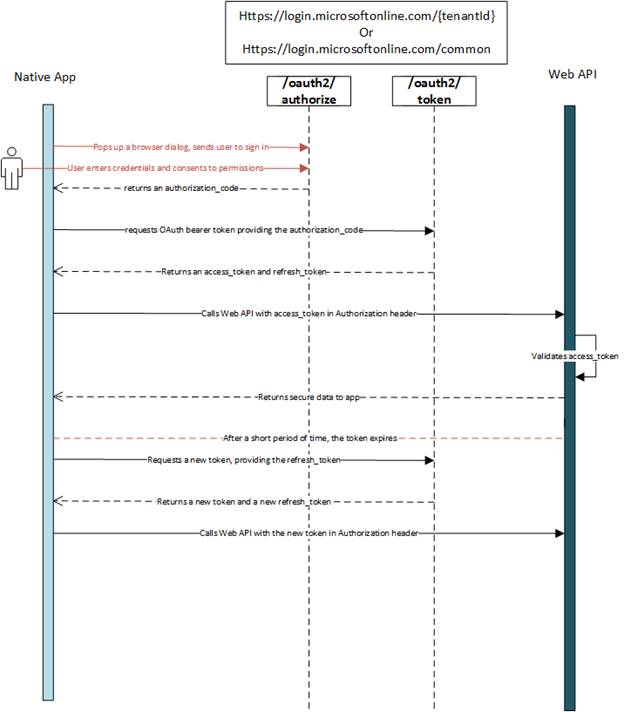
OAuth 2.0 authorization flow

 At a high level, the entire authorization flow for an application looks a bit like this, 
Build Azure Domain And AD integration Foundation

Azure Advanced Threat Protection (ATP)

 Azure Advanced Threat Protection (ATP) is a cloud-based security solution that leverages your on-premises Active Directory signals to identify, detect, and investigate advanced threats, compromised identities, and malicious insider actions directed at your organization. Azure ATP enables SecOp (Security Operation) analysts and security professionals to detect advanced attacks in hybrid environments in the following ways,

  • Monitors users, entity behavior, and activities with learning-based analytics.
  • Protects user identities and credentials stored in Active Directory.
  • Identifies and investigates suspicious user activities and advanced attacks throughout all phases of a cyberattack.
  • Provides clear incident information on a simple timeline for fast triage

Enterprise cloud directory Azure Active Directory is a comprehensive identity and access management solution in the cloud. It combines core directory services, advanced identity governance, security, and application access management. Azure AD makes it easy for your developers to build policy-based identity management into your organization’s applications. Azure AD Premium editions include additional features to meet the advanced identity and access needs of enterprise organizations, such as,

  • The ability for someone to sign in to thousands of applications, including on-premises business applications as well as cloud-based and consumer apps.
  • Multifactor authentication.
  • Conditional access based on group and location, or device state.
  • Azure IoT device-level authentication.
  • Access monitoring and logging.
  • Cloud App Discovery.
  • Self-Service Password Reset (SSPR).

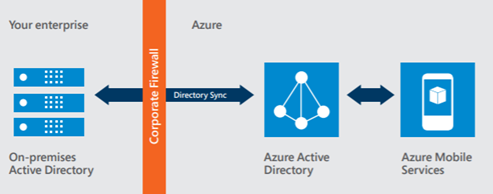
Azure AD enables a single identity management capability across on-premises, cloud, and mobile solutions. 
Build Azure Domain And AD integration Foundation

  The Azure AD Premium P2 edition offers three important features,

  • Azure AD Identity Protection leverages the anomaly detection of Azure AD to detect anomalies in real time. It uses adaptive machine-learning algorithms and heuristics to detect indications that an identity has been compromised. With Azure AD Identity Protection, you can detect potential vulnerabilities affecting your organization’s identities, configure automated responses to detected suspicious actions that are related to your organization’s identities, investigate suspicious incidents, and take appropriate action to resolve them.
  • Azure AD Privileged Identity Management helps you manage, control, and monitor access within your organization, by identifying Azure AD administrators, enabling just-in-time administrative access to online services, and providing reports and alerts about administrative access.
  • Access reviews provide governance of identities to ensure users and administrators have the correct access to apps and resources over time. Access reviews enable IT organizations to review access to groups or resources and confirm they still need access to perform their tasks.

Multifactor authentication

 The use of multiple authentication factors reduces the risk of unauthorized user access, such as through phishing attacks, and Azure MFA works for both on-premises and cloud applications and across both in a hybrid configuration, helping to safeguard access to data and applications. It delivers strong authentication through a range of easy verification options—phone call, text message, or mobile app notification—allowing users to choose the method they prefer for both on-premises and cloud applications. Conditional access Users can access your organization’s resources by using a variety of devices and apps from anywhere, so just focusing on who can access a resource is not sufficient anymore. You need to make sure that these devices meet your standards for security and compliance. With Azure AD conditional access, you can make automated access-control decisions for accessing your cloud apps that are based on conditions such as device state, location, client application, and sign-in risk. Azure IoT device-level authentication Authentication applies to devices as well as users, especially in today’s Internet of Things (IoT). Azure IoT supports X.509 certificates for enhanced authentication at the device level. Device identity can be transmitted safely and securely from the edge to the cloud. You can use the IoT Hub device identity registry to configure per-device security credentials and access control using tokens. Azure IoT Hub grants access to endpoints by verifying a token against the shared access policies and identity registry security credentials. Security credentials, such as symmetric keys, are never sent over the wire. 

Architecture diagrams for AAD

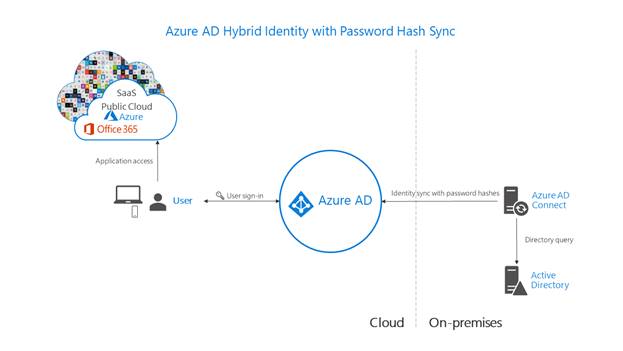
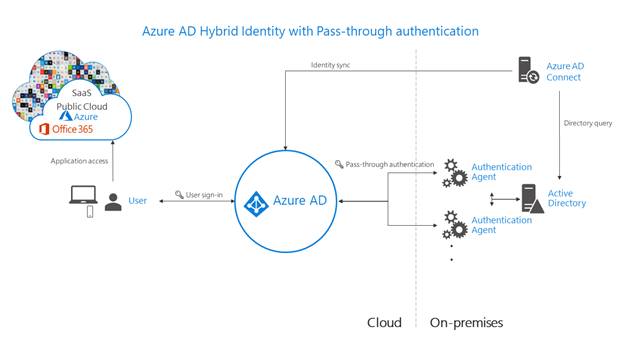
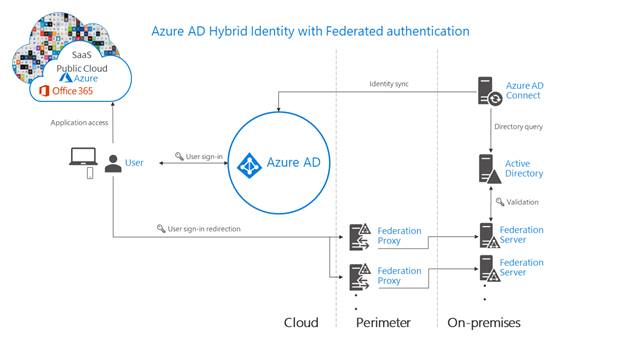
 The following diagrams outline the high-level architecture components required for each authentication method you can use with your Azure AD hybrid identity solution. They provide an overview to help you compare the differences between the solutions.

  • Simplicity of a password hash synchronization solution,
    Build Azure Domain And AD integration Foundation
  • Agent requirements of pass-through authentication, using two agents for redundancy,
    Build Azure Domain And AD integration Foundation
  • Components required for federation in your perimeter and internal network of your organization,
    Build Azure Domain And AD integration Foundation

Conclusion

 This article outlines various authentication options that organizations can configure and deploy to support access to cloud apps. To meet various business, security, and technical requirements, organizations can choose between password hash synchronization, Pass-through Authentication, and federation. Consider each authentication method, like does the effort to deploy the solution, and the user’s experience of the sign-in process, address your business requirements? Evaluate whether your organization needs the advanced scenarios and business continuity features of each authentication method. Finally, IoTCoast2Coast evaluate the considerations of each authentication method as per business requirement and committed to implement best solutions as discussed above.

Azure deployment and Disaster Recovery for SAP workload

Introduction

 Microsoft Azure provides a trusted path to enterprise-ready innovation with SAP solutions in the cloud. Mission critical applications such as SAP run reliably on Azure, which is an enterprise proven platform offering hyperscale, high availability, agility, and cost savings for running a customer’s SAP landscape. As an organization you need to adopt a business continuity and disaster recovery (BCDR) strategy that keeps your data safe, and your apps and workloads up and running, when planned and unplanned outages occur. IoTCoast2Coast helps customers to build their SAP on Azure landscapes and very often we discuss the easiest way to get started. We always recommend improving the Disaster Recovery process by implementing Azure Site Recovery, which is Microsoft’s cloud service that replicates on-premise servers and creates a recovery plan to provision resources in the cloud in case of an unexpected event. During normal operations client have to pay only for the storage – target virtual machines are created during the failover process. Reliable and inexpensive disaster recovery solution and it’s today’s reality. Azure Site Recovery protects your workload by replication of the disks. The process is compatible with SAP NetWeaver products and supported by Microsoft. Azure Site Recovery performs the replication, however it can’t ensure the data consistency between the data and log areas. The recommended solution is to create a System Replication between the on-premise and cloud instances. It will ensure the lowest RPO and RTO, but it requires a constantly running server in the cloud environment. As best practice, when it comes to protecting the HANA instance, we present an alternative solution based on the automatic shipping of data backups to Azure Blob storage. It will require some extra actions, but the total cost of the solution is much lower – the client only pays for the space being used. 

Setup And Configure SAP Backups And Disaster Recovery

Azure VM DBMS deployment for SAP workload

 Azure has two different deployment models we can use to create and work with resources,

  • Azure Resource Manager
  • Classic

IoTCoast2Coast recommend the Resource Manager deployment model for new deployments instead of the classic deployment model. 

Setup And Configure SAP Backups And Disaster Recovery

Prerequisite

  1. Azure Subscription
  2. Basic Azure knowledge
  3. SAP knowledge
  4. Administrator Access
  5. PowerShell (Good to have)
  6. Understanding of SAP HANA administration

Definition Throughout the document, these terms are used,

  • IaaS: Infrastructure as a service.
  • PaaS: Platform as a service.
  • SaaS: Software as a service.

SAP Azure Disaster Recovery Solution (Scenario)

 Let’s implement Azure Disaster Recovery Solution. It’s important to establish a rough vision of the end state before taking the first step. It’s not the company starting point, but it shows the potential destination. Assumptions / Challenge In the previous environment, SAP was running on-premise with no/ on-prem DR capability. This exposed the company to business risks:

  • Complete production shutdown on a global level if the SAP instance in the headquarters goes down.
  • Loss of data/other transactional information in case of data corruption.
  • High time for business recovery leading to production losses globally.
  • High risk of both infrastructure (Servers, Network, Storage, Backup failure) as well as application issues leading to unplanned business downtime

The Solution Let’s set up a recovery strategy for SAP using Cloud services on Microsoft Azure Cloud. This is intended to enable the client to have an RTO (Recovery Time Objective) of 4 hours and RPO (Recovery Point Objective) of 2 hours. The same could be configured as an on-demand DR solution, allowing the customer to pay for DR services on an as-needed basis. 

Highlights of the Solution

Setup And Configure SAP Backups And Disaster Recovery

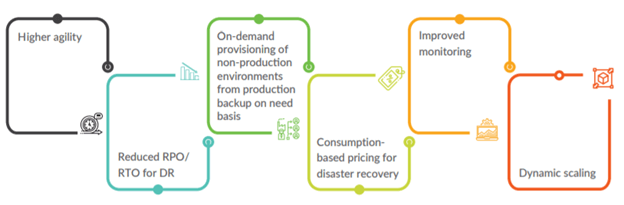
The Key Benefit IoTCoast2Coast implemented best practices for the architecture and business logic on Azure, and through the implementation of architectural best practices and the business logic on Azure, the following benefits were realized by the customer:

  • Higher Agility
  • Reduced RPO/RTO for DR
  • On demand provisioning of non-production environments from production backup on need basis
  • Consumption based pricing for Disaster Recovery
  • Improved Monitoring
  • Dynamic Scaling

    Setup And Configure SAP Backups And Disaster Recovery

Considerations for Azure VM DBMS deployment for SAP workload

 Let’s undiscover the generic deployment aspects of SAP-related DBMS systems on Microsoft Azure virtual machines (VMs) by using the Azure infrastructure as a service (IaaS) capabilities. It complements the SAP installation documentation and SAP Notes, which represent the primary resources for installations and deployments of SAP software on given platforms. Considerations of running SAP-related DBMS systems in Azure VMs are introduced. There are few references to specific DBMS systems in this chapter. Instead, the specific DBMS systems are handled. SAP component An individual SAP application such as ERP Central Component (ECC), Business Warehouse (BW), Solution Manager, or Enterprise Portal (EP). SAP components can be based on traditional ABAP or Java technologies or on a non-NetWeaver-based application such as Business Objects. SAP environment One or more SAP components logically grouped to perform a business function such as development, quality assurance, training, disaster recovery, or production. SAP landscape This term refers to the entire SAP assets in a customer’s IT landscape. The SAP landscape includes all production and nonproduction environments. SAP system The combination of a DBMS layer and an application layer of, for example, an SAP ERP development system, an SAP Business Warehouse test system, or an SAP CRM production system. In Azure deployments, dividing these two layers between on-premises and Azure isn’t supported. As a result, an SAP system is either deployed on-premises or it’s deployed in Azure. You can deploy the different systems of an SAP landscape in Azure or on-premises. For example, you could deploy the SAP CRM development and test systems in Azure but deploy the SAP CRM production system on-premises. Cross-premises Describes a scenario where VMs are deployed to an Azure subscription that has site-to-site, multisite, or Azure ExpressRoute connectivity between the on-premises data centers and Azure. In common Azure documentation, these kinds of deployments are also described as cross-premises scenarios. 

SAP Site Recovery

 The Site Recovery provides a disaster recovery solution for on-premises machines, and for Azure VMs. You replicate machines from a primary location to a secondary. When disaster strikes, you fail machines over to the secondary location, and access them from there. When everything’s up and running normally again, you fail machines back to recover them in the primary site. 

Azure Recovery Services contribute to your BCDR strategy

Site Recovery service Site Recovery helps ensure business continuity by keeping business apps and workloads running during outages. Site Recovery replicates workloads running on physical and virtual machines (VMs) from a primary site to a secondary location. When an outage occurs at your primary site, you fail over to a secondary location, and access apps from there. After the primary location is running again, you can fail back to it. Backup service The Azure Backup service keeps your data safe and recoverable by backing it up to Azure. Site Recovery can manage replication for:

  • Azure VMs replicating between Azure regions.
  • On-premises VMs, Azure Stack VMs and physical servers.

Resiliency/Reliability

 Azure keeps your applications up and running and your data available. Azure is the first cloud platform to provide a built-in backup and disaster recovery solution.Resiliency is not about avoiding failures but responding to failures. The objective is to respond to failure in a way that avoids downtime and data loss. Business continuity and data protection are critical issues for today’s organizations, and business continuity is built on the foundation of resilient systems, applications, and data. Reliability and resiliency are closely related. Reliability is defined as dependability and performing consistently well. Resiliency is defined as the capacity to recover quickly. Together, these two qualities are key to a trustworthy cloud service. Despite best efforts, disasters happen; they are inevitable but mostly unpredictable, and vary in type and magnitude. There is almost never a single root cause of a major issue. Instead, there are several contributing factors, which is the reason an issue is able to circumvent various layers of mitigations/defenses. 

Disaster Recovery

 Disaster recovery strategy is key to business continuity. Site recovery and data backup are elements of a disaster recovery plan. Organizations using the cloud tend to take the reliability of the public cloud for granted, not recognizing that they may be responsible for choosing and implementing backup and recovery mechanisms. As a cloud customer, you will confront more opportunities to spend extra time and money on optional backup than you can ever take advantage of, so you need to make explicit and careful choices as to what you will and will not do. Your disaster recovery plan should,

  1. Identify and classify the threats and risks that may lead to disasters.
  2. Define the resources and processes that ensure business continuity during the disaster.
  3. Define the reconstitution mechanism to get the business back to normal from the disaster recovery state, after the effects of the disaster are mitigated.

An effective disaster recovery plan plays its role in all stages of operations and it is continuously improved by disaster recovery mock drills and feedback capture processes. Disaster recovery happens in the following sequential phases,

  1. Activation Phase
    In this phase, the disaster effects are assessed and announced.
  2. Execution Phase
    In this phase, the actual procedures to recover each of the disaster-affected Azure services are executed. Business operations are restored into the Azure paired region.
  3. Reconstitution Phase
    In this phase the original Azure region hosted system/service is restored, and execution phase procedures are stopped.

Build Your Enterprise Azure Network Foundation

Introduction

This article will provides Customers a brief description of networking solution for connecting customers from any location to Azure, leveraging our customers with the leading national and international network providers.

A single hardware failure is mitigated by a Fabric Controller which manages resource allocation, automatically failing-over to a different machine or cluster. Hardware management is transparent to the customer. Without additional configuration, data is protected by locally redundant storage, which maintains multiple replicas of data within a single region. If geo-replication for the virtual machine is configured, that geo-replication provides redundancy of data across regions to help ensure access to data in the event of a local disaster.

Network infrastructure and components are similarly redundant, with N+1 links to regional TelCos, load balancers, and routing switch fabric.

SAP on Azure is a very popular workload. As customers look to deploy their production SAP systems on Azure it is important to consider proper network design to ensure performance. This document will walk you through how to optimally connect to the Microsoft network for SAP and SAP HANA Large Instance.

Latency Optimization

The solution facilitates a seamless, fast migration to SAP on Azure, based on a secure, highly available, performant, and resilient connectivity solution covered by an end-to-end SLA.

When deploying enterprise applications such as SAP in Azure it is important to know the different connectivity methods used with the Microsoft network.

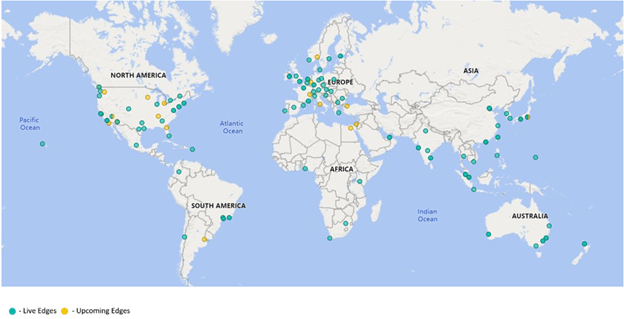
The most common way to interface with applications hosted in Azure is to connect via the Internet. Microsoft today interconnects with Internet Service Providers in over 150 locations around the world. Microsoft provides more than 80 percent of global GDP (Gross Domestic Product) with an experience of sub-30 milliseconds latency.

The most common way to interface with applications hosted in Azure is to connect via the Internet. Microsoft today interconnects with Internet Service Providers in over 150 locations around the world. Microsoft provides more than 80 percent of global GDP (Gross Domestic Product) with an experience of sub-30 milliseconds latency. We are adding new edges every week, and our ambition is to provide this level of performance to all of global audience.

When using Internet connectivity to access SAP applications customers can either leverage Microsoft VPN Gateway or Azure Virtual WAN. VPN Gateway allows customers to establish an IPSEC tunnel from an on-premise device to Azure directly over the internet.  

Prerequisite

  1. Azure Subscription
  2. Basic Azure knowledge
  3. SAP knowledge
  4. Administrator Access
  5. PowerShell (Good to have)
  6. Understanding of SAP HANA administration

Definition

Throughout the article, these terms are used:

IaaS: Infrastructure as a service.

PaaS: Platform as a service.

SaaS: Software as a service.

 
Abstract

This response document helps address standard Requests for Information (RFI) with which IoTCoast2Coast empower customers to evaluate different offerings in the market place today. Through the mappings available in the CCM, we can illustrate how Azure has implemented security and privacy controls aligned to other international standards such as ISO/IEC 27001, US Government frameworks including FedRAMP, and industry certifications such as PCI DSS.

Complexity

A cloud-specific controls framework such as the Cloud Control Matrix (CCM) reduces the risk of an organization failing to consider important factors when selecting a cloud provider. The risk is further mitigated by relying on the cumulative knowledge of industry experts who created the framework, and taking advantage of the efforts of many offerings.

Comparison

For organizations that do not have detailed knowledge about the different ways that cloud providers can develop or configure their offerings, reviewing a fully developed framework can provide insight into how to compare similar offerings and distinguish between providers. A framework can also help determine whether a specific service offering meets or exceeds compliance requirements and/or relevant standards.

Azure approach on SAP Connectivity Requirement

Both Azure and the underlying Microsoft Cloud and Infrastructure Operations (MCIO) physical environments employ Network frameworks that span multiple best standards.

Let’s enable a wide range of enterprise and consumer services with a highly available, secure, and agile network

Azure ExpressRoute Challenge

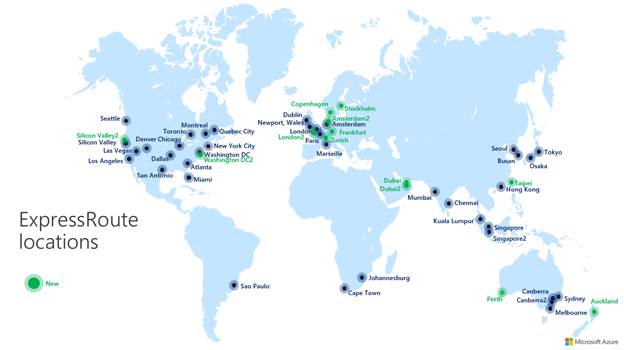
Azure ExpressRoute is the recommended Azure networking service to create a private connection between an on-premises network and Azure virtual networks, bypassing the public Internet (see reference architecture). This is applicable to both SAP S/4HANA as well as SAP HANA on Azure Large Instances deployments.

ExpressRoute enables the initial migration of the data estate, as well as the ongoing secure data transfer between your SAP on Azure solution and applications remaining in your enterprise data center. Most organisations in Northern Europe deploy their SAP on Azure solutions on the Azure West Europe multi-zone region located in The Netherlands.

There are couple of ExpressRoute nodes available in North America, offers <0.5 millisecond latency to SAP Hana on Azure and Large Instances. To safeguard performance of SAP HANA in-memory databases, latency and jitter should be considered when designing connectivity solution.

As physical distance directly impacts latency and jitter, it’s recommended for customers planning to transfer large data volumes and customers running hybrid cloud architectures to consider it seriously.

Architecture:

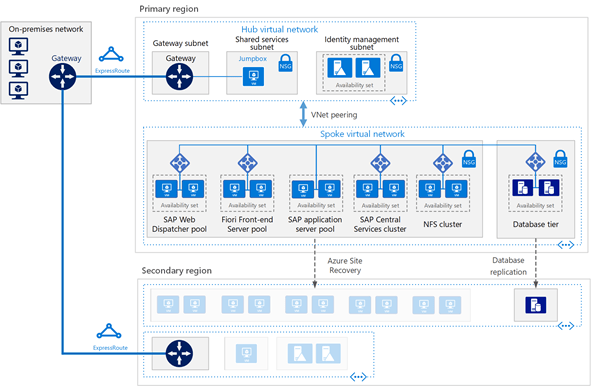
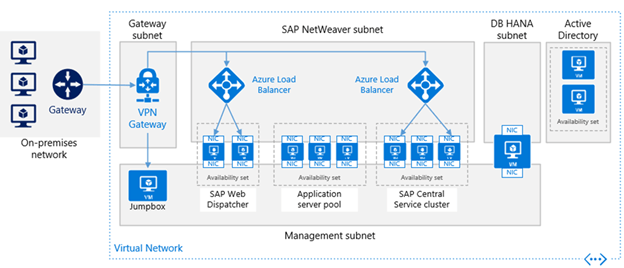
Let’s This reference architecture describes an enterprise-grade, production-level system. To suit your business needs, this configuration can be reduced to a single virtual machine. However, the following components are required:

Virtual network: The Azure Virtual Network service securely connects Azure resources to each other. In this architecture, the virtual network connects to an on-premises environment through a gateway deployed in the hub of a hub-spoke topology. The spoke is the virtual network used for the SAP applications.

Subnets: The virtual network is subdivided into separate subnets for each tier: gateway, application, database, and shared services.

Virtual machines: This architecture uses virtual machines running Linux for the application tier and database tier, grouped as follows:

Application tier: Includes the Front-end Server pool, SAP Web Dispatcher pool, application server pool, and SAP Central Services cluster. For high availability of Central Services on Azure Linux virtual machines, a highly available Network File System (NFS) service is required.

NFS cluster: This architecture uses an NFS server running on a Linux cluster to store data shared between SAP systems. This centralized cluster can be shared across multiple SAP systems. For high availability of the NFS service, the appropriate High Availability Extension for the selected Linux distribution is used.

SAP HANA: The database tier uses two or more Linux virtual machines in a cluster to achieve high availability. HANA System Replication (HSR) is used to replicate contents between primary and secondary HANA systems. Linux clustering is used to detect system failures and facilitate automatic failover. A storage-based or cloud-based fencing mechanism can be used to ensure the failed system is isolated or shut down to avoid the cluster split-brain condition.

Jumpbox: Also called a bastion host. This is a secure virtual machine on the network that administrators use to connect to the other virtual machines. It can run Windows or Linux. Use a Windows jumpbox for web browsing convenience when using HANA Cockpit or HANA Studio management tools.

Load balancers: Both built-in SAP load balancers and Azure Load Balancer are used to achieve HA. Azure Load Balancer instances are used to distribute traffic to virtual machines in the application tier subnet.

Availability sets: Virtual machines for all pools and clusters (Web Dispatcher, SAP application servers, Central Services, NFS, and HANA) are grouped into separate availability sets, and at least two virtual machines are provisioned per role. This makes the virtual machines eligible for a higher service level agreement (SLA).

NICs: Network interface cards (NICs) enable all communication of virtual machines on a virtual network.

Network security groups: To restrict incoming, outgoing, and intra-subnet traffic in the virtual network, network security groups (NSGs) are used.

Gateway: A gateway extends your on-premises network to the Azure virtual network. ExpressRoute is the recommended Azure service for creating private connections that do not go over the public Internet, but a Site-to-Site connection can also be used.

Azure Storage: To provide persistent storage of a virtual machine’s virtual hard disk (VHD), Azure Storage is required.

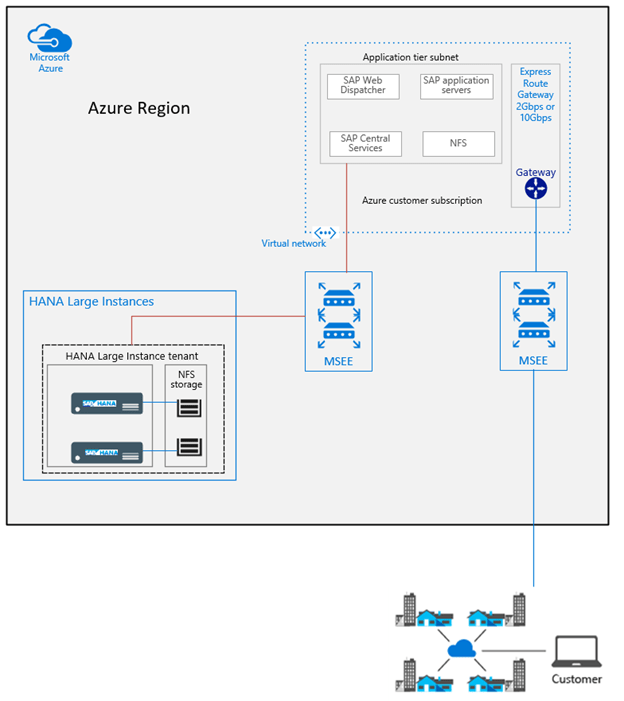
Highlights Networking architecture for HANA Large Instance  

The networking architecture for HANA Large Instance can be separated into four different parts:

On-premises networking and ExpressRoute connection to Azure. This part is the customer’s domain and is connected to Azure through ExpressRoute. This Expressroute circuit is fully paid by you as a customer. The bandwidth should be large enough to handle the network traffic between your on-premise assets and the Azure region you are connecting against. See the lower right in the following figure.

Azure network services, as previously discussed, with virtual networks, which again need ExpressRoute gateways added. This part is an area where you need to find the appropriate designs for your application requirements, security, and compliance requirements. Whether you use HANA Large Instance is another point to consider in terms of the number of virtual networks and Azure gateway SKUs to choose from. See the upper right in the figure.

Connectivity of HANA Large Instance through ExpressRoute technology into Azure. This part is deployed and handled by Microsoft. All you need to do is provide some IP address ranges after the deployment of your assets in HANA Large Instance connect the ExpressRoute circuit to the virtual networks. For more information, see SAP HANA (Large Instances) infrastructure and connectivity on Azure. There is no additional fee for you as a customer for the connectivity between the Azure data center network fabric and HANA Large Instance units.

Networking within the HANA Large Instance stamp, which is mostly transparent for you.

The differences to SAP deployments in Azure:

  • The HANA Large Instance units of your customer tenant are connected through another ExpressRoute circuit into your virtual networks. To separate load conditions, the on-premises to Azure virtual network ExpressRoute circuits and the circuits between Azure virtual networks and HANA Large Instances don’t share the same routers.
  • The workload profile between the SAP application layer and the HANA Large Instance is of a different nature, with many small requests and bursts like data transfers (result sets) from SAP HANA into the application layer.
  • The SAP application architecture is more sensitive to network latency than typical scenarios where data is exchanged between on-premises and Azure.
  • The Azure ExpressRoute gateway has at least two ExpressRoute connections. One circuit that is connected from on-premise and one that is connected from HANA Large Instances. This leaves only room for another two additional circuits from different MSEEs to connect to on ExpressRoute Gateway. This restriction is independent of the usage of ExpressRoute Fast Path. All the connected circuits share the maximum bandwidth for incoming data of the ExpressRoute gateway.

HANA Large Instance units in multiple regions

To realize disaster recovery set ups, you need to have SHANA Large Instance units in multiple Azure regions. Even with using Azure [Global Vnet Peering], the transitive routing by default is not working between HANA Large Instance tenants in two different regions. However, Global Reach opens up the communication path between the HANA Large Instance units you have provisioned in two different regions. This usage scenario of ExpressRoute Global Reach enables:

  • HANA System Replication without any additional proxies or firewalls
  • Copying backups between HANA Large Instance units in two different regions to perform system copies or system refreshes.

The figure shows how the different virtual networks in both regions are connected to two different ExpressRoute circuits that are used to connect to SAP HANA on Azure (Large Instances) in both Azure regions.

Conclusion  

The Whether you choose to reach the Microsoft cloud / Azure through the Internet or through a private network, IoTCoast2Coast is committed to provides it’s customers to build the fastest and most reliable global network of any public cloud. Microsoft continue innovating and investing in a globally distributed networking platform to enable high performance, low latency, and the world’s most reliable cloud.

IoTCoast2Coast will continue to provide you with the best possible network experience, wherever in the world you happen to be.

My Session at Microsoft Ignite The Tour- Toronto

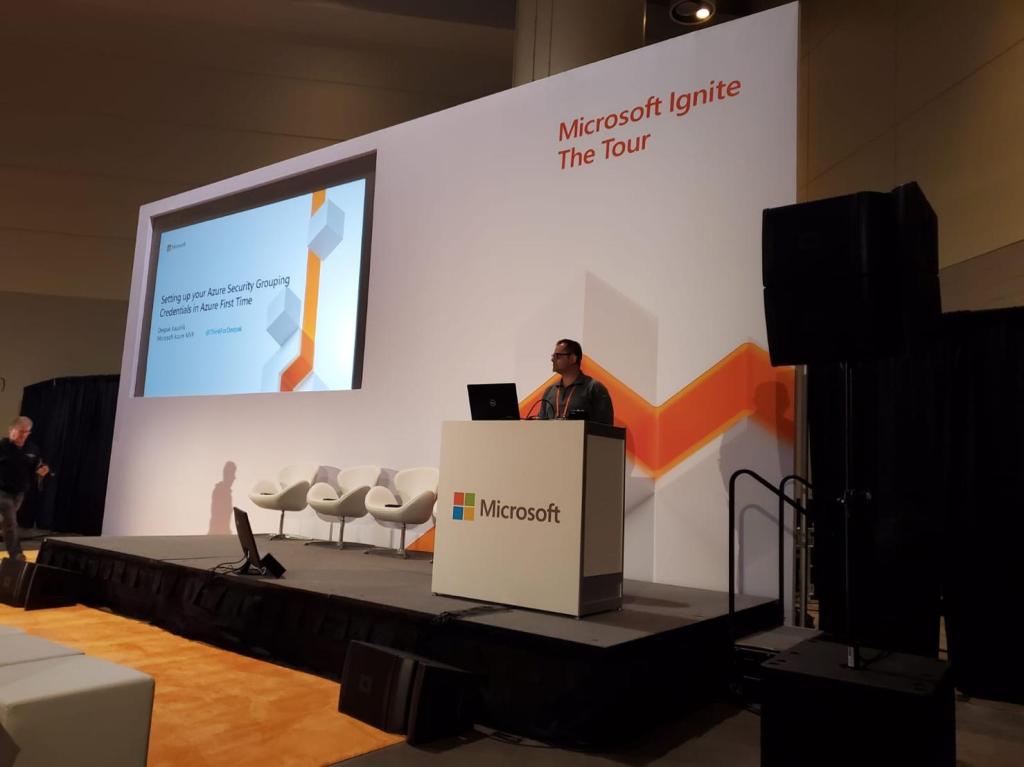
I

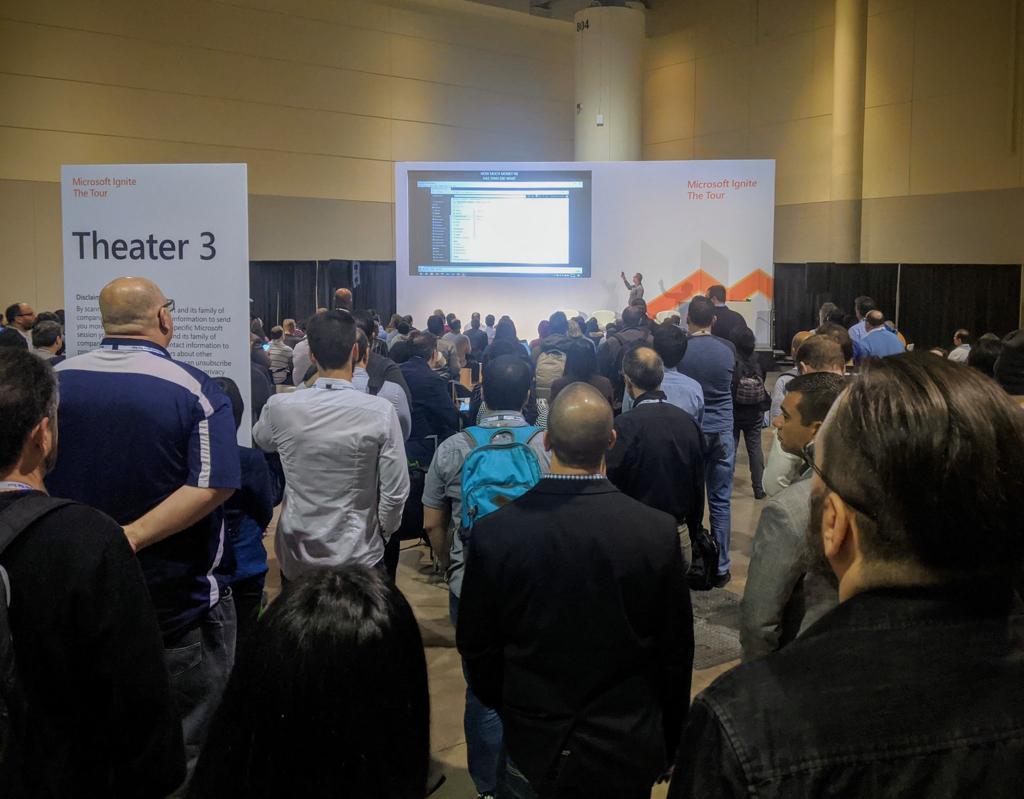
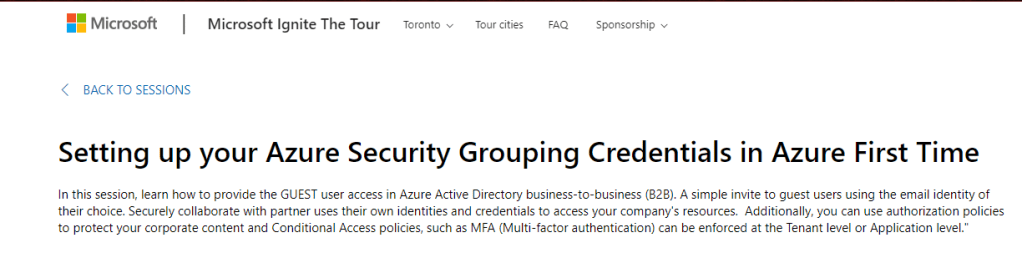
I’m so happy to delivered my TALK on #AZURE #SECURITY at Microsoft Ignite The Tour #TORONTO -Day 1 (Jan 8th, 2020) Great Turnout with more than 250+ attendees, and even many didn’t get the seats!! THANKS for great feedback and lovely tweets 👍, much appreciated!! ☁️

https://toronto.myignitetour.techcommunity.microsoft.com/sessions/90797?source=sessions

Azure Governance Foundation You ought to know

Introduction

Azure Governance provides mechanisms and processes to maintain control over your applications and resources in Azure. Azure customers get the most advanced set of governance capabilities. It involves planning your initiatives and setting strategic priorities.  There should be a balance between “Agility” to the team and “Governance” to ensure team can work with best practices without compromising security and overhead cost.

Governance in Azure is primarily implemented with two services.

Azure Policy allows you to create, assign, and manage policy definitions to enforce rules for your resources. Stay compliant with internal and external regulations by configuring your templates using policies, access controls, resources, and then deploying them. This feature keeps those resources in compliance with your corporate standards.

Azure Cost Management allows you to track cloud usage and expenditures for your Azure resources and other cloud providers. Customers can ensure compliance at no additional cost, save significant amount of $ expenditures by proper resource management. Example drop unused resources, enable services like ‘Azure SQL Datawarehouse (ASDWH)’ ONLY when required. A lot of extra cost could be saved by automation of resources and correct storage decision.

Prerequisite

  1. Azure Subscription
  2. Basic Azure knowledge
  3. Administrator Access
  4. PowerShell (Good to have)

Five Disciplines of Cloud Governance

Let’s start cloud journey and a journey without a target destination is just wandering. It’s important to establish a rough vision of the end state before taking the first step. It’s not company starting point, but it shows potential destination.

Corporate policies: Corporate policies drive cloud governance. The governance guide focuses on specific aspects of corporate policy:

  • Business risks: Identifying and understanding corporate risks.
  • Policy and compliance: Converting risks into policy statements that support any compliance requirements.
  • Processes: Ensuring adherence to the stated policies.

Five Disciplines of Cloud Governance: These disciplines support the corporate policies. Each discipline protects the company from potential pitfalls:

  • Cost Management
  • Security Baseline
  • Resource Consistency
  • Identity Baseline
  • Deployment Acceleration

Essentially, corporate policies serve as the early warning system to detect potential problems. The disciplines help the company manage risks.

The following infographic provides a frame of reference for the end state.

Governance basics

Following are the key components of the Governance for an Enterprise:

  • Scope & Hierarchy
  • RBAC
  • Policy
  • Azure Resource Manager Templates

Scope & Hierarchy

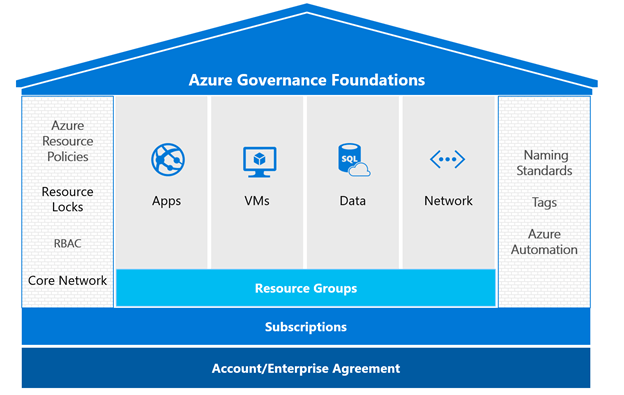
Resource group stay in a subscription; a subscription is container for the logically similar resources.  Management group is additional level of hierarchy which help to administer subscriptions. 

As per business need Management group hierarchy up to Six level (deep) can be created.

Role-based access control

Access management for resources is a critical function for any organization. Role-based access control (RBAC) helps you to manage who has access to Azure resources, what they can do with those resources, and what areas they have access to.

Following actions with RBAC:

• Allow one user to manage VM in a subscription and another user to manage virtual networks

• Allow a DBA group to manage SQL databases in a subscription

• Allow a user to manage all resources in a resource group, such as VM’s, websites, and subnets

• Allow an application to access all resources in a resource group

RBAC Recommended Practice

Using RBAC, you can isolate duties within your team and grant only the amount of access to users that they need to perform their jobs.

Instead of giving everybody open permissions in your Azure subscription or resources, you can allow only certain actions at a particular scope.

When planning your access control strategy, it’s a best practice to grant users the least privilege to get their work done. The following diagram shows a suggested pattern for using RBAC.

Security Principal

A security principal is an object that represents a user, group, service principal, or managed identity that is requesting access to Azure resources.

Security principal for a role assignment

User – An individual who has a profile in Azure Active Directory. You can also assign roles to users in other tenants. For information about users in other organizations, see Azure Active Directory B2B.

Group – A set of users created in Azure Active Directory. When you assign a role to a group, all users within that group have that role.

Service principal – A security identity used by applications or services to access specific Azure resources. You can think of it as a user identity (username and password or certificate) for an application.

Managed identity – An identity in Azure Active Directory that is automatically managed by Azure. You typically use managed identities when developing cloud applications to manage the credentials for authenticating to Azure services.

Azure Built-in Roles

FOUR FUNDAMENTAL built-in roles, please note ‘The first Three’ apply to all resource types:

Owner – Has full access to all resources including the right to delegate access to others.

Contributor – Can create and manage all types of Azure resources but can’t grant access to others.

Reader – Can view existing Azure resources.

User Access Administrator – Lets you manage user access to Azure resources.

Let’s Add some Roles for Enterprise

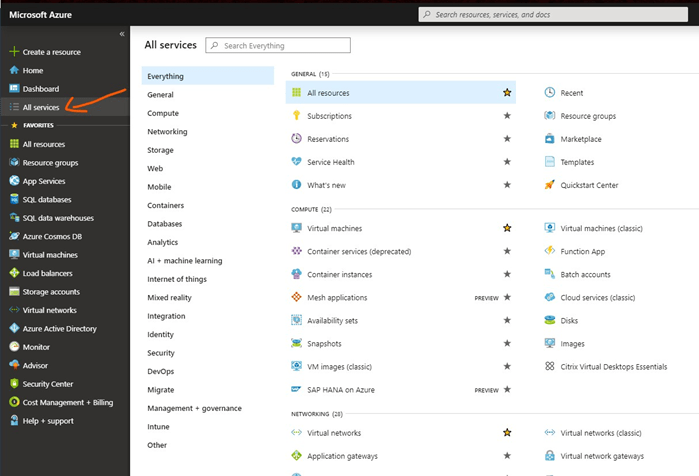
  1. Go to the Portal and click on the All Services
  1. Search Users and Select Users
  • Add ‘New Guest User’, give our Email Address and Hit Invite
  • Invited Guest will get Email notification (Sample Email) and they need to Accept it.


Azure Policy

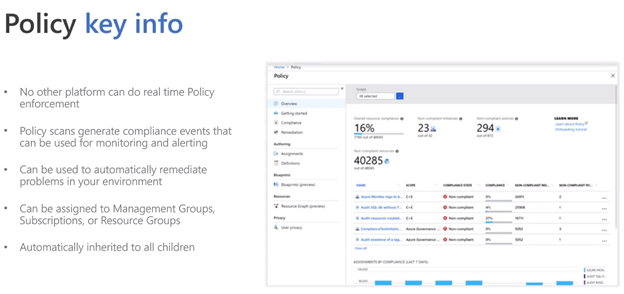
Azure Policy allow us to have Real-time enforcement, compliance assessment and remediation at scale.

Let’s create new Policy

  1. Go to the Portal and type Policy in search window.
  • Click on the Definition under Policy and give details:

Policy best practices

Azure Resource Manager (ARM)

Azure Resource Manager Template defines the resources you need to deploy for your solution.

Please note that Azure Resource Manager Template is a just a simple JSON file.

Governance Strategy

New Compliance Product: Welcome Azure Blueprints (PREVIEW)

Blueprints enable quick creation of governed subscriptions. This allows Cloud Architects to design environments that comply with organizational standards and best practices – enabling your app teams to get to production faster.

Let’s Create Azure Blueprint for Enterprise 

The first step in defining a standard pattern for compliance is to compose a blueprint from the available resources. Here we will create a new blueprint to configure role and policy assignments for the subscription. Then we will add a new resource group, and create a Resource Manager template and role assignment on the new resource group.

  • Select All services in the left pane. Search for and select Blueprints. We can create a blank Blueprint or sample Blueprint
  • Select Blueprint definitions from the page on the left and select the + Create blueprint button at the top of the page.

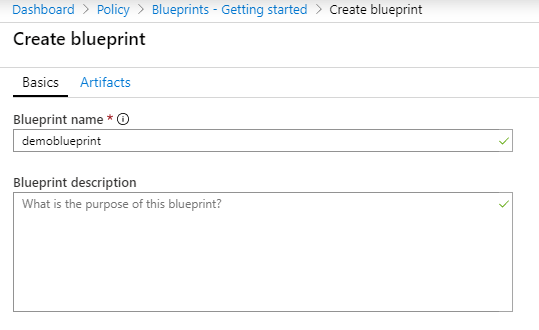
Provide a Blueprint name such as DemoBlueprint. (Use up to 48 letters and numbers, but no spaces or special characters). Leave Blueprint description blank for now.

In the Definition location box, select the ellipsis on the right, select the management group or subscription where you want to save the blueprint, and choose Select.

  • Add a role assignment at the subscription level
  • Select the + Add artifact row under Subscription. The Add artifact window opens on the right side of the browser.
  • Select Role assignment for Artifact type.
  • Under Role, select Contributor. Leave the Add user, app or group box with the check box that indicates a dynamic parameter.
  • Select Add to add this artifact to the blueprint.

Once you completed blueprint should look similar to the following.

Publish a blueprint

Now that all the planned artifacts have been added to the blueprint, it’s time to publish it. Publishing makes the blueprint available to be assigned to a subscription.

  • Select Blueprint definitions from the page on the left.
  • In the list of blueprints, right-click the one you previously created and select Publish blueprint.
  • In the pane that opens, provide a Version (letters, numbers, and hyphens with a maximum length of 20 characters), such as v1. Optionally, enter text in Change notes, such as First publish.
  • Select Publish at the bottom of the page.

Select Publish at the bottom of the page.

Azure Cost Management

Cost Management help enterprise with

  • Analyze cloud costs
  • Monitor with budgets
  • Optimize with recommendations

Enterprise can easily understand Azure costs with

  • Cost Analysis
  • Cost alerts
  • Budgets
  • Advisor Recommendation
  • Cloudyn

Conclusion

Bearing these factors in mind, it is important to consider how this applies to your organization. Any governance model will need to reflect the company’s strategic, compliance, and budgetary goals and requirements. One of first steps should be to model the organization’s hierarchy to map out the pattern for departments, accounts and subscriptions you will use in the Enterprise Portal.

Once you have taken billing and administrative factors into account to devise a subscription strategy, then the next step is to develop a centralized approach. The centralized approach makes it easier to build and maintain hybrid network connectivity, protect data sovereignty, and enforce compliance requirements within the environment.

References

https://docs.microsoft.com/en-us/azure/governance/azure-management

https://docs.microsoft.com/en-us/azure/cloud-adoption-framework/govern/index

https://docs.microsoft.com/en-us/azure/cloud-adoption-framework/govern/guides/standard/

IoT Coast 2 Coast Webinar: Be #IoT #Security Ninja- Protect & Processed #IoT #Solutions using Device to Cloud Messaging

Webinar: Be #IoT #Security Ninja- Protect & Processed #IoT #Solutions using Device to Cloud Messaging

Saturday, November 23, 2019

9:00 AM – 10:00 AM (1 hours)

Online Microsoft Teams Meeting

Session Details:

  • Secure Your Business with Azure Security #Better #Everyday
  • Understand the value of the Microsoft Azure IoT Hub and other Azure services for IoT solutions
  • Build an end-to-end IoT solution that processes and analyzes data both in the field and in the cloud.
  • Questions & Answers
  • Ask Me Anything

Speakers:

Deepak Kaushik [Microsoft MVP]

Deepak is a Microsoft Azure MVP and C# corner MVP. He is currently working on architecting and building solutions around Microsoft Azure. He is passionate about technology and comes from a development background. He has also led various projects in the Infrastructure as a Service (IaaS) and Platform as a Service (PaaS). 

Nik  Shahriar [C# Corner MVP]


Azure IoT Hub Consultant, Snr Data Engineer, Snr Azure Data Integration Lead/Design, Snr BI Consultant , Snr Technical Team Lead, Snr Data Architect, Azure Stream Analytics,Azure IoT Edge, Azure Logic App, Azure Data Factory, C#MVP

 ________________________________________________________________________________

Join Microsoft Teams Meeting

Link: https://teams.microsoft.com/l/meetup-join/19%3ameeting_YjgyMDkwYjItNDMyOS00YzA2LThhNTQtMTQ5Mjg5ZmVlZWMy%40thread.v2/0?context=%7b%22Tid%22%3a%2258ec5f12-8c9c-4b91-b548-3a4526550560%22%2c%22Oid%22%3a%221ae56dba-cf66-4777-aeff-cc4abbc451a0%22%7d

Learn more about Teams | Meeting options

Register here:

https://www.eventbrite.com/e/be-iot-security-ninja-protect-processed-iot-solutions-using-device-t-tickets-82682673101?ref=estw

Let’s Build Azure Security Foundation for your Enterprise

Introduction

Let’s strengthen your security with Azure As you might know that cloud security covers every assets like Azure Resources, Networking, Data Protection (structured & unstructured), Active directory and much more. Let’s see how new Azure innovations, couple of them announced on Nov 4th , 2019 at the Microsoft Ignite Conference able to help us across security, compliance, and identity needs.

Prerequisite

  1. Azure Subscription
  2. Basic Azure knowledge
  3. Administrator Access
  4. PowerShell (Good to have)

Moving to the cloud

As organizations considering and evaluating public cloud services like Azure, AWS etc., it is essential to explore how cloud service models will affect cost, security, compliance, ease of use and privacy. It is equally important that customers understand that how security and compliance are managed by the cloud solution provider, in this case Microsoft enable a safe computing solution.

Many organizations that consider public cloud computing like Azure mistakenly assume that after moving to the cloud their role in securing their data shifts most security and compliance responsibilities to the Microsoft- THIS IS NOT TRUE.

Please don’t assume your resources are automatically protected, while Azure does ensure a secure infrastructure, you are responsible for ensuring protection of your data – not Microsoft.

Azure by design should provide security for certain elements, such as the physical infrastructure and network elements, but customers must be aware of their own responsibilities. MICROSOFT may provide services to help protect data, but customers must also understand their role in protecting the security and privacy of their data. The best illustration of this issue involves the poor implementation of a password policy; a CSP’s best security measures will be defeated if users fail to use complex or difficult-to-guess passwords.

It’s all detailed in Microsoft’s Shared Responsibility Security Model. Understanding where the Shared Responsibility model starts and stops is critical to ensuring your data is secure and compliant. 

Welcome to Share Responsibility Security Model

Great News – Azure infrastructure adhered with many regulatory compliances like Azure CIS 1.1.0, PCI DSS 3.2.1, ISO 27001, SOC TSP providing 24×7 continuity from inside geographically dispersed datacenters.

In compliance with these standards, Microsoft provides security for physical assets, databases, monitoring and operations network infrastructure and availability. Within Azure, Microsoft assumes responsibility for general datacenter components such as compute hosts, datacenter assets, and the networks that connect them. Customers continue to be solely responsible for their user accounts, system endpoints, permissions/access controls and most importantly their data.

Customer data availability and integrity comes with the package when leveraging cloud, however retention, compliance, and rights management are the responsibility of the customer. Microsoft provides many features and tools (discussed below) to help with these challenges, but it is up to the customer to architect and implement the necessary policies and controls for their data.

A layered approach to security

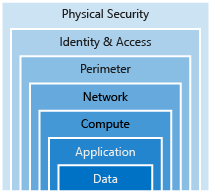
Azure Security Defense is a strategy that employs a series of mechanisms to slow the advance of an attack aimed at acquiring unauthorized access to information. Each layer provides protection so that if one layer is breached, a subsequent layer is already in place to prevent further exposure.

Microsoft applies a layered approach to security, both in physical data centers and across Azure services. The objective of defense in depth is to protect and prevent information from being stolen by individuals who are not authorized to access it, Let’s take a look at each of the layers.

Data

Hackers LOVE data, it’s so precious for everyone. Below are Data storage options:

  • Stored in a database
  • Stored on disk inside virtual machines
  • Stored on a SaaS application such as Office 365
  • Stored in cloud storage

Secure the data can be ensured by controlling access to data only to group of people who need it. Later part of this document we will see step to secure the Data.

Application

Integrating security into the application development life cycle will help reduce the number of vulnerabilities introduced in code.

  • Ensure applications are secure and free of vulnerabilities.
  • Need to store sensitive application secrets in a secure storage medium like Key Vault .
  • Make security a design requirement for all application development.

Compute

  • Secure access to virtual machines.
  • Implement endpoint protection and keep systems patched and current.

Malware, unpatched systems, and improperly secured systems open your environment to attacks. The focus in this layer is on making sure your compute resources are secure, and use the proper controls in place to minimize security issues.

Networking

  • Limit communication between resources.
  • Deny by default.
  • Restrict inbound internet access and limit outbound, where appropriate.
  • Implement secure connectivity to on-premises networks.

At this layer, the focus is on limiting the network connectivity across all your resources to allow only what is required. By limiting this communication, you reduce the risk of lateral movement throughout your network.

Perimeter

  • Use distributed denial of service (DDoS) protection to filter large-scale attacks before they can cause a denial of service for end users.
  • Use perimeter firewalls to identify and alert on malicious attacks against your network.

At the network perimeter, it’s about protecting from network-based attacks against your resources. Identifying these attacks, eliminating their impact, and alerting you when they happen are important ways to keep your network secure.

Identity and access

  • Control access to infrastructure and change control.
  • Use single sign-on and multi-factor authentication.
  • Audit events and changes.

The identity and access layer is all about ensuring identities are secure, access granted is only what is needed, and changes are logged.

Physical security

  • Physical building security and controlling access to computing hardware within the data center is the first line of defense.

With physical security, the intent is to provide physical safeguards against access to assets. This ensures that other layers can’t be bypassed, and loss or theft is handled appropriately.

1.    Azure Sentinel

Microsoft launch new product & services on Nov 4th, 2019 like “Azure Sentinel”.  Azure Sentinel is available to help security analysts, collect data from a variety of sources, including Zscaler, Barracuda, and Citrix. In addition, Microsoft also releasing new hunting queries and machine learning-based detections to assist analysts in prioritizing the most important events.

2.    Azure Security Center

Azure Security Center is a unified infrastructure security management system that strengthens the security posture of your data centers and provides advanced threat protection & remediation suggestions across your workloads in the cloud.

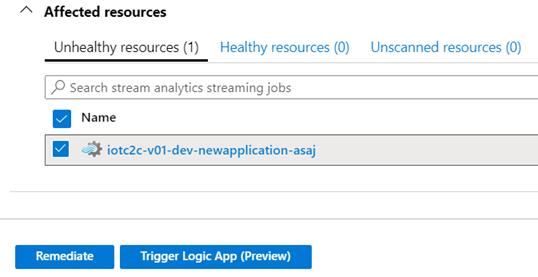
Here we can see total 8 recommendations from 5 unhealthy resources.

Let’s see ‘Compute & apps resources’ recommendation

Compute recommendation ‘Diagnostic logs in Azure Stream Analytics should be enabled’, Secure Score, Failed Resources and Severity details will be found.

More Details about threats like Data exfiltration and threat resistance and Information can be find by clicking the Description.

Now it’s the time to re-mediate it, so scroll down and let’s fix the remediation.

Fix the issue:

For Manual remediation, follow the steps as mentioned above, alternatively scroll down and select the ‘Unhealthy Resource’ and click Remediate

By Clicking Remediate 1 resource, you have mitigated Security vulnerability.

This is most secure and visualize platform.  Azure ensure best Cloud security and rich tool-sets.  

Need Cloud Security Solution for your Enterprise, please Contact me-Happy to help!!

Image Credit: Google

20 Must follow #Microsoft #Azure #influencers on Twitter

I am so grateful and incredibly humbled to acknowledge as ‘ 20 Must follow #Microsoft #Azure #influencers on Twitter ‘.

My deepest gratitude to all committed & working for #technologies . I always enjoying doodling with the Technologies and helping clients with Azure, IoT and other offering.

Please refer below:

https://www.nigelfrank.com/blog/top-20-microsoft-azure-influencers-on-twitter/

Source: https://www.nigelfrank.com/blog/top-20-microsoft-azure-influencers-on-twitter/