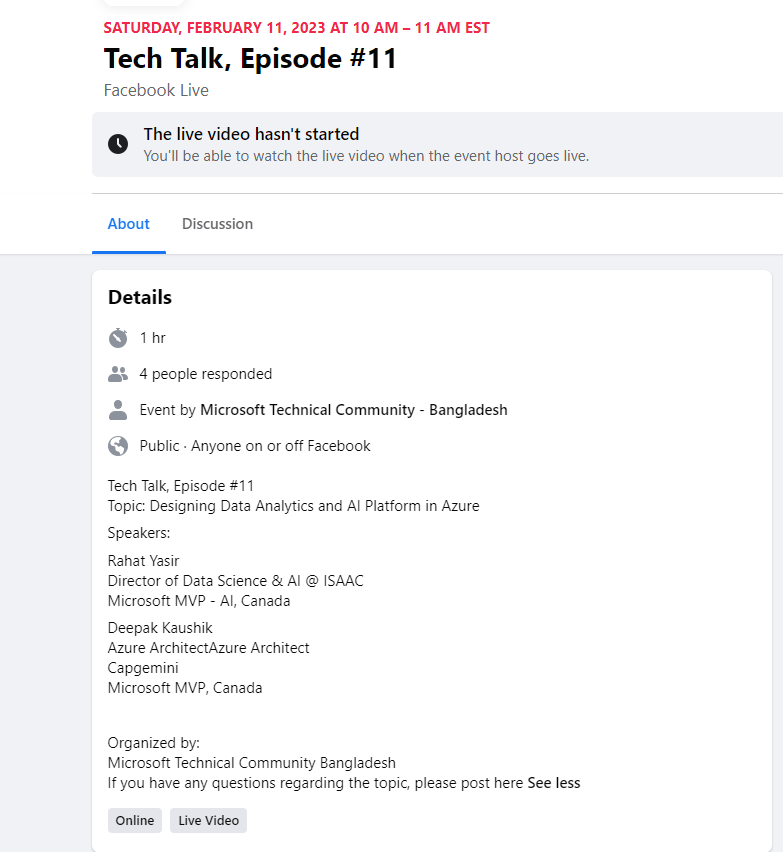
SATURDAY, FEBRUARY 11, 2023 AT 10 AM – 11 AM EST
Tech Talk, Episode #11
Facebook Live
https://www.facebook.com/events/950324909465661



SATURDAY, FEBRUARY 11, 2023 AT 10 AM – 11 AM EST
Facebook Live
https://www.facebook.com/events/950324909465661
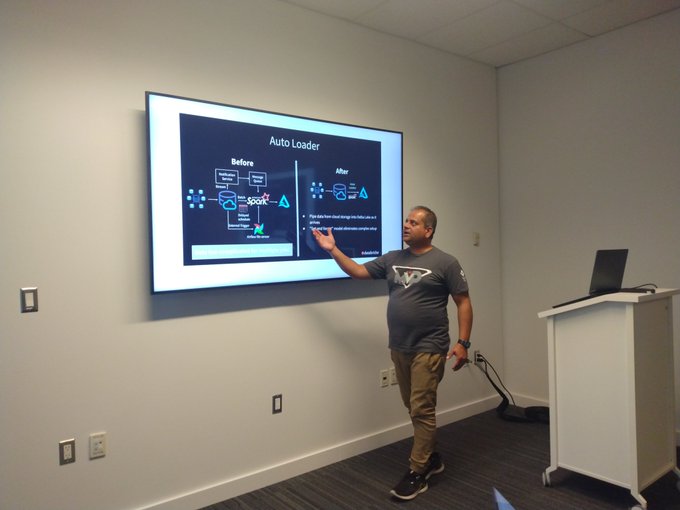
Excited to present “Lakehouse Architecture and Realtime Enterprises Challenges” session at Windsor Hackforge. I will talk about cloud data platform, streaming data, best practices that can make Enterprise successful.
THURSDAY, FEBRUARY 9, 2023 AT 6 PM – 7 PM
Thank you Hackforge!!
https://www.facebook.com/events/1239423089988722
#azure#streamingdata#streamprocessing
#data#ai#azure#mvpbuzz#CdnMVP#AIDevWorld#aidevelopment#IIOT#conference2023#cloud#streaming


Understand Azure Lakehouse Architecture with Deepak Kaushik ☁️ MVP. 👨🏫
Register: https://lnkd.in/gyNZphiV
A lakehouse is the flexibility and cost-efficiency of a data lake with the contextual and high-speed querying capabilities of a data warehouse.
This enables enterprises to use the single-repository model of data warehouses for unified storage without sacrificing the analytical flexibility of data lakes, allowing data lakehouses to excel at both analytical and machine learning workloads.
Agenda
👉 Concept
👉 Why do we need it
👉 Demo
👉 Q/A
Date 📅 : 10th Feb 2023
Time ⏲ : 08:00 am: BGD | 09:00 am: VNM, IDN, THA | 10:00 am: PHL, MYS, SGP
Pradeep ParappilAnnie MathewShubhangi Gupta
#lakehouse#analytics#machinelearning#data#azure#styavadev

Register here:

Azure is a powerful cloud computing platform that offers a wide range of services to meet various business needs. Two popular services within Azure are Azure App Services and Azure Virtual Machines. Both services provide different solutions for different business needs, and in this article, we will discuss their key features and provide some real-world scenarios where they can be used.
Azure App Services
Azure App Services is a fully managed platform for building and hosting web applications and APIs. It provides an easy-to-use interface for deploying and managing web applications, with features such as automatic scaling, continuous deployment, and built-in monitoring and diagnostics.
Real-World Scenarios:
Azure Virtual Machines
Azure Virtual Machines provide a scalable and flexible solution for businesses to run their applications and workloads on the cloud. It enables businesses to create and manage virtual machines in the cloud, allowing for flexibility in choosing the operating system, language, and software that they require.
Real-World Scenarios:
Conclusion
Azure App Services and Azure Virtual Machines are two popular services within Azure that provide different solutions for different business needs. Azure App Services provide an easy-to-use platform for hosting web applications and APIs, while Azure Virtual Machines provide a flexible solution for running applications and workloads on the cloud. By understanding the features and capabilities of these services, businesses can choose the best solution for their specific needs and benefit from the scalability, flexibility, and cost-effectiveness of the Azure platform.
Problem statement
To create a Data Warehouse (DW) and Data Mart (DM) for multiple categories of market prices, to support queries of multiple pricing information from source data location(Oracle). Overall, this data is needed for different departments of the business to analyze the data wrt pricing information.
Difficulty that business is facing with current available solution
The data from the source location is not easily extracted and difficult for the business to report on as the tools are not user-friendly or inefficient to gather data when multiple curves as required for the business. The present data source is not designed to pull large amounts of data for analytical purposes and the business is currently pulling the data from source manually.
Which solution does the business looking for overcoming present difficulties
Looking for a cloud solution that will implement a self-serve model/process for accessing the complete data, that is simple to use, provides flexibility in gathering large amounts of data with best performance.
Proposed Architectures to the business
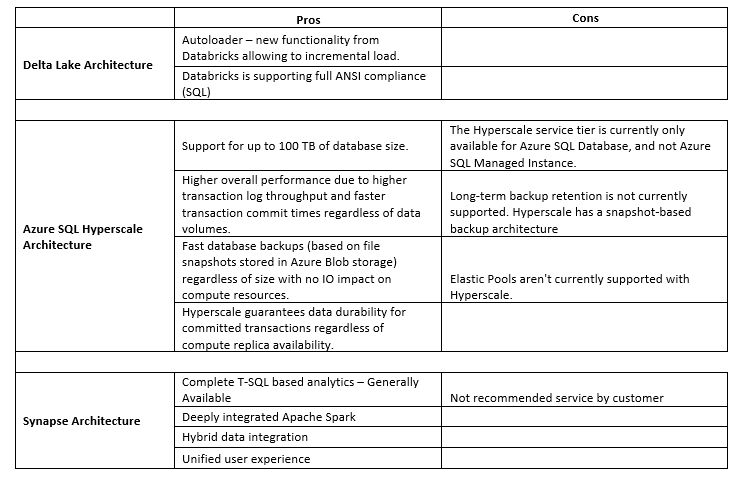
Approved Architecture and proposed solution
Delta Lake provides ACID transactions, scalable metadata handling, and unifies streaming and batch data processing. Access/revert to earlier versions of data for audits, rollbacks, or reproduce through Time travel and DML Operations such as SQL, Scala/Java and Python APIs to merge, update and delete datasets can be performed.
Azure Databricks is an Apache Spark-based analytics platform optimized for the Microsoft Azure cloud services platform. Industry leading Spark (Databricks Runtime) built on a highly optimized version of Apache Spark offering 50x performance.
Because of these salient features Delta Lake Architecture is chosen for the business.
The logical architecture reflects data movement from source systems, transformation through the data platform and load the data in Delta Lake for future reports or Dashboards.

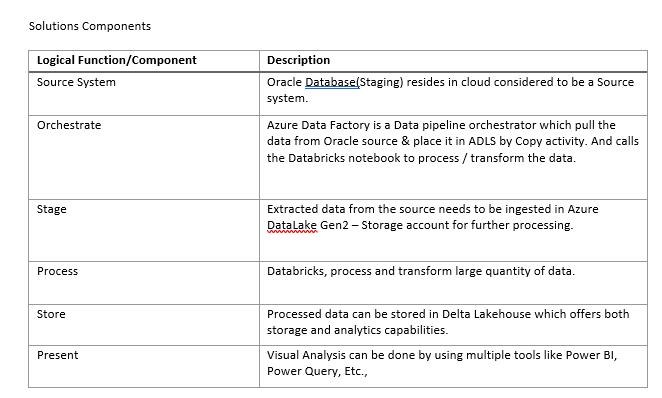
How did we achieved the required solution for the business using approved architecture
Integrating the Oracle System of the business providing the 5 day rolling data to Azure Global container where all the historic and incremental data to be transformed.

This data is transformed using Databricks notebooks by creating staging layers such as Bronze which holds the raw data from Global container then after applying user defined transformation into gold layer. These final delta tables are used for analysis purposes.
In this article, we will be discussing Azure IoT Streaming Data and how you can process it using Kusto Query Language (KQL).
Azure IoT Hub is a cloud-based platform that allows you to connect, monitor, and manage IoT devices. With Azure IoT Hub, you can collect streaming data from your devices and process it in real-time using Azure Stream Analytics. Azure Stream Analytics is a fully managed service that allows you to process and analyze data in real-time using a simple SQL-like language called Kusto Query Language (KQL).
Here’s how you can use Azure IoT Hub and Azure Stream Analytics to process IoT streaming data using KQL:
Step 1: Create an Azure IoT Hub
The first step is to create an Azure IoT Hub. You can create an IoT Hub using the Azure portal or the Azure CLI. Once you have created an IoT Hub, you can register your IoT devices with the hub.
Step 2: Create an Azure Stream Analytics job
The next step is to create an Azure Stream Analytics job. You can create a Stream Analytics job using the Azure portal. When creating the job, you need to specify the input and output sources for the job.
Step 3: Configure the input source
The input source for the Stream Analytics job should be the IoT Hub that you created in Step 1. You can configure the input source by specifying the IoT Hub as the input source for the Stream Analytics job. Once you have configured the input source, you need to specify the format of the data that is being streamed from the IoT devices. The format of the data can be JSON or CSV.
Step 4: Configure the output source
The output source for the Stream Analytics job can be an Azure Blob storage, Azure Table storage, or an Azure SQL database. You can configure the output source by specifying the output source for the Stream Analytics job.
Step 5: Write KQL queries
Once you have configured the input and output sources for the Stream Analytics job, you can write KQL queries to process the data that is being streamed from the IoT devices. KQL is a simple SQL-like language that allows you to query and process data in real-time. Here are some examples of KQL queries that you can use to process IoT streaming data:
Step 6: Monitor the Stream Analytics job
Once you have written the KQL queries, you can monitor the Stream Analytics job to ensure that it is processing the IoT streaming data as expected. You can monitor the job using the Azure portal or the Azure CLI.
Conclusion
In this article, we discussed Azure IoT Streaming Data and how you can process it using Kusto Query Language (KQL). We covered the steps to create an Azure IoT Hub, create an Azure Stream Analytics job, configure the input and output sources, write KQL queries, and monitor the Stream Analytics job. By following these steps, you can process and analyze IoT streaming data in real-time using Azure Stream Analytics and KQL. For more information on Azure IoT and Stream Analytics, check out the Azure IoT Hub documentation and the Azure Stream Analytics documentation.
Migrating to Azure can be a daunting task, but with careful planning and execution, it can be a smooth and successful process. Azure provides many tools and services that can help businesses move their workloads to the cloud quickly and efficiently. In this article, we will outline a step-by-step guide on how to do a successful migration on Azure.
Step 1: Assess Your Current Environment
The first step in the migration process is to assess your current environment. You need to understand your existing infrastructure, applications, and data to identify what can be moved to Azure and what cannot. This includes evaluating your hardware, software, and network infrastructure.
There are many tools available to help you with this process, such as the Azure Migrate service. This service provides an assessment of your existing environment and identifies any potential issues that may arise during the migration process.
Step 2: Plan Your Migration Strategy
Once you have assessed your current environment, the next step is to plan your migration strategy. This involves identifying which applications and workloads will be migrated, how they will be migrated, and the timeline for the migration.
There are several migration strategies to choose from, including rehosting, refactoring, rearchitecting, and rebuilding. The strategy you choose will depend on your business needs and the complexity of your existing environment.
Step 3: Create Your Azure Environment
The next step is to create your Azure environment. This involves setting up your virtual network, creating your Azure resources, and configuring your security settings.
Azure provides many tools to help you with this process, such as the Azure Resource Manager, which enables you to manage your resources and automate the deployment of your infrastructure.
Step 4: Migrate Your Data and Applications
Once your Azure environment is set up, the next step is to migrate your data and applications. There are several ways to do this, such as using Azure Site Recovery, Azure Database Migration Service, or manually migrating your applications.
It is important to test your applications and data after migration to ensure they are working as expected. You can use Azure Monitor to monitor the performance of your applications and troubleshoot any issues that may arise.
Step 5: Optimize and Manage Your Azure Environment
The final step in the migration process is to optimize and manage your Azure environment. This involves monitoring your environment, identifying any potential issues, and optimizing your resources to ensure they are being used efficiently.
Azure provides many tools to help you with this process, such as Azure Advisor, which provides recommendations on how to optimize your resources and reduce costs.
Conclusion
Migrating to Azure can be a complex process, but with careful planning and execution, it can be a smooth and successful process. By following the steps outlined above, you can ensure a successful migration to Azure and take advantage of the many benefits that cloud computing provides, such as scalability, flexibility, and cost savings.
In this blogpost, we will be discussing Azure Security and why it’s an important step for your organization. We will also cover the steps to secure your Azure environment.
What is Azure Security?
Azure Security is a set of practices and technologies designed to protect your organization’s data and applications hosted in the cloud. Azure Security is crucial for organizations because it helps to prevent security breaches and data leaks, ensuring that your organization’s data is safe from unauthorized access, data corruption, and data loss.
Why is Azure Security important?
Azure Security is important for several reasons:
Steps to secure your Azure environment:
The first step in securing your Azure environment is to create a secure environment. You can create a secure Azure environment by following the best practices recommended by Azure. These practices include:
Once you have created a secure Azure environment, the next step is to secure your Azure resources. You can secure your Azure resources by:
The third step in securing your Azure environment is to secure your applications. You can secure your applications by:
The final step in securing your Azure environment is to monitor your environment for security threats. You can monitor your Azure environment by:
Conclusion
In this article, we discussed Azure Security and why it’s an important step for your organization. We covered the steps to secure your Azure environment, which include creating a secure Azure environment, securing your Azure resources, securing your applications, and monitoring your Azure environment. By following these steps, you can help to ensure that your organization’s data is safe and secure in the cloud. For more information on Azure Security, check out the Azure Security Center documentation and the Azure Security Best Practices guide.
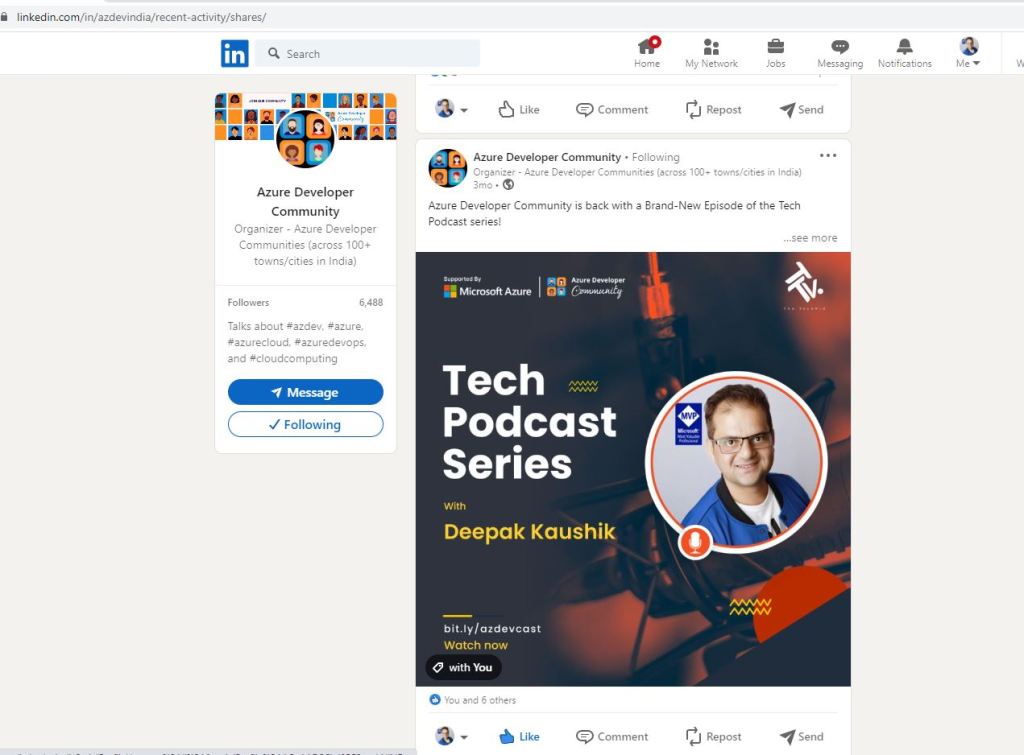
Azure Developer Community is back with a Brand-New Episode of the Tech Podcast series!
Check out Deepak Kaushik ☁️ MVP, Azure Architect at Capgemini, and 5X Microsoft Azure MVP and MCT. He has been contributing to the Azure Community for years. He is also an International speaker. In this podcast, he shared his contributions to the community and how important it is to him.
📺Watch now: https://bit.ly/azdevcast
#microsoft#techpodcastseries#MVP#azure#community
On Aug 18, I was speaking on #Microsoft365Dev at #Microsoft Reactor #Toronto#M365Dev @MSFTReactor for hosting us cc