Author Archives: Deepak Kaaushik

Unknown's avatar

About Deepak Kaaushik

I am a Sr. Consultant at Saskatoon/Canada and Microsoft MVP. I am a passionate Microsoft Certified Professional Developer (MCPD) /Technology strategist, Technical author & Software Architect (TOGAF 9.1 Certified) with hands on experience in Software design & development, Agile practices and Continuous Delivery. Since 2008, I am exchanging knowledge with the technical fraternity via different online forums and personal blogs. I LOVE to share my knowledge with community.

Streamlining Business Processes with Azure Integration and Messaging

In today’s dynamic business landscape, the ability to integrate disparate systems and communicate seamlessly across various platforms is crucial for maintaining competitiveness and driving innovation. Azure Integration and Messaging services offer a robust platform for businesses to connect applications, data, and services both within the organization and with external partners. In this blog post, we’ll explore the significance of Azure Integration and Messaging with real-world examples, along with a sample diagram illustrating its architecture and a practical application scenario.

The Importance of Azure Integration and Messaging

Azure Integration and Messaging services provide a comprehensive suite of tools and services to facilitate communication and integration between different applications, services, and systems. Whether it’s connecting legacy on-premises systems with cloud-based applications, enabling real-time data exchange between various endpoints, or orchestrating complex business processes, Azure offers a range of solutions to meet diverse integration needs.

Real-World Example: E-commerce Order Processing

Let’s consider an example of an e-commerce company that relies on multiple systems and services to manage its operations, including order processing, inventory management, and customer relationship management (CRM). Efficient communication and integration between these systems are essential for delivering a seamless experience to customers and ensuring smooth business operations.

Architecture Diagram:

Azure Integration Architecture Diagram

In the above diagram, we illustrate a simplified architecture leveraging Azure Integration and Messaging services for e-commerce order processing:

  1. Order Placement: When a customer places an order through the e-commerce website, the order details are captured and sent to Azure Service Bus Queue for processing.
  2. Order Processing: Azure Logic Apps, a serverless workflow automation platform, monitors the Service Bus Queue for new orders. Upon receiving an order, Logic Apps triggers a series of actions, including inventory verification, payment processing, and order fulfillment.
  3. Inventory Management: Azure Functions are used to interact with the inventory management system, updating inventory levels in real-time based on the processed orders.
  4. Payment Processing: Payment information is securely transmitted to the payment gateway using Azure API Management, ensuring compliance with industry standards and regulations.
  5. Order Fulfillment: Once payment is confirmed and inventory is available, Azure Logic Apps triggers the fulfillment process, which may involve generating shipping labels, updating order status, and sending notifications to customers.
  6. CRM Integration: Completed orders are synchronized with the CRM system using Azure Event Grid, enabling customer service representatives to access up-to-date order information and provide timely support to customers.

Conclusion

Azure Integration and Messaging services play a vital role in enabling seamless communication and integration across diverse systems and services, empowering businesses to streamline operations, enhance customer experiences, and drive digital transformation. By leveraging Azure’s robust platform and comprehensive set of tools, organizations can overcome integration challenges and unlock new opportunities for innovation and growth.

Incorporating Azure Integration and Messaging into your business processes can yield significant benefits, from increased efficiency and agility to improved customer satisfaction and competitive advantage. Whether you’re a small startup or a large enterprise, Azure provides the scalability, reliability, and flexibility needed to meet your integration needs and adapt to changing business requirements.

If you’re interested in exploring how Azure Integration and Messaging can transform your business, feel free to reach out to our team for personalized guidance and support. Together, we can embark on a journey to unlock the full potential of your digital ecosystem and drive success in the digital age.

Azure Dev Series: Monitoring and Troubleshooting Azure Applications

*image sourced from Google

As applications become increasingly complex and distributed, effective monitoring and troubleshooting are essential for ensuring optimal performance, availability, and user experience. Azure provides a comprehensive suite of monitoring and diagnostics tools that enable developers and IT professionals to gain insights into their applications, proactively detect and resolve issues, and optimize resource utilization.

Azure Monitor: Azure Monitor is a centralized monitoring service that collects and analyzes telemetry data from various Azure resources, applications, and on-premises environments. Key features of Azure Monitor include:

  1. Application Insights: Gain deep insights into the performance, availability, and usage of your web and mobile applications by integrating Application Insights into your development lifecycle.
  2. Log Analytics: Collect, analyze, and query log data from various sources, including Azure resources, on-premises systems, and third-party services, enabling advanced log analytics and troubleshooting.
  3. Metrics and Alerts: Monitor and visualize performance metrics for your Azure resources, and configure alerts to proactively notify you of potential issues or violations of predefined thresholds.
  4. Workbooks: Create interactive and customizable reports and dashboards using Azure Monitor Workbooks, combining data from multiple sources for comprehensive monitoring and analysis.

Azure Service Health: Azure Service Health is a suite of services that provides personalized guidance and support for monitoring the health and availability of Azure services and resources.

*image sourced from Google

  1. Azure Status: Stay informed about the current and historical health status of Azure services, planned maintenance activities, and service advisories.
  2. Service Health: Get personalized notifications and guidance when Azure service issues or planned maintenance activities might affect your resources.
  3. Resource Health: Identify and troubleshoot issues affecting specific Azure resources within your subscriptions.

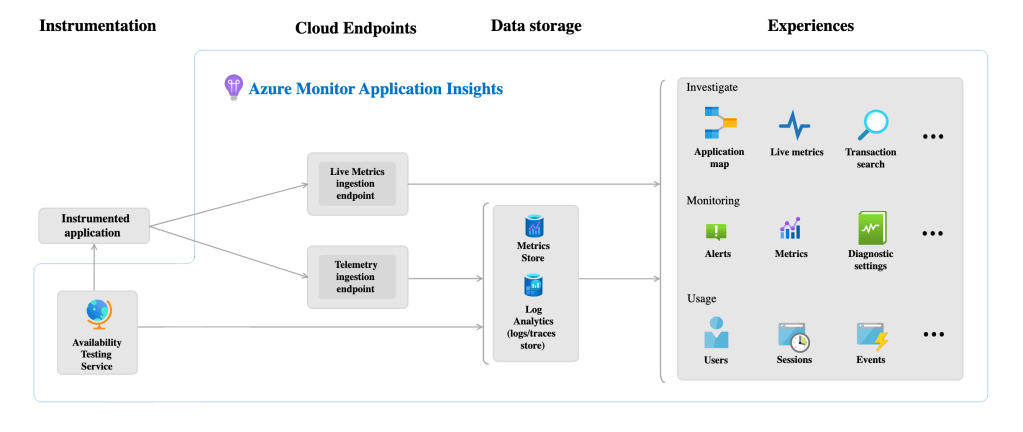
Application Insights: Application Insights is a comprehensive application performance monitoring (APM) solution that enables you to monitor the availability, performance, and usage of your applications, regardless of their hosting environment (Azure, on-premises, or hybrid).

*image sourced from Google

Key features include:

  1. Distributed Tracing: Gain end-to-end visibility into distributed applications by tracing requests across multiple components and services.
  2. Live Metrics: Monitor real-time performance metrics, such as response times, failure rates, and resource utilization, enabling proactive issue detection and resolution.
  3. Usage Analysis: Understand user behavior and application usage patterns through detailed analytics and visualization tools.
  4. Failure Diagnostics: Automatically capture and analyze exceptions, crashes, and other failure data for root cause analysis and remediation.

Azure Monitor for Containers: For containerized applications running on Azure Kubernetes Service (AKS) or other Kubernetes environments, Azure Monitor for Containers provides comprehensive monitoring and troubleshooting capabilities:

  1. Container Insights: Gain visibility into the performance and health of your containerized applications and the underlying Kubernetes infrastructure.
  2. Live Metrics: Monitor real-time metrics for containers, nodes, and control plane components, enabling proactive issue detection and resolution.
  3. Log Analytics: Collect and analyze container logs, events, and Kubernetes resource logs for troubleshooting and auditing purposes.
  4. Workload Health: Visualize the health and resource utilization of your containerized workloads, including replicas, pods, and containers.

Monitoring and Troubleshooting Best Practices: To effectively monitor and troubleshoot your Azure applications, it’s essential to follow best practices and implement a comprehensive monitoring strategy:

  1. Instrument Your Applications: Integrate monitoring instrumentation into your applications from the early stages of development to capture telemetry data and gain insights into application behavior.
  2. Centralize Monitoring: Consolidate monitoring data from various sources (applications, infrastructure, and third-party services) into a centralized platform like Azure Monitor for comprehensive visibility and analysis.
  3. Define Monitoring Metrics: Identify and define the key performance indicators (KPIs) and metrics that are most relevant to your applications and business objectives.
  4. Establish Baselines and Thresholds: Establish baselines for normal application behavior and define appropriate thresholds for alerts and notifications.
  5. Automate Monitoring and Alerting: Leverage automation and configuration management tools to streamline monitoring and alerting processes, ensuring consistent and scalable monitoring across your Azure environment.
  6. Implement Proactive Monitoring: Shift from reactive to proactive monitoring by analyzing historical data, identifying patterns, and predicting potential issues before they occur.
  7. Continuous Improvement: Regularly review and refine your monitoring strategy, incorporating feedback from stakeholders and lessons learned from past incidents.

Throughout this article, we’ve explored the various monitoring and troubleshooting tools and services provided by Azure, highlighting their capabilities in ensuring the performance, availability, and reliability of your applications. In the following articles, we’ll dive deeper into specific monitoring scenarios, advanced troubleshooting techniques, and practical examples of implementing comprehensive monitoring strategies on Azure.

Ensuring Azure Security and Compliance in a Cloud-Native World

In today’s rapidly evolving digital landscape, organizations are increasingly embracing cloud-native architectures to drive innovation, scalability, and agility. Microsoft Azure provides a robust platform for building and deploying cloud-native applications. However, as businesses migrate their workloads to the cloud, ensuring security and compliance becomes paramount. In this blog post, we’ll explore how Azure offers a comprehensive set of tools and services to address security and compliance challenges in the cloud-native environment, accompanied by real-time examples, diagrams, and illustrations.

1. Understanding Azure Security and Compliance

Azure offers a range of built-in security features and compliance certifications to help organizations safeguard their data and meet regulatory requirements. These include:

  • Azure Security Center: Azure Security Center provides unified security management and advanced threat protection across hybrid cloud workloads. It continuously monitors resources, identifies threats, and provides actionable recommendations to enhance security posture.
  • Azure Sentinel: Azure Sentinel is a cloud-native security information and event management (SIEM) service that uses AI to detect and respond to threats across the enterprise. It aggregates data from various sources, including Azure resources, on-premises environments, and third-party solutions, to provide a holistic view of the security landscape.
  • Azure Policy: Azure Policy enables organizations to enforce compliance with corporate standards and regulatory requirements. It allows administrators to define and enforce policies that govern resource configurations and access controls, ensuring adherence to best practices and regulatory guidelines.

2. Real-Time Example: Securing a Cloud-Native Application

Let’s consider a scenario where a company is developing a cloud-native e-commerce application on Azure. To ensure security and compliance:

  • Network Security: Utilize Azure Firewall to control traffic between application components and external networks. Configure network security groups (NSGs) to restrict access to specific IP addresses and ports.
  • Identity and Access Management (IAM): Implement Azure Active Directory (Azure AD) for centralized identity management and authentication. Use role-based access control (RBAC) to assign granular permissions to users and services based on their roles and responsibilities.
  • Data Encryption: Encrypt sensitive data at rest and in transit using Azure Key Vault and Azure Disk Encryption. Utilize Azure Information Protection to classify and protect data based on its sensitivity level.

3. Ensuring Compliance with Regulatory Requirements

In addition to security, compliance with industry-specific regulations such as GDPR, HIPAA, and PCI DSS is critical for many organizations. Azure offers a range of compliance certifications and regulatory frameworks to help customers meet their compliance obligations. These include:

  • GDPR Compliance: Azure provides tools and services to help customers comply with the General Data Protection Regulation (GDPR), including data encryption, audit logs, and data residency options.
  • HIPAA Compliance: Azure offers a HIPAA-compliant cloud platform that meets the stringent requirements for protecting healthcare data. Customers can leverage Azure services such as Azure SQL Database and Azure Cosmos DB for HIPAA-compliant data storage and processing.

4. Sample Diagram: Azure Security and Compliance Architecture

Azure Security and Compliance Architecture Diagram

[Insert description of the diagram]

5. Conclusion

In conclusion, ensuring security and compliance in a cloud-native environment is essential for organizations leveraging Azure for their digital transformation initiatives. By leveraging the comprehensive security and compliance features offered by Azure, businesses can build and deploy cloud-native applications with confidence, knowing that their data is protected and regulatory requirements are met.

With Azure Security Center, Azure Sentinel, Azure Policy, and other robust tools and services, organizations can mitigate risks, detect threats, and enforce compliance across their cloud environments. By adopting a proactive approach to security and compliance, businesses can harness the full potential of cloud-native technologies while minimizing the associated risks.

By embracing Azure’s security and compliance capabilities, organizations can navigate the complexities of the cloud-native world with confidence, driving innovation and growth while safeguarding their most valuable assets.

Azure Dev Series: Securing Azure Applications and Data

*image sourced from Google

In today’s digital landscape, where cyber threats are ever-evolving, ensuring the security of your applications and data is of paramount importance. Azure offers a comprehensive set of security services and features that enable developers to build secure, compliant, and resilient applications while safeguarding their data from potential threats.

Identity and Access Management: Azure Active Directory (Azure AD) is a cloud-based identity and access management service that provides secure and centralized authentication and authorization for your applications and resources. Key features include:

  1. Single Sign-On (SSO): Enable SSO across your cloud and on-premises applications, providing a seamless and secure user experience.
  2. Multi-Factor Authentication (MFA): Implement MFA for added security, requiring users to provide an additional form of authentication beyond their username and password.
  3. Conditional Access: Define and enforce access policies based on various conditions, such as user location, device health, and risk assessment.
  4. Role-Based Access Control (RBAC): Grant and manage access to Azure resources based on predefined roles, ensuring the principle of least privilege.

Data Protection and Encryption: Azure provides several services and features to protect your data at rest and in transit, ensuring confidentiality and compliance with industry standards and regulations.

  1. Azure Key Vault: Securely store and manage cryptographic keys, secrets, and certificates used for encrypting your data and applications.
  2. Azure Disk Encryption: Encrypt your virtual machine disks and data at rest using industry-standard encryption algorithms and keys stored in Azure Key Vault.
  3. Azure Storage Service Encryption: Automatically encrypt your data in Azure Storage (Blob, File, Queue, and Table) before it’s stored, providing data at rest encryption.
  4. Azure SQL Database Encryption: Encrypt your SQL databases using Transparent Data Encryption (TDE) and Bring Your Own Key (BYOK) capabilities.

Network Security: Azure provides a range of network security services and features to secure your application traffic and protect against unauthorized access and threats.

  1. Azure Virtual Network: Create logically isolated networks in the cloud and control network traffic using network security groups and route tables.
  2. Azure Firewall: Implement a cloud-based, stateful firewall service to secure your application traffic and protect against threats.
  3. Azure DDoS Protection: Safeguard your applications against distributed denial of service (DDoS) attacks with Azure’s built-in DDoS protection service.
  4. Azure Web Application Firewall (WAF): Protect your web applications from common web vulnerabilities and threats, such as SQL injection, cross-site scripting (XSS), and other OWASP top 10 threats.

Security Monitoring and Threat Detection: Azure offers robust security monitoring and threat detection services to help you proactively identify and respond to potential security risks and incidents.

  1. Azure Security Center: A unified security management system that provides advanced threat protection, security policy management, and continuous monitoring for your Azure resources.
  2. Azure Sentinel: A cloud-native Security Information and Event Management (SIEM) solution that collects, analyzes, and correlates security data from various sources to detect and investigate threats.
  3. Azure Monitor: A comprehensive monitoring service that provides insights into the performance, availability, and security of your Azure resources and applications.

Implementing a Secure Azure Architecture: Building secure applications on Azure requires a multi-layered approach that encompasses various security controls and best practices. Here are some key considerations:

  1. Defense in Depth: Implement security controls at multiple layers, including network, application, data, and identity, to create a robust security posture.
  2. Least Privilege: Grant the minimum necessary permissions and access rights to users, applications, and services, following the principle of least privilege.
  3. Secure DevOps: Incorporate security practices throughout the development lifecycle, including secure coding practices, automated security testing, and continuous monitoring.
  4. Encryption and Key Management: Encrypt data at rest and in transit, and securely manage cryptographic keys using Azure Key Vault.
  5. Secure Networking: Implement network segmentation, firewalls, and secure connectivity options (e.g., VPNs, Express Route) to protect your applications and data.
  6. Monitoring and Auditing: Continuously monitor your resources and applications for security events, and enable auditing and logging to maintain a comprehensive security trail.
  7. Incident Response: Develop an incident response plan to effectively detect, investigate, and respond to security incidents in a timely and coordinated manner.

Throughout this article, we’ve explored the various security services and features offered by Azure, highlighting their capabilities in protecting your applications, data, and infrastructure from potential threats. In the following articles, we’ll dive deeper into best practices, security hardening techniques, and practical examples of implementing secure architectures on Azure.

Driving Innovation: Insights from Canadian MVP Show Lead’s Talks on Azure, Fabric, and Azure AI

Driving Innovation: Insights from Canadian MVP Show Lead’s Talks on Azure, Fabric, and Azure AI

In the fast-evolving realm of cloud technology, the contributions of Microsoft Most Valuable Professionals (MVPs) play a pivotal role in driving innovation and shaping the industry landscape. As a Canadian MVP Show Lead deeply immersed in the Azure ecosystem, my recent discussions with fellow Microsoft Azure MVPs have shed light on the transformative power of Azure, Azure Fabric, and Azure AI in the years 2023-2024.

Unveiling Azure’s Potential

Azure, Microsoft’s cloud computing platform, continues to redefine possibilities for businesses worldwide. In my talks, we delved into Azure’s latest advancements, highlighting its scalability, reliability, and versatility in meeting diverse business needs. From infrastructure as a service (IaaS) to platform as a service (PaaS) and beyond, Azure’s comprehensive suite empowers organizations to innovate seamlessly, driving efficiency and agility across industries.

Harnessing the Power of Azure Fabric

Azure Fabric, a key component of Azure’s fabric-based computing environment, emerged as a focal point of our discussions. Its distributed systems architecture enables seamless scalability, fault tolerance, and high availability for mission-critical applications. As we explored real-world use cases and best practices, it became evident that Azure Fabric is instrumental in orchestrating complex workflows and ensuring optimal performance in dynamic cloud environments.

Empowering Insights with Azure AI

The integration of artificial intelligence (AI) capabilities within Azure has revolutionized data analytics, decision-making, and customer experiences. Azure AI’s suite of services, including machine learning, cognitive services, and Azure Bot Services, empowers organizations to extract actionable insights, automate processes, and deliver personalized interactions at scale. Our conversations underscored the transformative impact of AI-driven solutions across industries, from predictive maintenance in manufacturing to personalized recommendations in retail.

Collaborative Exchange and Innovation

The collaborative exchange among Microsoft Azure MVPs during these talks epitomizes the spirit of knowledge sharing and innovation within the MVP community. Our diverse perspectives, hands-on experiences, and deep technical insights enriched the discussions, paving the way for groundbreaking ideas and solutions leveraging Azure’s capabilities.

Looking Ahead: Embracing Future Possibilities

As we navigate the dynamic landscape of cloud technology, the conversations around Azure, Azure Fabric, and Azure AI serve as a catalyst for continuous learning, exploration, and innovation. The collective expertise of MVPs worldwide, coupled with Microsoft’s ongoing advancements in cloud services, propels organizations towards digital transformation and sustainable growth.

In conclusion, my engagements as a Canadian MVP Show Lead and dialogues with fellow Azure MVPs underscore the immense potential of Azure’s ecosystem in driving innovation, empowering businesses, and shaping the future of technology in 2023-2024 and beyond. Together, we embrace the opportunities ahead, harnessing the full spectrum of Azure’s capabilities to create impactful solutions and drive positive change in a rapidly evolving digital landscape.

Embracing Azure Cloud-Native Applications and Gen AI in Industry: Revolutionizing Business

In today’s rapidly evolving technological landscape, industries worldwide are continuously seeking innovative solutions to streamline operations, enhance efficiency, and drive growth. Two significant advancements in this pursuit are the adoption of Azure cloud-native applications and the integration of Generative Artificial Intelligence (Gen AI) technologies. Combining these powerful tools offers unparalleled opportunities for businesses to thrive in the digital age.

What are Azure Cloud-Native Applications?

Azure cloud-native applications are built specifically to leverage the scalability, reliability, and flexibility of the Microsoft Azure cloud platform. They are designed to run in a cloud environment, utilizing cloud-native services such as Azure Kubernetes Service (AKS), Azure Functions, Azure Cosmos DB, and Azure Logic Apps.

Example:

Consider a manufacturing company that aims to optimize its supply chain management. By migrating its legacy systems to Azure cloud-native applications, the company can implement real-time data analytics to track inventory levels, monitor production processes, and predict demand fluctuations. Through the seamless integration of Azure services, such as Azure IoT Hub for sensor data collection and Azure Machine Learning for predictive analytics, the company can achieve unprecedented levels of operational efficiency and agility.

Benefits of Azure Cloud-Native Applications:

  1. Scalability: Azure cloud-native applications can effortlessly scale up or down based on demand, ensuring optimal performance and cost-efficiency.
  2. Reliability: Leveraging Azure’s robust infrastructure, businesses can ensure high availability and reliability for their applications, minimizing downtime and maximizing uptime.
  3. Flexibility: Azure offers a wide range of cloud services and tools, allowing businesses to tailor their applications to meet specific requirements and adapt to changing market dynamics.

Integrating Gen AI into Azure Cloud-Native Applications:

Gen AI, or Generative Artificial Intelligence, refers to AI systems capable of creating content, designs, or solutions autonomously. By integrating Gen AI capabilities into Azure cloud-native applications, businesses can unlock new possibilities for innovation and creativity.

Example:

Imagine an e-commerce platform that utilizes Gen AI to personalize the user experience. By analyzing customer data, browsing history, and purchase patterns, the platform can generate personalized product recommendations in real-time. Moreover, by leveraging Azure’s powerful AI services, such as Azure Cognitive Services and Azure Machine Learning, the platform can continuously improve its recommendation algorithms, enhancing customer satisfaction and driving sales.

Benefits of Integrating Gen AI with Azure Cloud-Native Applications:

  1. Personalization: Gen AI enables businesses to deliver highly personalized experiences to their customers, increasing engagement and loyalty.
  2. Automation: By automating tasks such as content generation, design, and decision-making, businesses can streamline operations and free up resources for more strategic initiatives.
  3. Innovation: Gen AI empowers businesses to explore new creative possibilities and uncover insights that may not be apparent through traditional methods.

Real-World Impact:

The convergence of Azure cloud-native applications and Gen AI is poised to revolutionize industries across the globe. From manufacturing and healthcare to finance and retail, businesses of all sizes and sectors stand to benefit from these transformative technologies.

Key Changes in the Real World:

  1. Increased Efficiency: Businesses can streamline operations, automate repetitive tasks, and optimize resource allocation, leading to increased efficiency and productivity.
  2. Enhanced Customer Experience: Personalized experiences driven by Gen AI algorithms enable businesses to better understand and cater to customer needs, resulting in higher satisfaction and loyalty.
  3. Accelerated Innovation: The agility and flexibility of Azure cloud-native applications coupled with the creative potential of Gen AI foster a culture of innovation, enabling businesses to stay ahead of the competition and seize new opportunities.

In conclusion, the integration of Azure cloud-native applications and Gen AI represents a paradigm shift in how businesses operate and innovate in the digital age. By embracing these technologies, organizations can unlock untapped potential, drive growth, and shape the future of industry.

Azure Dev Series: Azure Storage Solutions for Developers

*image sourced from Google

In today’s data-driven world, efficiently storing, managing, and accessing data is crucial for building robust and scalable applications. Azure Storage, Microsoft’s cloud storage solution, offers a comprehensive set of services that cater to various data storage needs, ranging from structured databases to unstructured blob storage and file shares. In this article, we’ll explore the key features and use cases of Azure Blob Storage, Azure Files, Azure Disk Storage, and Azure Cosmos DB.

Azure Blob Storage: Blob Storage is a massively scalable object storage solution designed for storing and retrieving unstructured data, such as images, videos, backups, and large binary files. Some key features of Blob Storage include:

*image sourced from Google

  1. Tiered Storage: Choose between hot, cool, and archive access tiers to optimize storage costs based on data access patterns. This allows you to balance performance and cost, ensuring that frequently accessed data is stored on faster, more expensive storage, while infrequently accessed data is stored on more cost-effective tiers.
  2. Immutable Storage: Create time-based retention policies for data stored in Blob Storage, ensuring data immutability and protection against accidental or malicious modifications. This is particularly useful for compliance, legal, and archival purposes.
  3. Lifecycle Management: Automate data lifecycle management by transitioning blob data across storage tiers or expiring data based on defined policies. This helps you optimize storage costs and ensure data is stored on the appropriate tier based on its access patterns.
  4. Secure Access: Control access to your blob data using Azure Active Directory (AAD) integration, shared access signatures (SAS), and advanced threat protection. This ensures that your data remains secure and accessible only to authorized users and applications.

Azure Files: Azure Files is a fully managed file share service that provides cloud-based Server Message Block (SMB) and Network File System (NFS) file shares, enabling seamless integration with on-premises and cloud-based workloads. Key features include:

  1. Lift and Shift: Easily migrate existing on-premises file shares to Azure Files, enabling hybrid cloud scenarios and consolidating file storage. This simplifies the migration process and allows you to leverage the benefits of cloud storage without modifying your applications.
  2. Shared Access: Multiple VMs or applications can simultaneously access and modify files stored in Azure Files, enabling collaboration and shared access scenarios. This makes it ideal for use cases such as shared application settings, development environments, and content management systems.
  3. Snapshots and Backups: Create point-in-time snapshots and backups of your file shares for data protection and disaster recovery purposes. This ensures that you can quickly recover from data loss events and maintain data integrity.
  4. Hybrid Caching: Leverage Azure File Sync to cache frequently accessed data on-premises, enabling consistent performance and reducing latency for remote or branch office scenarios. This allows you to maintain the benefits of cloud storage while ensuring optimal performance for your on-premises workloads.

Azure Disk Storage: Azure Disk Storage provides persistent, high-performance block storage for virtual machines (VMs) and applications running in the cloud. Key features include:

  1. Managed and Unmanaged Disks: Choose between managed disks (Azure-managed) or unmanaged disks for your storage needs. Managed disks simplify disk management, while unmanaged disks provide more control and flexibility.
  2. Premium and Standard Disks: Select the appropriate disk type based on your performance and cost requirements. Premium disks offer high-performance solid-state drive (SSD) storage, while standard disks provide cost-effective hard disk drive (HDD) storage.
  3. Disk Snapshots and Backups: Create point-in-time snapshots and backups of your disks for data protection and disaster recovery purposes. This ensures that you can quickly recover from data loss events and maintain data integrity.
  4. Disk Encryption: Encrypt your disk data at rest using Azure Disk Encryption, ensuring data security and compliance. This helps protect your data from unauthorized access and meets various regulatory requirements.

Azure Cosmos DB: Azure Cosmos DB is a globally distributed, multi-model database service that supports various data models, including key-value, document, graph, and columnar. Some key features of Cosmos DB include:

  1. Multi-Model Flexibility: Store and query data using different data models, enabling flexible and efficient data representation. This allows you to choose the most appropriate data model for your application’s needs without being locked into a specific database technology.
  2. Global Distribution: Replicate data across multiple Azure regions for high availability, low latency, and disaster recovery. This ensures that your data is always available and accessible from any location, providing a seamless user experience.
  3. Tunable Consistency Levels: Choose from five well-defined consistency levels to balance availability, latency, and data consistency based on your application requirements. This allows you to fine-tune your database’s performance and consistency, ensuring optimal application behavior.
  4. Automatic Indexing: Cosmos DB automatically indexes all data, enabling fast queries without the need for manual index management. This simplifies database administration and ensures that your queries always perform optimally.

Throughout this article, we’ve explored the various Azure Storage services and their key features, highlighting their versatility and suitability for different data storage and management scenarios. In the following articles, we’ll dive deeper into best practices, performance optimization, and practical examples of leveraging these services in your applications.

Navigating the API-First Strategy: Unleashing the Power of Azure Integration Services

In today’s rapidly evolving digital landscape, organizations are increasingly embracing cloud technologies to drive innovation, agility, and growth. As businesses adopt hybrid environments encompassing both cloud and on-premises infrastructure, the need for seamless integration and efficient management of APIs becomes paramount. In this blog post, we’ll explore the intricacies of implementing an API-first strategy and how Azure Integration Services, with its robust API Management capabilities, serves as a linchpin in realizing the full potential of this approach.

The Importance of API-First Strategy in a Dynamic Hybrid Environment

Embracing an API-first strategy involves prioritizing the design, development, and management of APIs as a core foundation for digital transformation initiatives. By adopting this approach, organizations can foster greater agility, scalability, and interoperability across diverse cloud and on-premises landscapes. However, navigating the complexities of hybrid environments requires a comprehensive understanding of API management principles and best practices.

Leveraging Azure Integration Services for API Management

Azure Integration Services offers a suite of powerful tools and services designed to streamline the integration and management of APIs in hybrid, multi-cloud environments. At the heart of Azure Integration Services lies API Management, a robust platform that enables organizations to design, publish, secure, and analyze APIs with ease. Let’s delve into some key features and capabilities:

  1. API Design and Publishing: With Azure API Management, organizations can design APIs using industry-standard specifications such as OpenAPI and Swagger. This allows for consistent API design practices and facilitates seamless integration with existing systems and services. Additionally, the platform provides tools for publishing APIs securely to internal stakeholders or external partners.
  2. Security and Governance: Ensuring the security and governance of APIs is paramount in today’s threat landscape. Azure API Management offers comprehensive security features such as authentication, authorization, and encryption to safeguard API endpoints and data. Moreover, it provides robust governance capabilities, including versioning, rate limiting, and access control, to maintain compliance and control over API usage.
  3. Developer Experience (DevEx): A key aspect of successful API management is providing developers with a frictionless experience. Azure API Management enhances developer productivity by offering self-service API registration, documentation, and testing capabilities. This fosters collaboration and accelerates the pace of API development and adoption within the organization.
  4. Analytics and Insights: Effective API management requires continuous monitoring and analysis of API usage, performance, and reliability. Azure API Management provides rich analytics and reporting tools that enable organizations to gain actionable insights into API usage patterns, identify potential bottlenecks, and optimize API performance for enhanced user experience.

Unlocking Maximum Value with API-First Approach

By embracing an API-first approach and leveraging Azure Integration Services for API management, organizations can unlock maximum value across their hybrid environments. Whether it’s integrating disparate systems, enabling partner ecosystems, or building innovative applications with OpenAI, APIs serve as the connective tissue that drives digital transformation and business agility.

In conclusion, the journey towards digital innovation in a dynamic hybrid environment begins with a strategic focus on API-first principles. With Azure Integration Services and API Management, organizations can effectively navigate the complexities of modern integration landscapes, ensuring seamless connectivity, security, and governance across diverse cloud and on-premises environments. Embrace the API-first mindset, and embark on a transformative journey towards unlocking the full potential of your digital ecosystem.

Canadian MVP Show: Maximizing Cost Efficiency in the Cloud: A Guide to Azure Cost Optimization with Azure Well-Architected Framework (AWAF)

Recording Here:

Introduction:
In today’s digital landscape, cloud computing has become an indispensable tool for businesses of all sizes. However, with the flexibility and scalability offered by cloud services like Azure comes the potential for overspending if not managed effectively. In this blog, we’ll explore strategies for optimizing costs on Azure using the Azure Well-Architected Framework (AWAF).

Understanding Azure Well-Architected Framework (AWAF):
The Azure Well-Architected Framework provides a set of best practices and guidelines for building and running well-architected applications on Azure. It encompasses five pillars: Cost Optimization, Operational Excellence, Performance Efficiency, Reliability, and Security. While each pillar is crucial, for the purpose of this blog, we’ll focus primarily on Cost Optimization.

Key Strategies for Azure Cost Optimization:

  1. Right-Sizing Resources: One of the most effective ways to optimize costs is by ensuring that your resources are appropriately sized to meet your workload demands. Azure provides tools like Azure Advisor and Azure Cost Management to analyze resource usage and recommend right-sizing opportunities. By rightsizing VMs, databases, and other resources, you can eliminate unnecessary overhead and reduce costs.
  2. Utilizing Reserved Instances: Azure offers Reserved Instances (RIs), which allow you to reserve virtual machines, databases, and other Azure resources for a one- or three-year term. By committing to a predefined usage level, you can benefit from significant discounts compared to pay-as-you-go pricing. Analyze your workload patterns to identify opportunities for RI purchases and maximize cost savings.
  3. Implementing Auto-Scaling: Leveraging auto-scaling capabilities can help you optimize costs by dynamically adjusting resource capacity based on workload demands. Azure provides services like Azure Autoscale and Azure Functions that allow you to automatically scale resources up or down in response to changes in traffic or utilization. By scaling resources based on actual usage, you can avoid over-provisioning and reduce unnecessary expenses.
  4. Optimizing Storage Costs: Storage costs can quickly add up, especially for organizations with large datasets. To optimize storage costs on Azure, consider implementing lifecycle management policies to automatically tier or archive data based on usage patterns. Additionally, leverage features like Azure Blob Storage lifecycle management and Azure Data Lake Storage tiering to minimize storage costs while ensuring data availability and compliance.
  5. Monitoring and Reporting: Continuous monitoring and reporting are essential for effective cost optimization. Azure provides various monitoring and reporting tools, including Azure Monitor, Azure Cost Management, and Azure Budgets, which allow you to track resource usage, identify cost trends, and set budgetary controls. By regularly reviewing cost reports and implementing proactive cost management strategies, you can identify areas for optimization and avoid unexpected expenses.

Conclusion:
Optimizing costs on Azure is a collaborative effort that requires proactive planning, ongoing monitoring, and continuous optimization. By leveraging the Azure Well-Architected Framework (AWAF) and implementing strategies such as right-sizing resources, utilizing reserved instances, implementing auto-scaling, optimizing storage costs, and monitoring and reporting, organizations can effectively manage their cloud expenses while maximizing value and efficiency. With a focus on cost optimization as part of a well-architected approach, businesses can achieve greater financial agility and competitive advantage in today’s dynamic cloud environment.

Tags:

Azure #CloudComputing #CostOptimization #WellArchitectedFramework #AWAF #ReservedInstances #AutoScaling #StorageOptimization #Monitoring #Reporting #CloudManagement

Automating Email Attachments to Azure Blob Storage with Azure Logic Apps

Azure Logic Apps provide a powerful platform for automating workflows across different services without writing code. In this tutorial, we will guide you through the process of moving specific email attachments to an Azure Blob Storage container using Azure Logic Apps.

Prerequisites
Before getting started, ensure you have the following:

  1. Microsoft Azure Account

Step-by-Step Guide

Step 1: Create a Logic App

  1. Log in to the Azure Portal (https://portal.azure.com/).
  2. Navigate to “Create a resource” > “Integration” > “Logic App.”
  3. Enter a name, select your subscription, resource group, and location, then click on “Create.”

Step 2: Access Logic App Designer

  1. Once the Logic App is created, click on “Logic App Designer” from the dashboard.

Step 3: Create a Blank Logic App

  1. In Logic App Designer, click on “Blank Logic App” to start building your workflow.

Step 4: Configure Email Trigger

  1. Search for and select “Outlook.com” as the trigger.
  2. Sign in to your Outlook account and choose the specific folder you want to monitor (e.g., Inbox).
  3. Add a filter based on the email subject (e.g., “Sales”) to trigger the workflow for specific emails.

Step 5: Get Email Attachment

  1. Add a new step and choose “Outlook.com” again.
  2. Select the action as “Get Attachment” and configure it to fetch the attachment from the triggered email.

Step 6: Configure Blob Storage Action

  1. Add another step and choose “Azure Blob Storage” as the action.
  2. Connect your Azure Blob Storage account with the Logic App.
  3. Configure the Blob Storage action to create a blob with the attachment content in the desired container and folder.

Step 7: Test and Run the Logic App

  1. Save your Logic App and run a test by sending an email with the specified subject keyword and attachment.
  2. Verify that the Logic App successfully retrieves the attachment and saves it to the Blob Storage container.

Conclusion
By following these steps, you have successfully created an automated workflow using Azure Logic Apps to move specific email attachments to Azure Blob Storage. This automation streamlines business processes and improves efficiency by eliminating manual tasks. Explore more Logic App capabilities to further enhance your workflows and integrations.