I am a Sr. Consultant at Saskatoon/Canada and Microsoft MVP. I am a passionate Microsoft Certified Professional Developer (MCPD) /Technology strategist, Technical author & Software Architect (TOGAF 9.1 Certified) with hands on experience in Software design & development, Agile practices and Continuous Delivery.
Since 2008, I am exchanging knowledge with the technical fraternity via different online forums and personal blogs. I LOVE to share my knowledge with community.
Description: Explore the cutting-edge capabilities of artificial intelligence with Azure Open AI Demo. Witness the power of AI-driven solutions on the Microsoft Azure platform as we showcase innovative technologies and their real-world applications. From natural language processing to computer vision and beyond, discover how Azure empowers businesses to harness the potential of AI for enhanced productivity and insights. Join us for an immersive journey into the future of AI and unlock new possibilities for your organization. #Azure #OpenAI #ArtificialIntelligence #Demo #Microsoft #Technology
Let’s walk through practical steps and strategies to help you optimize your cloud costs effectively. Whether you’re a beginner or an experienced user, you’ll find valuable insights and actionable tips to streamline your Azure expenses. Let’s unlock the power of AWAF and take control of your Azure spending together! #Azure #CloudCostOptimization #AWAF #CloudComputing #CostManagement #AzureTips #CloudCostSavings #CloudInfrastructure #AzureTutorial
In today’s fast-paced digital landscape, data is the lifeblood of enterprises, driving decision-making, innovation, and competitive advantage. As data volumes continue to soar, organizations are increasingly turning to advanced technologies to harness the full potential of their data assets. Among these technologies, Azure AI Catalogue and Azure Lake House Architecture stand out as transformative solutions, empowering businesses to unlock insights, streamline processes, and drive growth. Let’s delve into the intricacies of these powerful tools and explore how they are revolutionizing the data landscape.
Azure AI Catalogue: A Gateway to Intelligent Data Management
Azure AI Catalogue serves as a centralized hub for managing, discovering, and governing data assets across the organization. By leveraging advanced AI and machine learning capabilities, it provides a comprehensive suite of tools to enrich, classify, and annotate data, making it more accessible and actionable for users.
Key Features and Benefits:
Data Discovery and Exploration: Azure AI Catalogue employs powerful search algorithms and metadata management techniques to enable users to quickly discover relevant data assets within the organization. This fosters collaboration and accelerates decision-making by ensuring that stakeholders have access to the right information at the right time.
Data Enrichment and Annotation: Through automated data profiling and tagging, Azure AI Catalogue enhances the quality and relevance of data assets, making them more valuable for downstream analytics and insights generation. By enriching data with contextual information and annotations, organizations can improve data governance and compliance while facilitating more accurate analysis.
Collaborative Workflows: Azure AI Catalogue facilitates seamless collaboration among data professionals, allowing them to share insights, best practices, and data assets across teams and departments. This promotes knowledge sharing and fosters a culture of data-driven innovation within the organization.
Data Governance and Compliance: With built-in data governance features, Azure AI Catalogue helps organizations maintain regulatory compliance and data security standards. By establishing policies for data access, usage, and retention, it ensures that sensitive information is protected and that data practices align with industry regulations.
Azure Lake House Architecture: The Convergence of Data Lakes and Data Warehouses
Azure Lake House Architecture represents a paradigm shift in data management, blending the scalability and flexibility of data lakes with the structured querying and performance optimization of data warehouses. By combining these two approaches into a unified architecture, organizations can overcome the limitations of traditional data silos and derive greater value from their data assets.
Key Components and Capabilities:
Unified Data Repository: Azure Lake House Architecture provides a unified repository for storing structured, semi-structured, and unstructured data in its native format. By eliminating the need for data transformation and schema enforcement upfront, it enables organizations to ingest and analyze diverse data sources with minimal friction.
Scalable Analytics: Leveraging Azure’s cloud infrastructure, Azure Lake House Architecture offers unparalleled scalability for analytics workloads, allowing organizations to process massive volumes of data with ease. Whether it’s batch processing, real-time analytics, or machine learning, the architecture can scale up or down based on demand, ensuring optimal performance and resource utilization.
Data Governance and Security: With robust security controls and compliance features, Azure Lake House Architecture helps organizations maintain data integrity and protect sensitive information. By implementing granular access controls, encryption, and auditing capabilities, it ensures that data is accessed and utilized in a secure and compliant manner.
Advanced Analytics and AI: By integrating with Azure’s suite of AI and analytics services, Azure Lake House Architecture enables organizations to derive actionable insights and drive informed decision-making. Whether it’s predictive analytics, natural language processing, or advanced machine learning, the architecture provides the necessary tools and frameworks to extract value from data at scale.
Conclusion
In an era defined by data-driven innovation, Azure AI Catalogue and Azure Lake House Architecture represent the cornerstone of modern data management and analytics. By empowering organizations to unlock the full potential of their data assets, these transformative solutions are driving agility, efficiency, and competitiveness in the digital age. As businesses continue to evolve and embrace the power of data, Azure remains at the forefront, delivering cutting-edge technologies to fuel the next wave of innovation and growth.
In the rapidly evolving landscape of artificial intelligence (AI), Microsoft Azure stands out as a frontrunner, offering a comprehensive suite of tools and services to empower developers and businesses alike. Among its arsenal of AI offerings, Azure AI Prompt Flow and Azure Fabric emerge as key components, facilitating seamless integration, scalability, and efficiency in AI-driven applications.
Azure AI Prompt Flow: Streamlining AI Model Development
Azure AI Prompt Flow is a cutting-edge framework designed to streamline the process of AI model development by leveraging the power of natural language processing (NLP). At its core, Prompt Flow enables developers to interactively generate training data for AI models using natural language prompts.
Key Features and Capabilities:
Natural Language Prompting: With Azure AI Prompt Flow, developers can craft natural language prompts to generate diverse training data for AI models. These prompts serve as instructions for the model, guiding it to perform specific tasks or generate desired outputs.
Interactive Training: Unlike traditional static datasets, Prompt Flow enables interactive training, allowing developers to iteratively refine their models by providing real-time feedback based on generated responses.
Data Augmentation: By dynamically generating training data through natural language prompts, Prompt Flow facilitates data augmentation, enhancing the robustness and generalization capabilities of AI models.
Adaptive Learning: The framework supports adaptive learning, enabling AI models to continuously improve and adapt to evolving data patterns and user preferences over time.
Azure Fabric: Orchestrating Scalable and Resilient AI Workflows
Azure Fabric serves as the backbone for orchestrating scalable and resilient AI workflows within the Azure ecosystem. Built on a foundation of microservices architecture, Azure Fabric empowers developers to deploy, manage, and scale AI applications with ease.
Key Components and Functionality:
Microservices Architecture: Azure Fabric adopts a microservices architecture, breaking down complex AI applications into smaller, independent services that can be developed, deployed, and scaled independently. This modular approach enhances agility, flexibility, and maintainability.
Service Fabric Clusters: Azure Fabric leverages Service Fabric clusters to host and manage microservices-based applications. These clusters provide robust orchestration capabilities, ensuring high availability, fault tolerance, and scalability across distributed environments.
Auto-scaling and Load Balancing: Azure Fabric incorporates built-in auto-scaling and load balancing mechanisms to dynamically adjust resource allocation based on workload demands. This enables AI applications to efficiently utilize computing resources while maintaining optimal performance.
Fault Tolerance and Self-healing: With native support for fault tolerance and self-healing capabilities, Azure Fabric enhances the reliability and resilience of AI applications. In the event of service failures or disruptions, the framework automatically orchestrates recovery processes to minimize downtime and ensure uninterrupted operation.
Unlocking Synergies: Azure AI Prompt Flow & Azure Fabric Integration
The integration of Azure AI Prompt Flow and Azure Fabric unlocks synergies that amplify the capabilities of AI-driven applications. By combining Prompt Flow’s interactive training and data augmentation capabilities with Fabric’s scalability and resilience, developers can accelerate the development and deployment of AI solutions across diverse domains.
Benefits of Integration:
Accelerated Development Cycles: The seamless integration between Prompt Flow and Fabric enables rapid iteration and deployment of AI models, reducing time-to-market and accelerating innovation.
Scalable Infrastructure: Leveraging Fabric’s scalable infrastructure, developers can deploy AI models generated using Prompt Flow across distributed environments, catering to varying workloads and user demands.
Enhanced Reliability: By harnessing Fabric’s fault tolerance and self-healing capabilities, AI applications built using Prompt Flow remain resilient to disruptions, ensuring consistent performance and user experience.
Optimized Resource Utilization: Fabric’s auto-scaling and load balancing features ensure optimal utilization of computing resources, minimizing costs while maximizing the efficiency of AI workloads.
Conclusion
Azure AI Prompt Flow and Azure Fabric represent formidable tools in Microsoft’s AI arsenal, empowering developers to build scalable, resilient, and intelligent applications. By harnessing the synergies between Prompt Flow’s interactive training capabilities and Fabric’s scalable infrastructure, businesses can unlock new opportunities and drive innovation in the era of AI-powered digital transformation. As organizations continue to embrace AI technologies, Azure remains at the forefront, providing a robust platform for realizing the full potential of artificial intelligence.
Introduction: In today’s rapidly evolving digital landscape, organizations across industries are continually seeking ways to innovate and stay ahead of the curve. Digital transformation has emerged as a crucial strategy to drive growth, efficiency, and competitiveness in the modern business landscape. At the forefront of this transformation journey is Microsoft’s Azure AI POWER Analytics Platform, empowering businesses with cutting-edge tools and technologies to unlock valuable insights from data and drive informed decision-making.
Tech Talk Overview: On the 18th of February, at the MVP Show, industry experts and thought leaders congregated to delve into the intricacies of digital transformation and the transformative potential of the Azure AI POWER Analytics Platform. The event provided a platform for deep dives into the latest advancements, best practices, and real-world applications of Microsoft’s Azure AI technologies.
Key Takeaways:
Harnessing the Power of Azure AI: The session underscored the significance of Azure AI in enabling organizations to harness the power of artificial intelligence and machine learning. By leveraging Azure’s robust suite of AI services, businesses can automate processes, gain actionable insights, and enhance customer experiences.
Democratizing Data Analytics: One of the key highlights was the emphasis on democratizing data analytics through Azure’s intuitive tools and platforms. With Azure AI POWER Analytics, organizations can empower employees across departments to extract insights from data effortlessly, driving a culture of data-driven decision-making.
Seamless Integration with Existing Systems: Another focal point of discussion was Azure’s seamless integration capabilities with existing systems and infrastructure. Whether it’s deploying AI models on edge devices or integrating AI-powered analytics into existing applications, Azure provides a flexible and scalable framework for seamless integration.
Accelerating Innovation with AI: The Tech Talk also shed light on how Azure AI POWER Analytics Platform acts as a catalyst for innovation, enabling organizations to explore new business models, optimize operations, and create personalized customer experiences. From predictive analytics to natural language processing, Azure AI offers a myriad of tools to fuel innovation across various domains.
Driving Business Agility and Resilience: In the face of unprecedented challenges such as the COVID-19 pandemic, the event emphasized the role of digital transformation powered by Azure AI in driving business agility and resilience. By leveraging AI-driven insights, organizations can adapt to dynamic market conditions, mitigate risks, and seize new opportunities swiftly.
Conclusion: The Tech Talk on the 18th of February at the MVP Show served as a testament to the transformative potential of Azure AI POWER Analytics Platform in driving digital transformation and innovation across industries. As organizations continue to navigate the complexities of the digital landscape, Azure AI emerges as a formidable ally, empowering businesses to unlock new possibilities, drive efficiencies, and stay ahead in an increasingly competitive market environment. With Azure AI, the future of digital transformation is not just promising—it’s within reach.
In today’s digital landscape, delivering highly available and scalable applications is essential for meeting user expectations and ensuring business continuity. Azure provides a comprehensive set of services and architectural patterns that enable developers and architects to build resilient and scalable applications that can withstand failures, handle fluctuating traffic demands, and maintain high levels of uptime.
Understanding Scalability and High Availability:
Scalability refers to an application’s ability to handle increasing or decreasing workloads by adding or removing resources. There are two primary types of scalability:
1. Vertical Scaling (Scaling Up/Down): Increasing or decreasing the resources (such as CPU, memory, or disk) of an individual compute instance.
2. Horizontal Scaling (Scaling Out/In): Adding or removing multiple compute instances to distribute the workload across a larger or smaller pool of resources.
High availability, on the other hand, refers to an application’s ability to remain operational and accessible even in the event of failures or disruptions. It involves implementing redundancy, failover mechanisms, and fault tolerance to minimize downtime and ensure continuous service delivery.
Azure Services for Scalability and High Availability:
Azure offers a wide range of services and features that can help you build scalable and highly available applications:
1. Azure Virtual Machine Scale Sets: Automatically scale out or scale in virtual machine instances based on demand, enabling you to handle fluctuating workloads while optimizing resource utilization and costs.
2. Azure App Service:
*image sourced from Google
A fully managed platform for building and hosting web applications, mobile app back-ends, and RESTful APIs. App Service automatically scales resources based on demand and supports features like deployment slots, high-availability architecture, and auto-healing.
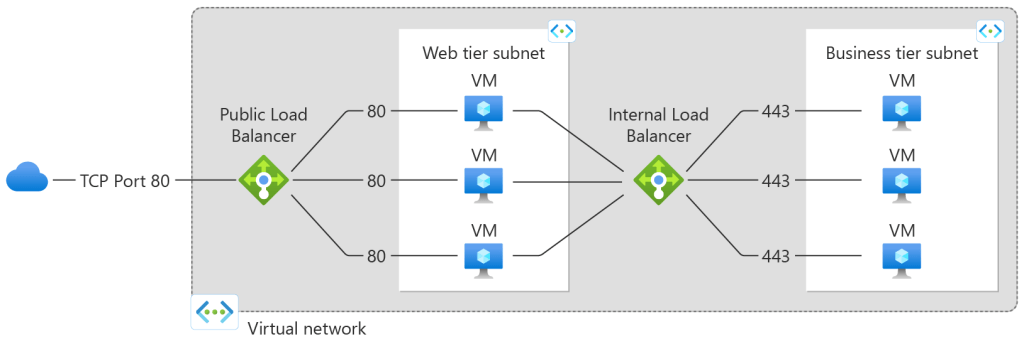
3. Azure Load Balancer:
*image sourced from Google
Distribute incoming traffic across multiple compute instances, ensuring high availability and optimal resource utilization. Azure Load Balancer supports both layer 4 (TCP/UDP) and layer 7 (HTTP/HTTPS) load balancing.
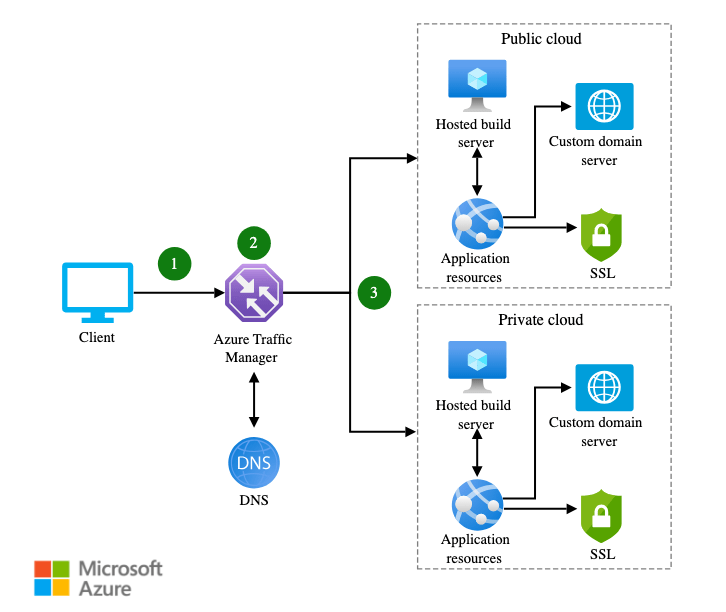
4. Azure Traffic Manager:
*image sourced from Google
Distribute user traffic across multiple Azure regions or services, enabling global load balancing, failover, and high availability for your applications.
5. Azure Service Fabric:
*image sourced from Google
A distributed systems platform for building and managing scalable, reliable, and easily managed microservices and containerized applications.
6. Azure Cosmos DB: A globally distributed, multi-model database service that provides low-latency data access, automatic indexing, and tunable consistency levels, ensuring high availability and scalability for your data layer.
7. Azure Cache for Redis:
*image sourced from Google
A fully managed, in-memory data cache that provides high-throughput, low-latency access to data, reducing the load on backend systems and improving application performance and scalability.
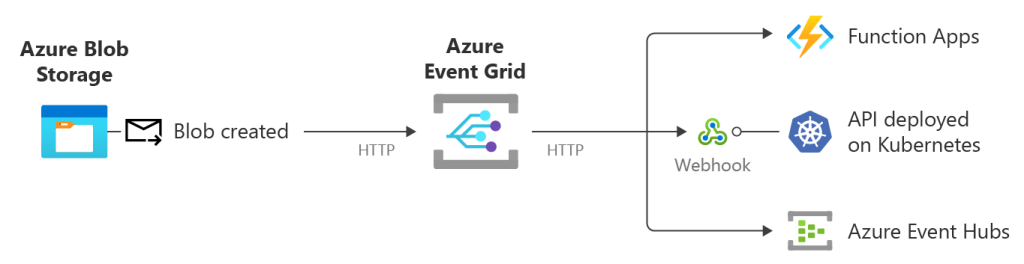
8. Azure Event Grid:
*image sourced from Google
A fully managed event routing service that enables reactive programming and event-driven architectures, allowing you to build loosely coupled, scalable, and highly available applications.
Architectural Patterns for Scalability and High Availability:
To effectively leverage Azure services and build scalable and highly available applications, it’s essential to follow proven architectural patterns and best practices:
1. Microservices Architecture: Break down monolithic applications into smaller, independently deployable microservices that can scale and fail independently, enabling greater agility, scalability, and resilience.
2. Stateless Application Design: Design your application components to be stateless, enabling horizontal scaling and failover across multiple instances without losing application state.
3. Queue-Based Load Leveling: Implement queuing mechanisms, such as Azure Service Bus or Azure Storage Queues, to decouple components and smooth out traffic spikes, improving scalability and resilience.
4. Geo-Replication and Failover: Replicate your application and data across multiple Azure regions, enabling failover and high availability in the event of regional outages or disasters.
5. Health Monitoring and Auto-Healing: Implement robust health monitoring and auto-healing mechanisms to detect failures and automatically recover or replace unhealthy instances, ensuring continuous service delivery.
6. Chaos Engineering: Proactively test and validate your application’s resilience by introducing controlled failures and simulating real-world scenarios, enabling you to identify and address potential issues before they impact production environments.
Best Practices for Scalable and Highly Available Applications:
In addition to leveraging Azure services and architectural patterns, it’s crucial to follow best practices when building scalable and highly available applications:
1. Design for Failure: Assume that failures will occur and design your applications to be resilient and fault-tolerant from the ground up.
2. Implement Loose Coupling: Decouple components and services to reduce dependencies and enable independent scaling and failure handling.
3. Leverage Caching: Implement caching strategies, such as Azure Cache for Redis, to improve application performance and reduce the load on backend systems.
4. Optimize Resource Utilization: Continuously monitor and optimize resource utilization by implementing auto-scaling, load balancing, and other scalability mechanisms.
5. Implement Robust Monitoring and Alerting: Implement comprehensive monitoring and alerting solutions, such as Azure Monitor and Application Insights, to proactively detect and respond to issues before they impact users.
6. Embrace DevOps and Automation: Adopt DevOps practices and automate deployments, scaling, and infrastructure management to ensure consistent and repeatable application delivery and operations.
7. Test for Scalability and Resilience: Regularly test your application’s scalability and resilience by simulating various load and failure scenarios, and use the insights gained to continuously improve your architecture and implementation.
By leveraging Azure’s scalability and high availability services, following proven architectural patterns, and adhering to best practices, developers and architects can build cloud-native applications that can scale seamlessly, withstand failures, and provide consistent and reliable service delivery to end-users.
In the rapidly evolving landscape of artificial intelligence and machine learning, staying abreast of the latest technologies and tools is crucial. Azure Gen AI and ML, offered by Microsoft, provide a cutting-edge platform for developers and data scientists to harness the potential of generative AI. As I delved into the realm of Azure Gen AI and ML, I discovered a rich curriculum that serves as a roadmap for mastering these transformative technologies. In this blog post, I am excited to share this curated curriculum to help a larger audience embark on their journey of mastering Azure Gen AI and ML.
Python is the backbone of many AI and ML applications. This beginner-friendly course provides a solid foundation for understanding Python, a language widely used in the world of data science.
Mastering Azure Gen AI and ML opens the doors to a world of possibilities. The provided curriculum offers a comprehensive learning path, covering foundational concepts to advanced techniques. As you navigate through these resources, you’ll acquire the skills and knowledge needed to leverage the full potential of Azure Gen AI and ML. Whether you’re a beginner or an experienced professional, this curriculum serves as a valuable guide for anyone looking to enhance their proficiency in the dynamic field of artificial intelligence and machine learning.
In today’s rapidly evolving application landscape, containerization and container orchestration have become essential technologies for enabling agility, scalability, and portability. Azure provides comprehensive support for containerization and offers a fully managed Kubernetes service, Azure Kubernetes Service (AKS), enabling developers and IT professionals to deploy and manage containerized applications at scale.
Understanding Containerization:
*image sourced from Google
Containerization is a virtualization approach that packages applications and their dependencies into isolated, lightweight, and portable containers. Containers share the host operating system kernel, enabling efficient resource utilization and consistent application behavior across different environments. Key benefits of containerization include:
1. Portability: Containers encapsulate the entire application runtime environment, ensuring consistent behavior across different hosting platforms and environments.
2. Isolation: Each container runs in an isolated environment, preventing conflicts with other containers or the host system, and ensuring secure and reliable application execution.
3. Efficiency: Containers share the host operating system kernel, resulting in more efficient resource utilization compared to traditional virtual machines.
4. Scalability: Containers can be easily scaled horizontally by spinning up additional instances, enabling applications to handle fluctuating demand and traffic loads.
Azure Container Registry (ACR):
Azure Container Registry is a private, centralized registry for storing and managing container images. Key features of ACR include:
*image sourced from Google
1. Secure Image Storage: Store and manage Docker container images in a secure, private registry hosted in Azure.
2. Geo-Replication: Replicate container images across multiple Azure regions, ensuring high availability and low-latency access to images.
3. Vulnerability Scanning: Automatically scan container images for known vulnerabilities and misconfigurations, enabling proactive security measures.
4. Integrated CI/CD: Integrate ACR with Azure DevOps Services or other CI/CD pipelines for automated image building, testing, and deployment.
Azure Kubernetes Service (AKS):
*image sourced from Google
Azure Kubernetes Service (AKS) is a fully managed Kubernetes service that enables you to deploy, manage, and scale containerized applications efficiently. Key features of AKS include:
1. Simplified Provisioning: Rapidly provision Kubernetes clusters with automated configuration, updates, and scaling, reducing the operational overhead of managing Kubernetes.
2. Integrated Networking: Leverage Azure Virtual Networks and networking services to securely connect and manage communications between your AKS clusters and other Azure resources.
3. Advanced Scheduling: Utilize advanced scheduling capabilities, such as node pools, pod disruption budgets, and node auto-scaling, to optimize resource utilization and ensure high availability.
4. Monitoring and Logging: Integrate with Azure Monitor for comprehensive monitoring and logging of your AKS clusters, enabling proactive issue detection and troubleshooting.
5. Secure Deployments: Leverage Azure Active Directory for authentication and role-based access control (RBAC) to secure your AKS deployments and restrict access to authorized users and services.
Deploying Containerized Applications on Azure:
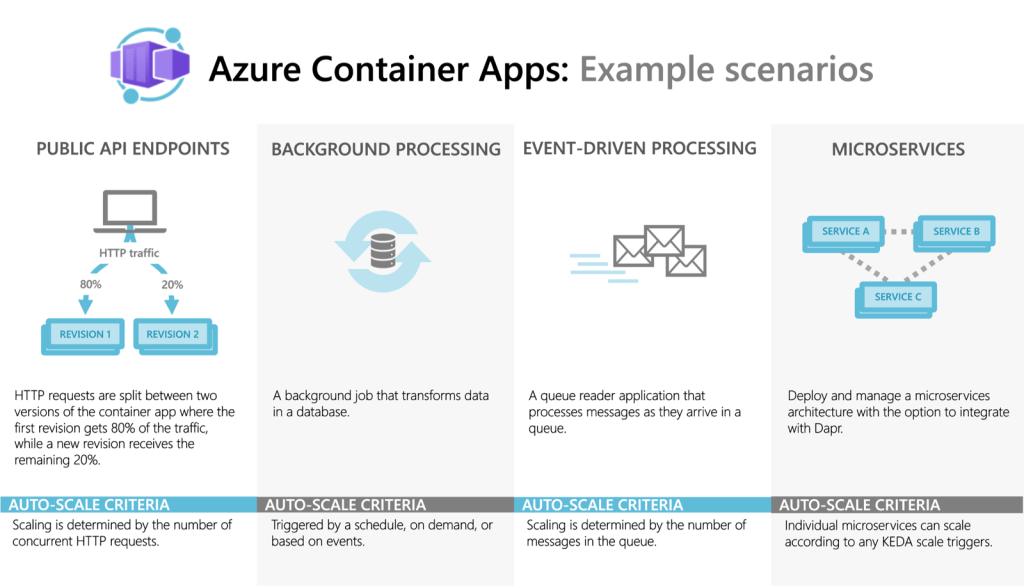
Azure provides various options for deploying and managing containerized applications, including Azure Kubernetes Service (AKS), Azure Container Instances (ACI), and Azure Web Apps for Containers. Here’s an overview of these services:
1. Azure Kubernetes Service (AKS): AKS is the recommended option for deploying and managing production-grade containerized applications at scale. It provides a fully managed Kubernetes environment, enabling you to leverage the power of Kubernetes for orchestrating and managing your containerized workloads.
2. Azure Container Instances (ACI): ACI is a serverless container offering that allows you to run containerized applications without provisioning and managing virtual machines or clusters. ACI is suitable for burst workloads, batch processing, and lightweight containerized applications that don’t require the full capabilities of Kubernetes.
3. Azure Web Apps for Containers: This service allows you to deploy and run containerized web applications on a fully managed platform as a service (PaaS) offering. It simplifies the deployment and scaling of containerized web apps while providing features like continuous deployment, custom domains, and SSL/TLS support.
Best Practices for Containerization and Kubernetes in Azure:
To effectively leverage containerization and Kubernetes in Azure, it’s essential to follow best practices and adopt a DevOps mindset:
1. Embrace DevOps and CI/CD: Implement DevOps practices and continuous integration and deployment (CI/CD) pipelines to automate the build, testing, and deployment of containerized applications, ensuring consistency and reliability.
2. Implement Infrastructure as Code (IaC): Define and manage your container infrastructure as code using tools like Azure Resource Manager templates or Terraform, enabling version control, repeatable deployments, and consistent environments.
3. Utilize Managed Services: Leverage fully managed services like Azure Kubernetes Service (AKS) and Azure Container Registry (ACR) to reduce operational overhead and benefit from automated updates, scaling, and security features.
4. Monitor and Observe: Implement comprehensive monitoring and observability practices for your containerized applications and Kubernetes clusters, leveraging tools like Azure Monitor, Prometheus, and Grafana to gain insights into application performance, resource utilization, and potential issues.
5. Secure Container Deployments: Implement security best practices, such as using private container registries, network isolation, RBAC, and vulnerability scanning, to protect your containerized applications and Kubernetes clusters from potential threats.
6. Optimize Resource Utilization: Leverage advanced scheduling capabilities in Kubernetes, such as node pools, auto-scaling, and resource quotas, to optimize resource utilization and ensure efficient and cost-effective container deployments.
7. Plan for Scalability and High Availability: Design your containerized applications and Kubernetes clusters with scalability and high availability in mind, utilizing features like load balancing, replication, and geo-replication to handle fluctuating demand and ensure application uptime.
By embracing containerization and Kubernetes in Azure, developers and organizations can unlock the benefits of agility, scalability, and portability, enabling them to build and deploy modern, cloud-native applications more efficiently and effectively.
In the rapidly evolving landscape of cloud computing, efficient application performance is paramount for businesses seeking to stay competitive. Azure, Microsoft’s cloud platform, offers a comprehensive suite of tools for application monitoring and performance optimization. In this blog post, we’ll explore some key strategies and tools available on Azure for monitoring and optimizing application performance, along with a real-time example to illustrate their practical application.
Why Monitoring and Optimization Matter
Before delving into specific tools and strategies, let’s briefly discuss why monitoring and optimization are crucial for Azure applications.
Enhanced User Experience: Applications with better performance provide a smoother and more satisfying user experience, leading to higher customer satisfaction and retention.
Identifying and Resolving Issues: Monitoring helps detect performance bottlenecks and potential issues before they escalate, enabling proactive problem-solving.
Azure Monitoring Tools
Azure Monitor
Azure Monitor provides comprehensive monitoring solutions for Azure resources. It collects and analyzes telemetry data from various sources, including applications, infrastructure, and networks. Key features include:
Metrics: Collects and visualizes performance metrics such as CPU usage, memory utilization, and response times.
Logs: Aggregates log data from Azure resources, allowing for advanced querying and analysis.
Alerts: Configurable alerts notify administrators of abnormal conditions or performance thresholds.
Application Insights
Application Insights is an application performance management (APM) service that helps developers monitor live applications. It provides deep insights into application performance and usage patterns, including:
Performance Monitoring: Identifies slow response times, dependencies, and resource usage.
Application Diagnostics: Captures exceptions, traces, and dependencies, aiding in debugging and troubleshooting.
User Analytics: Tracks user interactions and behavior, enabling developers to optimize user experiences.
Azure Advisor
Azure Advisor offers personalized recommendations to optimize Azure resources for performance, security, and cost-efficiency. It analyzes usage patterns and configurations to provide actionable insights, such as:
Performance Recommendations: Suggests optimizations to improve application performance and reduce latency.
Let’s consider a real-world scenario of optimizing an e-commerce application deployed on Azure. Our goal is to enhance performance while minimizing operational costs.
Monitoring Phase:
Instrumentation: Integrate Application Insights into the e-commerce application to collect telemetry data.
Metrics Collection: Configure Azure Monitor to collect performance metrics for virtual machines, databases, and web services.
Baseline Establishment: Establish baseline performance metrics to identify deviations and anomalies.
Optimization Phase:
Resource Scaling: Use Azure Advisor recommendations to rightsize virtual machines and databases based on historical usage patterns.
Caching: Implement Azure Cache for Redis to cache frequently accessed data, reducing database load and improving response times.
Content Delivery Network (CDN): Utilize Azure CDN to cache static content such as images and scripts, reducing latency for global users.
Load Balancing: Configure Azure Load Balancer to distribute traffic evenly across multiple instances, improving scalability and fault tolerance.
Conclusion
In conclusion, Azure offers powerful tools and services for monitoring and optimizing application performance. By leveraging Azure Monitor, Application Insights, and Azure Advisor, businesses can gain valuable insights into their applications’ health and performance, leading to enhanced user experiences and cost savings. Incorporating these monitoring and optimization practices into your Azure deployments will ensure that your applications remain efficient, resilient, and responsive in today’s dynamic cloud environment.
By adopting a proactive approach to monitoring and optimization, businesses can stay ahead of performance issues and deliver exceptional experiences to their users.
In the fast-paced world of software development, adopting DevOps practices has become crucial for delivering high-quality applications faster and more efficiently. Azure provides a comprehensive set of services and tools that enable developers and IT professionals to implement DevOps principles, streamline their development lifecycle, and achieve continuous integration and deployment (CI/CD).
Azure DevOps Services: Azure DevOps is a suite of services that provides an end-to-end solution for collaborative development, version control, agile planning, and CI/CD pipelines. Key components include:
*image sourced from Google
Azure Repos: A centralized source control system that supports Git repositories for version control and collaboration.
Azure Boards: A powerful agile project management tool that supports Kanban and Scrum methodologies, enabling teams to plan, track, and manage their work effectively.
Azure Pipelines: A cloud-based CI/CD service that enables automated build, testing, and deployment processes for various target environments (Azure, on-premises, or third-party clouds).
Azure Test Plans: A comprehensive testing solution that supports manual and exploratory testing, enabling teams to define and execute test plans and capture results.
Azure Artifacts: A centralized package management service that enables teams to share and consume packages, such as NuGet, npm, and Maven, across projects and pipelines.
Implementing Continuous Integration (CI): Continuous Integration (CI) is a DevOps practice that involves frequently integrating code changes from multiple developers into a central repository, triggering automated builds and tests to detect issues early in the development cycle. Azure DevOps Services and other Azure services can help streamline the CI process:
*image sourced from Google
Source Control Management: Use Azure Repos or integrate with other Git repositories (e.g., GitHub, Bitbucket) to manage your source code and collaborate with team members.
Automated Builds: Configure Azure Pipelines to automatically trigger builds whenever code changes are committed to the repository, ensuring that the latest code is continuously built and tested.
Automated Testing: Integrate unit, integration, and functional tests into your CI pipeline, automatically executing tests with every code commit to catch defects early and maintain code quality.
Dependency Management: Leverage Azure Artifacts to manage and share packages and dependencies across your projects and pipelines, ensuring consistent and reliable builds.
Code Quality Analysis: Integrate static code analysis tools (e.g., SonarQube, CodeCov) into your CI pipeline to enforce coding standards, identify code quality issues, and maintain technical debt.
Enabling Continuous Deployment (CD): Continuous Deployment (CD) is a DevOps practice that involves automatically deploying tested and validated software changes to production (or other target environments) with minimal manual intervention. Azure provides various services and tools to support CD:
Release Pipelines: Configure Azure Pipelines to define release pipelines that automate the deployment process, including approvals, environment configurations, and rollback strategies.
Deployment Targets: Deploy to various targets, such as Azure App Services, Azure Kubernetes Service (AKS), Azure Virtual Machines, or on-premises infrastructure, using deployment tasks and agents.
Infrastructure as Code (IaC): Use Azure Resource Manager templates, Terraform, or other IaC tools to define and manage your infrastructure configurations as code, enabling consistent and repeatable deployments.
Feature Flags: Leverage Azure App Configuration or other feature flag management solutions to control the rollout of new features and enable safe deployments with gradual rollouts or canary releases.
Monitoring and Feedback Loops: Integrate Application Insights, Azure Monitor, and other monitoring tools to gather feedback from production environments, enabling continuous improvement and rapid issue detection and resolution.
Optimizing DevOps Practices in Azure: To fully realize the benefits of DevOps and achieve efficient CI/CD pipelines in Azure, it’s essential to follow best practices and leverage various Azure services:
Embrace Automation: Automate as many processes as possible, including builds, testing, deployments, and infrastructure provisioning, to reduce manual effort and improve consistency and reliability.
Implement Infrastructure as Code (IaC): Define and manage your infrastructure configurations as code using Azure Resource Manager templates, Terraform, or other IaC tools, enabling version control, repeatable deployments, and consistent environments.
Leverage Containerization: Adopt containerization technologies like Docker and Kubernetes to package and deploy your applications consistently across different environments, enabling portability and scalability.
Implement Secure DevOps: Incorporate security practices throughout the development lifecycle, including secure coding practices, automated security testing, and continuous monitoring of deployed applications.
Enable Collaboration and Visibility: Foster collaboration and transparency by leveraging Azure Boards for agile planning, Azure Repos for source control management, and Azure Pipelines for sharing CI/CD pipelines across teams.
Embrace Continuous Learning: Continuously learn and improve by gathering feedback from production environments, analyzing metrics and telemetry data, and incorporating lessons learned into future iterations of your DevOps processes.
Throughout this article, we’ve explored the various Azure services and tools that enable DevOps practices, continuous integration, and continuous deployment. By adopting these practices and leveraging Azure’s capabilities, development teams can streamline their delivery processes, improve collaboration, and accelerate the delivery of high-quality software to end-users.






 Deepak Kaushik -> Cloud Blooded Beast