Monthly Archives: June 2023

Azure Dev Series: Deploying and Managing Azure Web Apps

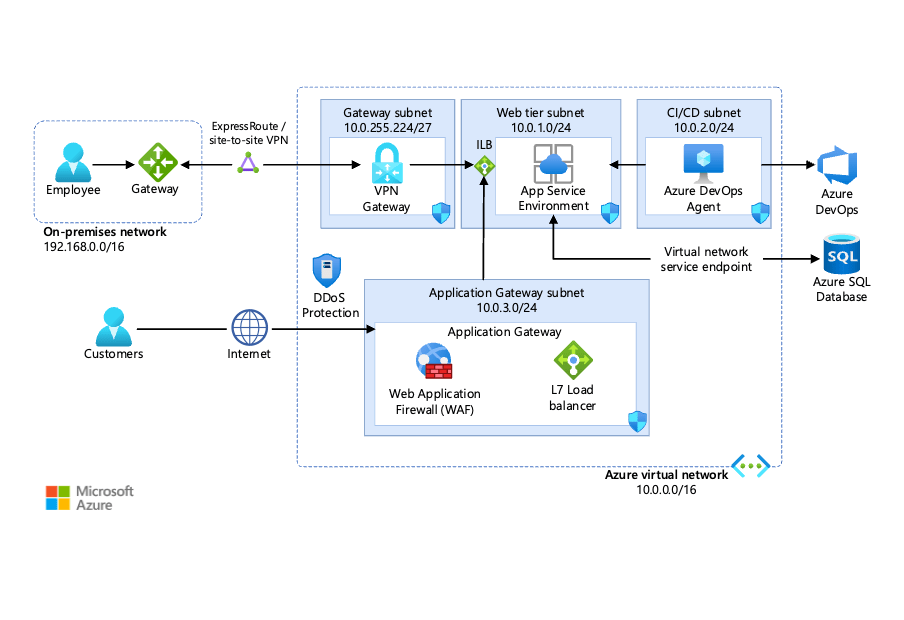
*image sourced from Google

In today’s digital landscape, delivering web applications efficiently and seamlessly is crucial for meeting user expectations and staying ahead of the competition. Azure Web Apps, a fully managed platform as a service (PaaS) offering from Microsoft, empowers developers to build, deploy, and manage web applications with ease, scalability, and cost-effectiveness.

Deploying Web Apps on Azure:

Azure Web Apps supports various deployment options, catering to different development workflows and preferences. Here are some common deployment methods:

1. Azure App Service Deployment Center: This built-in deployment feature within the Azure portal allows you to connect your web app to a source control repository (e.g., GitHub, Azure Repos, BitBucket) and enable continuous deployment. With each commit to your repository, the deployment center automatically builds and deploys your application to Azure. The integration with popular source control systems makes it easy to manage your code, track changes, and collaborate with your team.

2. Azure DevOps: Integrate your web app deployment with Azure DevOps, Microsoft’s suite of services for version control, agile planning, and continuous integration and deployment (CI/CD). Configure build and release pipelines to automate the entire deployment process, from compiling code to deploying to multiple environments (e.g., development, staging, production). Azure DevOps also offers features like work item tracking, test management, and reporting, making it an ideal choice for teams looking for a comprehensive development management solution.

3. FTP/FTPS: For simpler deployments or legacy applications, you can use FTP or FTPS to upload your application files directly to the web app’s file system. This method is suitable for small-scale applications or when you need to quickly deploy a static website. However, it lacks the automation and collaboration benefits offered by other deployment methods.

4. Cloud Shell: Azure Cloud Shell is a browser-based command-line experience that allows you to manage Azure resources, including deploying web apps, directly from the Azure portal or a remote machine. With support for Bash and PowerShell, you can use familiar command-line tools and scripts to automate and manage your deployments.

5. Local Git Deployment: Developers can also deploy their applications using Git directly from their local development environment, enabling a more streamlined and familiar workflow. This approach allows you to leverage Git’s version control capabilities while deploying your application to Azure with minimal configuration.

Managing and Scaling Web Apps:

Once deployed, Azure Web Apps provides a range of features and capabilities for managing and scaling your applications effectively:

1. Auto-scaling: Configure auto-scaling rules to automatically adjust the number of instances (scale out) or allocated resources (scale up) based on predefined metrics like CPU utilization or HTTP queue length. This ensures optimal performance and cost efficiency by matching resource allocation to real-time demand. Auto-scaling can be configured based on a schedule or specific performance thresholds, allowing you to fine-tune your application’s scalability to meet your unique requirements.

2. Deployment Slots: Create and manage multiple deployment slots for each web app, enabling techniques like blue-green deployments, canary releases, and A/B testing without impacting the production environment. Deployment slots allow you to test new features, validate performance, and ensure compatibility before swapping the staging environment with the production environment. This approach minimizes downtime and reduces the risk of deploying untested or unstable code to your live application.

3. Backup and Restore: Automatically back up your web app’s content, configuration, and databases at scheduled intervals or on-demand. Restore these backups to a different web app or to the same web app at a previous point in time, ensuring data protection and disaster recovery. Azure Web Apps also supports geo-redundant backups, enabling you to store your backups in different regions for added resilience and faster recovery in case of a regional outage.

4. Monitoring and Diagnostics: Monitor your web app’s performance, diagnose issues, and gain insights into application health and resource utilization using Azure Application Insights, Log Analytics, and other monitoring tools. These tools provide real-time telemetry, customizable dashboards, and powerful analytics capabilities to help you identify and resolve performance bottlenecks, errors, and other issues impacting your application’s user experience.

5. Security and Compliance: Secure your web apps with built-in features like SSL/TLS encryption, authentication and authorization options (e.g., Azure Active Directory, social providers), and compliance certifications (e.g., ISO, PCI DSS, HIPAA). Azure Web Apps also supports virtual network integration, allowing you to isolate your web app within your own virtual network for enhanced security and network control.

Throughout this article, we’ve explored the deployment and management capabilities of Azure Web Apps, highlighting its versatility, scalability, and ease of use. In the following articles, we’ll dive deeper into specific features and best practices for building and deploying high-performance, secure, and scalable web applications on Azure. By leveraging Azure Web Apps, developers can streamline their development workflows, automate deployment processes, and focus on delivering innovative and engaging web applications to their users.

Optimizing SAP Migration to Azure for Maximum Efficiency and Reliability

As businesses evolve in the digital era, migrating critical SAP systems to Azure has become a strategic imperative. Microsoft’s refined capacity management processes on Azure minimize downtime, risks, and costs while enhancing employee efficiencies. This article delves into IoTCoast2Coast’s measured approach to migrating sensitive data and confidential workloads with SAP systems, leveraging Azure’s agility and scalability.

The Right Approach to SAP Migration

Migrating mission-critical SAP systems to Azure requires a strategic approach to ensure maximum cost savings, scalability, and agility without disrupting business operations. IoTCoast2Coast adopted a horizontal strategy, migrating low-risk environments like sandboxes first to gain Azure migration experience. This approach mitigates risks while building confidence in Azure’s capabilities.

Prerequisites for Azure AD Integration with SAP Cloud Platform

To configure Azure AD integration with SAP Cloud Platform, specific prerequisites are necessary, including Azure and SAP Cloud Platform subscriptions, basic Azure knowledge, and appropriate user permissions.

Creating an Optimal SAP Environment on Azure

Azure stands out as the preferred platform for SAP deployments due to its reliability, scalability, and compliance capabilities. Azure supports a wide range of SAP solutions, including SAP HANA and S/4 HANA, providing a robust foundation for enterprise-grade SAP environments.

Telemetry Solution for SAP on Azure

Managing telemetry and monitoring for SAP landscapes requires a comprehensive approach. Microsoft developed the Unified Telemetry Platform (UTP) on Azure, enabling service maturity, compliance, and holistic health monitoring for SAP and other business processes.

Implementing UTP in SAP on Azure

The implementation of UTP involves creating a reusable custom method and configuration table to drive consistent telemetry payloads. This method integrates seamlessly with SAP business process events, ensuring accurate telemetry data capture and analysis.

Azure Monitor for Enhanced Monitoring and Alerting

Azure Monitor plays a vital role in monitoring and alerting for SAP on Azure environments. It provides deep insights into application performance, infrastructure health, and end-to-end business processes. Leveraging tools like Azure Application Insights and Azure Log Analytics enables proactive monitoring and issue resolution.

Best Practices and Lessons Learned

Key best practices include performing a thorough inventory of internal processes, capturing true end-to-end telemetry, building for Azure-native SAP components, and standardizing data usage across the organization. These practices ensure accurate monitoring, reporting, and business intelligence insights.

Conclusion

Microsoft’s Azure platform, coupled with refined monitoring and telemetry solutions like UTP and Azure Monitor, empowers enterprises to optimize SAP migration, enhance business visibility, and drive operational excellence. By adopting best practices and leveraging Azure’s capabilities, organizations can unlock the full potential of SAP on Azure, paving the way for digital transformation and business success in the cloud era.

Databricks vs Microsoft Fabric: Choosing the Right Data Platform

*image sourced from Google

With the rise of big data, businesses need robust data platforms to support analytics and machine learning. Two leading options are Databricks and Microsoft’s new Fabric platform. This article compares the key features and use cases of Databricks vs Fabric to help you choose the right tool.

What is Databricks?

Databricks provides a unified analytics platform optimized for big data and AI. It runs on Apache Spark and is available on all major cloud providers including AWS, Azure, and Google Cloud.

Key capabilities include:

  • Optimized Apache Spark performance – Runs Spark workloads faster and more reliably than standalone deployments.
  • Unified analytics – Combining data engineering, data science, and business intelligence in one platform.
  • Interactive notebooks – Supports collaboration via notebooks in Python, R, Scala, and SQL.
  • Machine learning – Integrated platform for the machine learning lifecycle including experiment tracking, model management, and deployment.
  • Delta Lake – Provides performance boost and reliability for big data workloads. Brings ACID transactions to Apache Spark.

Overall, Databricks excels at large-scale data processing and machine learning applications leveraging Apache Spark.

Introducing Microsoft Fabric

Microsoft Fabric is a new integrated data platform launched in 2022. It unifies data services within Azure and aims to simplify analytics.

Key highlights of Fabric:

  • Unified environment – Combining data engineering, machine learning, and business intelligence tools in one platform.
  • Built on Azure – Leverages underlying Azure services like Synapse Analytics, Data Factory, and Power BI.
  • Lightweight notebooks – Supports collaborative notebooks for data exploration and visualization.
  • Power BI integration – Natively supports Power BI reports and dashboards.
  • Microservices architecture – Designed for modern containerized application development.

Fabric focuses on enabling easy collaboration for analytics and BI use cases within the Azure ecosystem.

Architecture Comparison

Under the hood, Databricks and Fabric both utilize Apache Spark for data processing workloads. However, their architecture and approach differ:

Databricks

  • Runs Spark workloads within the customer’s own cloud infrastructure.
  • Charges are based on usage metrics like DBUs and instance hours.
  • Cloud agnostic – available on AWS, Azure, and Google Cloud.
  • Specialized features for big data, streaming, and ML.

*image sourced from Microsoft

Microsoft Fabric

  • Tightly integrated into Azure services.
  • Capacity-based pricing model rather than usage-based.
  • Leverages Azure-native services like Synapse Analytics.
  • General purpose features with a focus on collaboration.

*image sourced from Microsoft

Databricks provides more flexibility for the production of big data workloads while Fabric simplifies analytics within Azure.

Key Differences

CategoryDatabricksMicrosoft Fabric
ApproachCloud agnosticAzure-centric
UsageBig data & MLCollaboration & BI
PricingConsumption-basedCapacity-based
FeaturesDelta Lake, MLflowPower BI integration

When to Choose Databricks

Databricks shines for large-scale data processing and machine learning applications. It’s a good choice when:

  • You need a cost-effective Apache Spark platform.
  • Your data pipeline requires handling streaming data at scale.
  • Your data science teams want an end-to-end ML platform.
  • You need reliability features like Delta Lake for your big data lake.
  • You require a cloud-agnostic platform available across AWS, Azure, and GCP.

When to Choose Microsoft Fabric

Fabric simplifies collaboration and BI-focused analytics within Azure. Consider it if:

  • You want easy access to Power BI and Azure Synapse capabilities.
  • Your users will benefit from its collaborative notebooks.
  • Your analytics workloads are focused on business intelligence.
  • You want a unified data environment within the Azure ecosystem.
  • You need built-in support for microservices and containers.

Conclusion

Databricks outperforms for big data and machine learning use cases while Microsoft Fabric enables straightforward collaboration and BI within Azure. Evaluate their key features and your business needs to choose the right platform. Both options help simplify data analytics, but with different approaches.