Category Archives: April 2018

Azure IoT Streaming Data and how you can process it using Kusto Query Language (KQL)

In this article, we will be discussing Azure IoT Streaming Data and how you can process it using Kusto Query Language (KQL).

Azure IoT Hub is a cloud-based platform that allows you to connect, monitor, and manage IoT devices. With Azure IoT Hub, you can collect streaming data from your devices and process it in real-time using Azure Stream Analytics. Azure Stream Analytics is a fully managed service that allows you to process and analyze data in real-time using a simple SQL-like language called Kusto Query Language (KQL).

Here’s how you can use Azure IoT Hub and Azure Stream Analytics to process IoT streaming data using KQL:

Step 1: Create an Azure IoT Hub

The first step is to create an Azure IoT Hub. You can create an IoT Hub using the Azure portal or the Azure CLI. Once you have created an IoT Hub, you can register your IoT devices with the hub.

Step 2: Create an Azure Stream Analytics job

The next step is to create an Azure Stream Analytics job. You can create a Stream Analytics job using the Azure portal. When creating the job, you need to specify the input and output sources for the job.

Step 3: Configure the input source

The input source for the Stream Analytics job should be the IoT Hub that you created in Step 1. You can configure the input source by specifying the IoT Hub as the input source for the Stream Analytics job. Once you have configured the input source, you need to specify the format of the data that is being streamed from the IoT devices. The format of the data can be JSON or CSV.

Step 4: Configure the output source

The output source for the Stream Analytics job can be an Azure Blob storage, Azure Table storage, or an Azure SQL database. You can configure the output source by specifying the output source for the Stream Analytics job.

Step 5: Write KQL queries

Once you have configured the input and output sources for the Stream Analytics job, you can write KQL queries to process the data that is being streamed from the IoT devices. KQL is a simple SQL-like language that allows you to query and process data in real-time. Here are some examples of KQL queries that you can use to process IoT streaming data:

  • SELECT * FROM IoTHubInput This query selects all the data that is being streamed from the IoT devices.
  • SELECT DeviceId, Temperature, Humidity FROM IoTHubInput This query selects only the DeviceId, Temperature, and Humidity data from the IoT devices.
  • SELECT DeviceId, AVG(Temperature) as AverageTemperature, AVG(Humidity) as AverageHumidity FROM IoTHubInput GROUP BY DeviceId This query selects the average temperature and humidity data for each device that is being streamed from the IoT devices.

Step 6: Monitor the Stream Analytics job

Once you have written the KQL queries, you can monitor the Stream Analytics job to ensure that it is processing the IoT streaming data as expected. You can monitor the job using the Azure portal or the Azure CLI.

Conclusion

In this article, we discussed Azure IoT Streaming Data and how you can process it using Kusto Query Language (KQL). We covered the steps to create an Azure IoT Hub, create an Azure Stream Analytics job, configure the input and output sources, write KQL queries, and monitor the Stream Analytics job. By following these steps, you can process and analyze IoT streaming data in real-time using Azure Stream Analytics and KQL. For more information on Azure IoT and Stream Analytics, check out the Azure IoT Hub documentation and the Azure Stream Analytics documentation.
How to Do Successful Migration on Azure Step by Step

Migrating to Azure can be a daunting task, but with careful planning and execution, it can be a smooth and successful process. Azure provides many tools and services that can help businesses move their workloads to the cloud quickly and efficiently. In this article, we will outline a step-by-step guide on how to do a successful migration on Azure.

Step 1: Assess Your Current Environment

The first step in the migration process is to assess your current environment. You need to understand your existing infrastructure, applications, and data to identify what can be moved to Azure and what cannot. This includes evaluating your hardware, software, and network infrastructure.

There are many tools available to help you with this process, such as the Azure Migrate service. This service provides an assessment of your existing environment and identifies any potential issues that may arise during the migration process.

Step 2: Plan Your Migration Strategy

Once you have assessed your current environment, the next step is to plan your migration strategy. This involves identifying which applications and workloads will be migrated, how they will be migrated, and the timeline for the migration.

There are several migration strategies to choose from, including rehosting, refactoring, rearchitecting, and rebuilding. The strategy you choose will depend on your business needs and the complexity of your existing environment.

Step 3: Create Your Azure Environment

The next step is to create your Azure environment. This involves setting up your virtual network, creating your Azure resources, and configuring your security settings.

Azure provides many tools to help you with this process, such as the Azure Resource Manager, which enables you to manage your resources and automate the deployment of your infrastructure.

Step 4: Migrate Your Data and Applications

Once your Azure environment is set up, the next step is to migrate your data and applications. There are several ways to do this, such as using Azure Site Recovery, Azure Database Migration Service, or manually migrating your applications.

It is important to test your applications and data after migration to ensure they are working as expected. You can use Azure Monitor to monitor the performance of your applications and troubleshoot any issues that may arise.

Step 5: Optimize and Manage Your Azure Environment

The final step in the migration process is to optimize and manage your Azure environment. This involves monitoring your environment, identifying any potential issues, and optimizing your resources to ensure they are being used efficiently.

Azure provides many tools to help you with this process, such as Azure Advisor, which provides recommendations on how to optimize your resources and reduce costs.

Conclusion

Migrating to Azure can be a complex process, but with careful planning and execution, it can be a smooth and successful process. By following the steps outlined above, you can ensure a successful migration to Azure and take advantage of the many benefits that cloud computing provides, such as scalability, flexibility, and cost savings.

Azure Security and why it’s an important step for your organization

In this blogpost, we will be discussing Azure Security and why it’s an important step for your organization. We will also cover the steps to secure your Azure environment.

What is Azure Security?

Azure Security is a set of practices and technologies designed to protect your organization’s data and applications hosted in the cloud. Azure Security is crucial for organizations because it helps to prevent security breaches and data leaks, ensuring that your organization’s data is safe from unauthorized access, data corruption, and data loss.

Why is Azure Security important?

Azure Security is important for several reasons:

  1. Protects your data: Azure Security helps to protect your organization’s data from unauthorized access, data corruption, and data loss.
  2. Ensures compliance: Azure Security helps to ensure that your organization is compliant with regulatory requirements and industry standards.
  3. Mitigates security risks: Azure Security helps to mitigate security risks by identifying and addressing security vulnerabilities before they can be exploited.
  4. Builds trust: Azure Security helps to build trust with your customers and partners by ensuring that their data is safe.

Steps to secure your Azure environment:

  1. Create a secure Azure environment

The first step in securing your Azure environment is to create a secure environment. You can create a secure Azure environment by following the best practices recommended by Azure. These practices include:

  • Implementing strong authentication and authorization mechanisms
  • Enabling encryption for data at rest and in transit
  • Implementing access controls for resources
  • Implementing network security controls
  • Enabling security logging and monitoring
  1. Secure your Azure resources

Once you have created a secure Azure environment, the next step is to secure your Azure resources. You can secure your Azure resources by:

  • Implementing role-based access control (RBAC) for Azure resources
  • Enabling Azure Security Center to monitor your resources for security vulnerabilities
  • Implementing Azure Active Directory (Azure AD) to manage user access to Azure resources
  • Enabling multi-factor authentication (MFA) for user accounts
  • Enabling Azure AD Privileged Identity Management to manage administrative access
  1. Secure your applications

The third step in securing your Azure environment is to secure your applications. You can secure your applications by:

  • Implementing secure coding practices
  • Enabling application-level security features, such as firewalls and intrusion detection/prevention systems
  • Using Azure Key Vault to securely store and manage cryptographic keys and secrets
  • Implementing security testing and vulnerability scanning
  1. Monitor your Azure environment

The final step in securing your Azure environment is to monitor your environment for security threats. You can monitor your Azure environment by:

  • Enabling Azure Security Center to monitor your resources for security vulnerabilities and threats
  • Enabling Azure Monitor to monitor your Azure environment for operational and security events
  • Using Azure Sentinel to collect, analyze, and respond to security events

Conclusion

In this article, we discussed Azure Security and why it’s an important step for your organization. We covered the steps to secure your Azure environment, which include creating a secure Azure environment, securing your Azure resources, securing your applications, and monitoring your Azure environment. By following these steps, you can help to ensure that your organization’s data is safe and secure in the cloud. For more information on Azure Security, check out the Azure Security Center documentation and the Azure Security Best Practices guide.

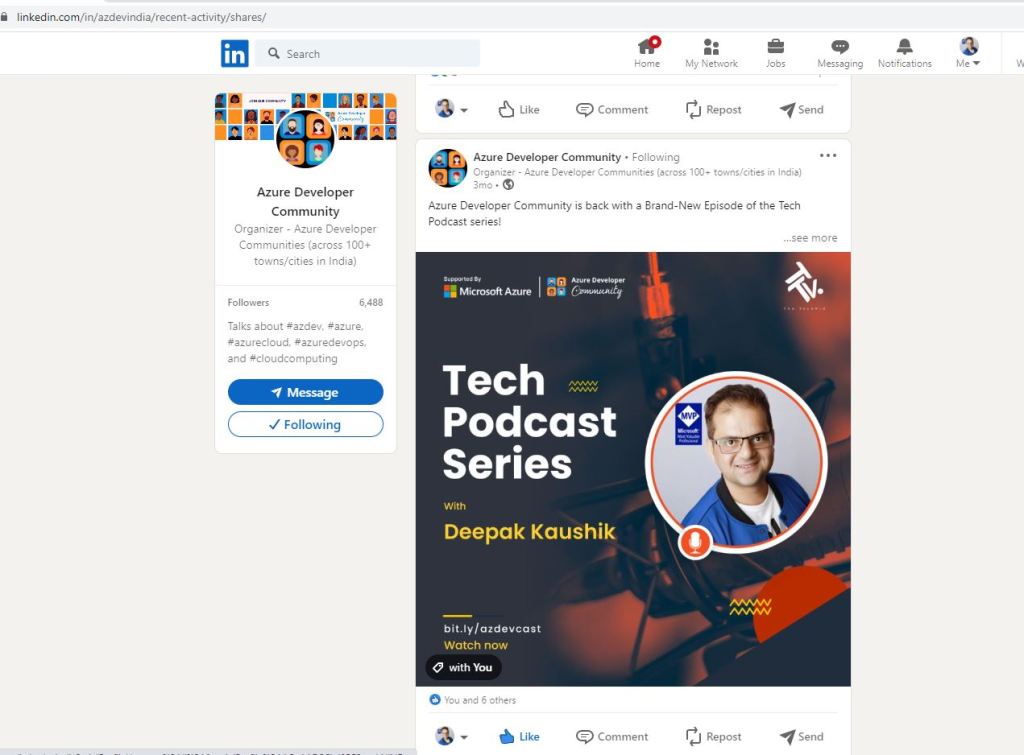
How Azure is Changing the World- Tech Podcast -India

Azure Developer Community is back with a Brand-New Episode of the Tech Podcast series!

Check out Deepak Kaushik ☁️ MVP, Azure Architect at Capgemini, and 5X Microsoft Azure MVP and MCT. He has been contributing to the Azure Community for years. He is also an International speaker. In this podcast, he shared his contributions to the community and how important it is to him.

📺Watch now: https://bit.ly/azdevcast

#microsoft#techpodcastseries#MVP#azure#community

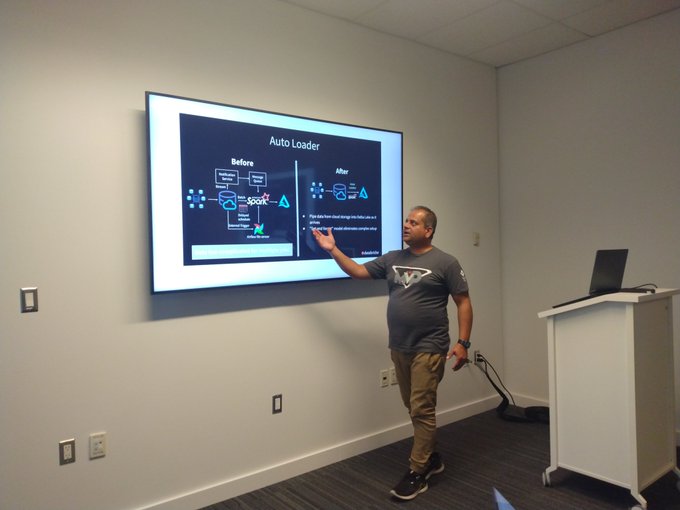
Speaking at Microsoft Reactor Toronto on Azure Analytics

Location: Microsoft Reactor Toronto 101 College Street #Suite 120 Toronto, ON M5G 1L7

Date and time: Thu, August 18, 2022, 6:30 PM – 8:00 PM EDT

Register here:

https://www.eventbrite.ca/e/learn-azure-analytics-azure-synapse-and-m365-development-tickets-398887231447

I love to discuss brilliant thoughts, ideas, or creative approaches to solving business challenges by #Azure#Databricks

Join me and other fantastic speakers as we talk about Azure, Databricks, Synapse, and M365.

Register for our upcoming event at the #Microsoft Reactor #Toronto on Thursday, August 18th.

#Microsoft#toronto#technicalarchitect#dataengineering#mvpbuzz

Nilesh Shah
Nik – Shahriar Nikkhah

Register here:

ARCHITECTURE OF MODERN AZURE ANALYTICS WITH DATABRICKS AUTOLOADER by Deepak Kaushik

  • Auto Loader
  • Transformation
  • Delta Lake
  • Bronze, Silver and Gold Tables
  • Demo

Lake Database in Synapse by Nik Shahriar

  • Few Data Architecture designs
  • What is a lake house?
  • Lakehouse Architecture.
  • Bronze, Silver delta lake.
  • Bronze Data Lake Demo

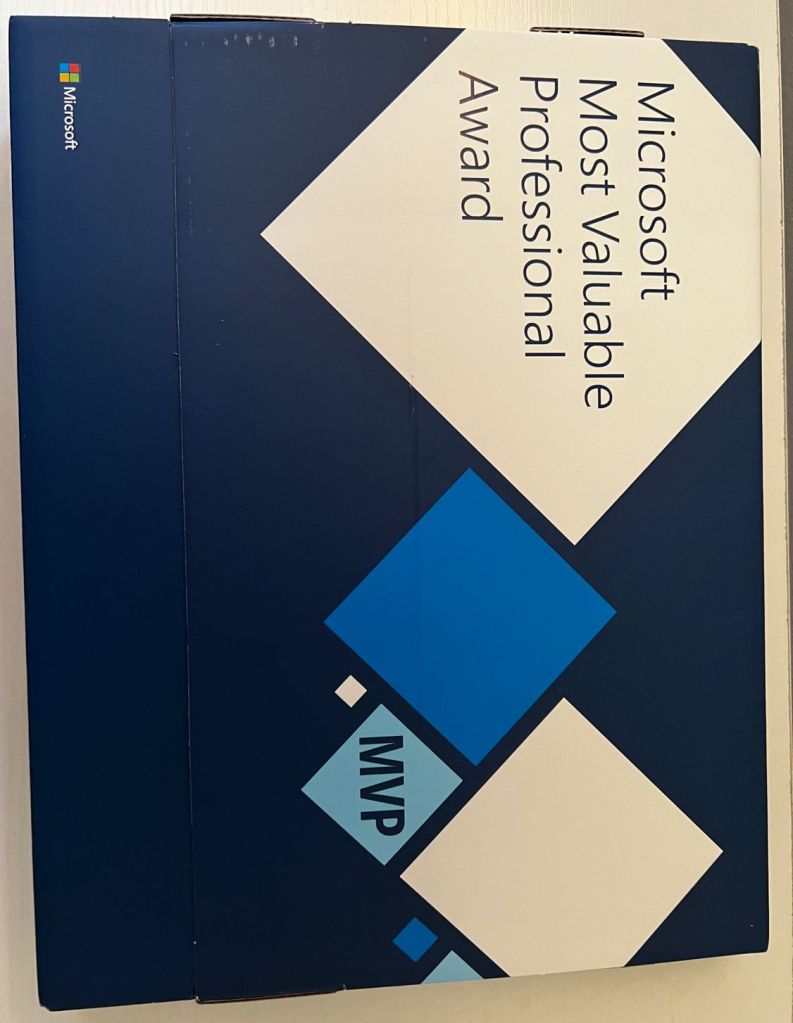
Happy to receive – 5th Microsoft MVP Award

I’m pleased to have received my fifth package of Microsoft MVP Awards in the #azure category. I still feel the same excitement I did the first time.

I am inspired to contribute more every time I open an MVP Package, which serves as a constant reminder of my gratitude to the community.

Thank you for your support, Christian Talavera and Betsy Weber

#MVP #mvpbuzz #microsoftmvp #cdnmvp #azure  #machinelearning #azurecloud #community #grateful #thankyou

Azure technology landscape and how it can help professionals remain competitive in the job market

As businesses increasingly move to the cloud, Microsoft Azure has become a popular choice for cloud computing services. Azure is a powerful platform that provides a wide range of services and tools, and staying up to date with the latest developments in the Azure technology landscape can help professionals remain competitive in the job market.

In this article, we’ll explore some of the key areas of Azure that professionals should be familiar with, including cloud migration, DevOps, artificial intelligence and machine learning, security and compliance, and internet of things (IoT).

Cloud Migration One of the most in-demand areas of Azure is cloud migration. This involves moving existing applications and services to Azure, which enables organizations to take advantage of cloud-based scalability, security, and cost savings. Professionals who are familiar with Azure migration services, such as Azure Site Recovery and Azure Database Migration Service, are in high demand as more businesses seek to move their applications and data to the cloud.

DevOps Another area of Azure that is in high demand is DevOps. This includes using Azure for continuous integration and deployment (CI/CD), as well as managing development pipelines and workflows. Azure DevOps provides a wide range of services, including Azure Repos for source control, Azure Boards for work item tracking, and Azure Test Plans for testing and release management. Professionals who are familiar with these services and how to integrate them into the software development lifecycle are highly valued in the job market.

Artificial Intelligence and Machine Learning Azure provides a wide range of services for machine learning and artificial intelligence, including Azure Cognitive Services, Azure Machine Learning, and Azure Databricks. Professionals who are skilled in these areas are in high demand, as businesses seek to use artificial intelligence and machine learning to gain insights from their data and improve their operations. Familiarity with Azure AI and ML services, as well as data science and machine learning concepts, can help professionals stand out in the job market.

Security and Compliance Security and compliance are becoming increasingly important in the cloud computing landscape, and Azure provides a wide range of tools and services to help businesses meet their security and compliance requirements. Professionals who are familiar with Azure security and compliance services, such as Azure Security Center and Azure Policy, are in high demand as businesses seek to ensure the security and compliance of their cloud-based applications and data.

Internet of Things (IoT) The internet of things (IoT) is becoming increasingly important for businesses in a variety of industries, and Azure provides a range of services for connecting, monitoring, and managing IoT devices. Azure IoT services, including Azure IoT Hub and Azure IoT Central, can help businesses connect their devices to the cloud, monitor their performance and status, and manage their data. Professionals who are familiar with these services, as well as IoT concepts and technologies, are in high demand as businesses seek to take advantage of the benefits of IoT.

In conclusion, Azure is a powerful platform that provides a wide range of services and tools for cloud computing. By staying up to date with the latest developments in the Azure technology landscape, professionals can remain competitive in the job market and position themselves for success in the rapidly evolving cloud computing industry. Whether you specialize in cloud migration, DevOps, artificial intelligence and machine learning, security and compliance, or internet of things (IoT), there are ample opportunities to grow and succeed in the Azure ecosystem.

Create and Deploy Web App using Azure API

In this article, we will be exploring how to use Azure API to create and deploy a web app on Azure.

Before we begin, let’s first understand what Azure API is. Azure API Management is a fully managed service that provides an API gateway for your APIs. It enables you to publish, secure, transform, maintain, and monitor your APIs at scale.

To create and deploy a web app on Azure, we will follow these steps:

  1. Create a resource group
  2. Create an App Service plan
  3. Create a web app
  4. Deploy the web app

Let’s get started!

Step 1: Create a resource group

The first step is to create a resource group, which is a logical container for resources deployed to Azure. You can create a resource group using the Azure Portal or Azure CLI. Here’s an example of how to create a resource group using Azure CLI:

sqlCopy codeaz group create --name myResourceGroup --location eastus

In this example, we’re creating a resource group named “myResourceGroup” in the “eastus” region.

Step 2: Create an App Service plan

An App Service plan is a set of computing resources that Azure uses to run your web app. You can create an App Service plan using the Azure Portal or Azure CLI. Here’s an example of how to create an App Service plan using Azure CLI:

cssCopy codeaz appservice plan create --name myAppServicePlan --resource-group myResourceGroup --sku B1 --is-linux

In this example, we’re creating an App Service plan named “myAppServicePlan” in the “myResourceGroup” resource group, with a pricing tier of B1 and running on Linux.

Step 3: Create a web app

Now that we have an App Service plan, we can create a web app. You can create a web app using the Azure Portal or Azure CLI. Here’s an example of how to create a web app using Azure CLI:

cssCopy codeaz webapp create --name myWebApp --resource-group myResourceGroup --plan myAppServicePlan --runtime "node|14-lts"

In this example, we’re creating a web app named “myWebApp” in the “myResourceGroup” resource group, running on the “myAppServicePlan” App Service plan, and using the Node.js 14 LTS runtime.

Step 4: Deploy the web app

Now that we have a web app, we can deploy our application code to it. There are several ways to deploy code to a web app on Azure, such as using Git, FTP, or Azure Pipelines. Here’s an example of how to deploy code using Git:

bashCopy code# Clone your app's Git repository
git clone https://mywebapp.scm.azurewebsites.net:443/mywebapp.git

# Change to the repository directory
cd mywebapp

# Create a new file
echo "Hello, World!" > index.html

# Add the file to Git
git add index.html

# Commit the changes
git commit -m "Add index.html"

# Push the changes to Azure
git push

In this example, we’re cloning the Git repository for our web app, creating a new file called “index.html”, adding it to Git, committing the changes, and pushing the changes to Azure. Once the changes are pushed, Azure will automatically build and deploy the new code to your web app.

Conclusion

In this article, we learned how to create and deploy a web app on Azure using Azure API. We followed four simple steps, which were to create a resource group, create an App Service plan, create a web app,