Walkover to Microsoft Cloud (Azure) Security

Welcome again!!

Today, we will discuss about Microsoft Cloud Security from a curious customer questions perspective, before moving towards detailed technical understanding.
  1. Could we consider Cloud as a Secure Platform?

    I really don’t have any idea, and neither could I promise that,  but what I understood from my learning is that ‘Cloud Environment’ has better security as compared to the ‘On Premises Data Center’. Some of the reasons for Security of the ‘Microsoft Data Centers’ are –

    1. Controlled access/ Reachability to the Azure Data Centers. So far, no Azure Security breach has been reported.
    2. Technology perspective (Adhere to the Azure Security Development Lifecycle (SDL)).
    3. Authentication is managed by Multi-factor authentication (MFA).

      For more details, you have to navigate down.

  2. Is Owning Cloud Services Cheap (Save Money)?

    I would say ‘Yes’, because Microsoft provides the best infra and as an individual customer, probably it would not be possible to invest the ‘huge amount’ for Infrastructure Services.
  3. What are the major reasons which trigger you to choose Microsoft Cloud Security?

    I would say ‘Agility’ or ‘BUSINESS VALUE’. Please consider the real time issue of the ‘System Performance’ or ‘Application Performance’ of your ‘Production Server’.

    If you have an ‘On Premises Customer’, you may look over System Hardware, Server Configuration, Network Speed etc. Then, you would zero in on what exact changes the system needs, and then plan for the changes. It may take at least couple of weeks to months, as per Business Need.

    However, it would take only a couple of hours with the Cloud to ‘Scale Up’ your Servers. It’s a good gain from an organizational perspective. Indeed, it saves a couple of weeks/months and hence we have saved MONEY. Furthermore, it adds value to the business, which is ‘Super Important’.

    So now, let’s have some understanding of how ‘Cloud Security’ works?

As businesses are needed to be built as secure as we can make them, clients may have some concerns over the Data security, specifically Bank / Financial Clients. They may think twice whether the ‘CREDIT CARD’ or the commercial data is safe at the Cloud. I feel, we as a Consultant should have knowledge before any suggestion/ commitments.

So, as a customer, you could toss different questions.

  • Is our data in the cloud as secure as on premises data/ more or less secure?
  • How easily could someone  hack the cloud data?
  • How much percentage of Data would be vulnerable on the Cloud?
  • For hackers, I think cloud could be a ‘Golden Opportunity’ for data theft?

What you think, does Microsoft really don’t know about RISK or did they plan for this ‘At All’?

Certainly, one thing I could say is that the capability, resources, and Infrastructure of any Cloud Provider are much higher than an ‘On Premise Data warehouse’. And security has been ensured by many statistics analysis tools and basic analysis tool.

Security is ensured by various other means. For example, Cloud Active Directory (AD), which keeps a check about Login locations. If a customer logs in from North America in the morning, say 10 AM, he/she could not be logged in from Africa at 10:15 AM (example) and access would be restricted until further authentication.

So far, I have shared my way of thinking or my knowledge. Let’s see what security mechanism Microsoft Cloud follows.
  • Microsoft Azure is the cloud platform with many integrated tools, templates, and  services.
  • Azure leverages us to use our existing learning/expertise of the database, database warehouse, storage, web applications, networking, and computing services to build and manage applications aligned with the cloud.
  • Azure Security Development Lifecycle (SDL) ensures that everything from the initial phase to launch/deployment phase is secured.
  • Operational Security Assurance (OSA) provides us a platform to ensure secure operations throughout the lifecycle of the cloud based platform.
  • Azure Security Center (for more details refer to Microsoft Azure website) offers continuous monitoring by
    1. Secure Identity
    2. Secure Infrastructure
    3. Secure Applications and Data

Secure Identity

Azure Active Directory (AAD) ensures the access to only ‘Authorized Users’. So, Azure enables us to manage user credentials to protect abstract information. Furthermore, AAD ensures authentication, authorization, and access control etc.

Secure Infrastructure

Precisely, this is the biggest part of the Microsoft Cloud Security and a lot of actors play vital roles to achieve Infrastructure Security. Many of them are Azure Virtual Networks that ensure a safe practice to extend on-premises network to the cloud via VPN or WAN (Azure Express Route).

Unauthorized and unintentional exchange of the information between deployments in a multi-tenant architecture is averted by mentioned tactics.

  • Using Virtual local area network (VLAN) isolation.
  • Access control lists (ACLs), Load balancers.
  • Network address translation (NAT) separates internal network traffic from external traffic.
  • Regulated Traffic Flow procedures.

Microsoft Antimalware for Azure protects Azure Cloud Services and Virtual Machines, through web application firewalls, network firewalls, antimalware, intrusion detection and prevention systems (IDS/IPS), and many more.

Secure apps and data

Azure adheres to the industry-best protocols of the data encryption in transition – Data travels between devices and Microsoft datacenters, within datacenters, as well as when the data is at rest in Azure Storage. Security is ensured by encryption for data, files, applications, services, communications, and drives.

Another Data security features in Azure

We can also encrypt our data before pushing it into Azure, in addition,  ensure key security from on premises data centers.

Conclusion

Hopefully, you have understood the basics of Microsoft Cloud (Azure) Security. This is only the basics; you can get extensive knowledge by reading the Microsoft Azure website (https://azure.microsoft.com/) and get the latest information about Azure/Cloud Security. I would love to keep on sharing the Microsoft Technology stuff with you. Next time, I will discuss ‘Advanced Security with Microsoft Azure’.

Until next time, Happy Coding and Keep Improving!!

Learn Azure Cloud Storage & Data Classification and Prediction using Azure Machine Learning

Learn Azure Cloud Storage & Data Classification and Prediction using Azure Machine Learning
Sat, May 27, 2017 10:30 AM – 12:00 PM CDT

Please join my meeting from your computer, tablet or smartphone.
https://global.gotomeeting.com/join/260753421

You can also dial in using your phone.
United States: +1 (872) 240-3412

Access Code: 260-753-421

First GoToMeeting? Try a test session: https://care.citrixonline.com/g2m/getready

Azure IaaS as a *Starting Point* on your Cloud Journey

In this article , we will discuss how to leverage business with Azure IaaS (Infrastructure as a Service). We will take a comparative look between Traditional Model vs. Cloud Model.

If you have quesitons about the clous Cloud , please look over the following:

I am sure by the end of this article, we will have a sound rationale for using Cloud Services

Azure As Starting Point

As shown above , in the Traditional on-premise Service Model we have to take care of the Application, Data, Runtime, Server, Storage etc.

But we could use either IaaS, PaaS or SaaS based on individual and business usage

Pay per use

2

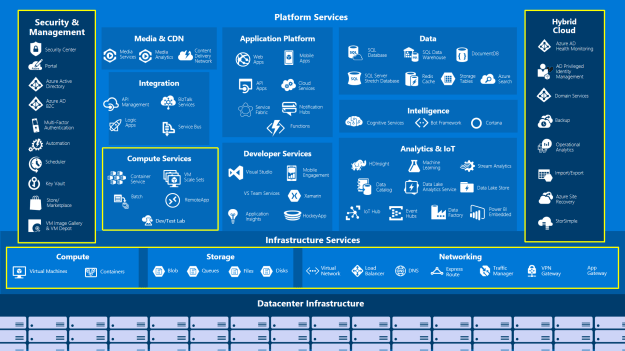
For Platform as a Service (PaaS), we can benefit from one or all of the Security & Management, Platform Services or Infrastructure Services.

Worldwide Azure Regions Availability

3

As of today, there are a total of 34 Azure regions to give support 24/7 to customers in almost every continent.

Geo Redundancy

4

Highly promising Geo replications options are available across the globe for Disaster Recovery.

Security

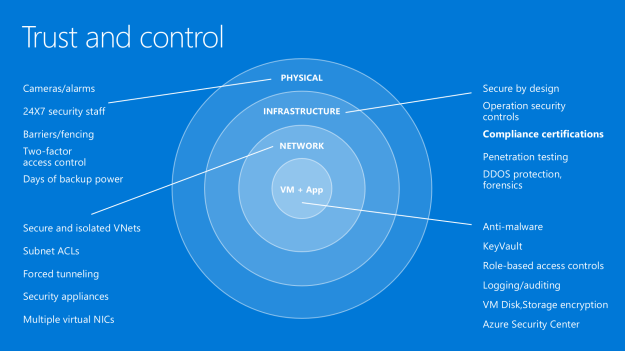
It would not be wrong to say that the data is highly secure in the Cloud, owing to the Security mechanisms at the levels of:

  1. Physical
  2. Infra
  3. Network and
  4. VM

It is shown below.

5

Azure Security Center

For details, please refer to this related article:

Azure Security – Solution To Digital Transformation

Azure security center is available to keep an eye out every time for Cloud Resources, as shown below.

6

Now, let’s dive deep down into IaaS Core Services.

It’s a combination of the following

  1. Compute
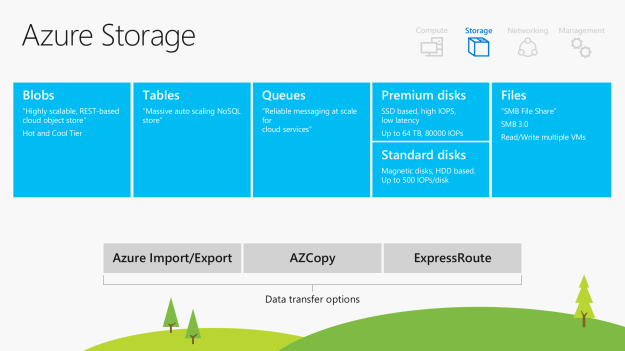
  2. Storage
  3. Networking and
  4. Managementimage007Options for the Compute Families9.pngAzure Storage,For more details, please refer to my Azure Storage series from 1 to 7,
Introduction To Azure Data Lake

Background

In this blog, we will walk through Azure Data Lake Store feature. Azure Data Lake Store is ‘Generally Available’ from Nov 2016 and is among the fastest emerging Azure Service.

Introduction

In my past Azure articles, we have learned about how to create virtual machines, Data Warehouse and Azure app Service as a platform-as-a-service (PaaS) subscription from Microsoft Azure. In case you did not get a chance to walk through, please first read the articles, mentioned below.

Read More

After Azure Data Lake Store public view availability, it has grown a lot because of the incredible offerings.

What is Azure Data Lake?

Azure Data Lake offering is not limited/restricted to data size, type, platform and features. However, it has been introduced with the supporting features of the batch, streaming, interactive analytics etc. Now, data scientists, data analysts and the data developers can store any size of data, shape, and with considerably faster speed. Azure Data Lake (ADL) not only makes it possible to store Big Data but also offers good services, mentioned below.

  • Azure Data Lake Store
  • Azure Data Lake Analytics
  • Azure HDInsight

Azure Data Lake Store (DLS)

DLS is a no-limits data lake to power intelligent action. With DLS, we can store trillions of files. Hence, we can say that DLS is most suited to the security Server data, large audio/video (e.g Youtube) and Security Insurance Data of the whole country.

Data Lake Store scales any size of data and it can provide massive output to run analytic jobs with thousands of concurrent users that read and write hundreds of terabytes of the data efficiently.

Data Lake Store protects the data as the data is always encrypted by adhering to the security and regulatory compliance. For more details of Azure Security, read more at.

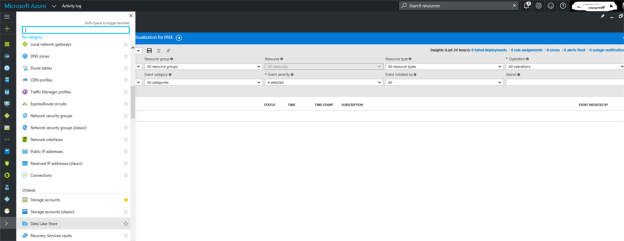
Now, please login to your Azure Account at https://portal.azure.com/

Click on Azure –More Services ->Data Storage and then Data Lake Store.

PIC

Furthermore, Microsoft Azure Data Lake Store supports any Application that uses the open Apache Hadoop Distributed File System (HDFS). By supporting HDFS, we can easily migrate your existing Hadoop and Spark data to the Cloud.

Azure Data Lake Analytics (DLA)

An on-demand analytics job Service is required to power an intelligent action. With DLA, ease to improve the scalability of the database increased tremendously. Scalability can be increased in the minutes and we have to pay for what we use.

DLA has a massive support from Parallel system and ‘PETABYTES’ of the data, as it can be processed easily for different categories. In addition to it, we can count on the enhanced SSO (Single Sign ON), multifactor authentication.

Azure HDInsightPIC2

HDInsight offers Hadoop Service for enterprise. It has reliable open source analytics, architecture for full redundancy, and data geo-replication. HDInsight also supports SSO etc., which are a few among many. Azure machine type enables the utilization of the resources and we only have to pay for the computing and storage.

In addition, HDInsight has a good support of the integration with independent software vendors (ISVs).
A recent study showed HDInsight delivered 63% lower TCO than deploying Hadoop on-premises and industry’s best 99.9% SLA and 24/7 support. (Above figure is heavily borrowed from Microsoft Azure Site)

Conclusion

Nowadays, it’s imperative to look over the cloud very seriously. Azure Data Lake is among the fastest evolving services and will be a contributing factor for any cloud based enterprise solution.